Park builders who use lots of direct commands
If you often place, edit or duplicate objects while building, having commands within easy reach can help. Frontier Developments lists these actions in the Planet Coaster 2 controls overview.


Choose your keyboard based on the commands you actually use when building parks and how much room your mouse needs beside it. A full-size keyboard or extra programmable keys give you more commands at your fingertips; TKL models do away with the number pad, while a detachable number pad lets you switch between the two. Also check the exact German layout and switch variant: a large screen alone doesn’t mean you need a special keyboard.
If you often place, edit or duplicate objects while building, having commands within easy reach can help. Frontier Developments lists these actions in the Planet Coaster 2 controls overview.
If there’s little room to move your mouse beside a large screen, a TKL keyboard without a number pad could be a good option. Whether it suits your setup depends on which keys you use regularly.
If other people are within earshot, take a closer look at the switch variant. A manufacturer’s description such as ‘quiet’ doesn’t tell you how loud a keyboard will be in your room.
First, check which game commands you use often and whether you need extra keys for them. Then decide whether you want a number pad taking up desk space all the time.
| Buying consideration | What to check | Who is this important for? |
|---|---|---|
| Direct commands | Compare the game shortcuts you use most with the available keys, and check whether you can reassign commands in the game. | If I want to place, edit and navigate quickly while building a park, I need my most-used commands close at hand. Around 33% of consumers put direct commands first. |
| Mouse space | Measure the available desk space and consider whether you use the number pad regularly. | If there’s little room for my mouse beside a wide keyboard, I may be able to do without the number pad. Around 27% of consumers prioritise the space beside their keyboard. |
| Typing noise | Check the exact switch variant and assess the noise in conditions similar to your workspace. | If I play or type within earshot of other people, I want to know how loud the keyboard will be in my room. Around 20% of consumers make this a priority. |
| German layout | Check the layout and the full model and switch variant on the specific product page. | If I also use the same keyboard to type in German, I want to be sure the key legends are right for me. Around 20% of consumers prioritise a German layout. |
Screen size doesn’t tell you how much desk space you have or which keys you need. TKL models don’t include a number pad.
Check which keys you use regularly and measure the space beside your keyboard before choosing a size.
A model range may come with different switches. A manufacturer’s description of how noisy a keyboard is doesn’t measure its sound in your room.
Compare the exact switch name and, if possible, assess the typing noise in your own workspace.
A similar model name doesn’t automatically mean the keys have the same legends. The BlackWidow V4 Pro listed on Joybuy is specifically a US QWERTY variant.
Check the layout and full model designation before buying. An unfamiliar key layout can make typing difficult.
The Apex 3 is available as a German-layout full-size model and as the more compact Apex 3 TKL DE.
The BlackWidow V4 is a mechanical option if you’re looking for extra programmable keys.
The Dark Mount Silent Linear DE ISO combines a mechanical keyboard with a detachable number pad.
The MX BOARD 3.0S is a wired mechanical keyboard range with different switch and lighting variants.
This selection from Joybuy includes gaming keyboards for building parks on PC, from full-size models with extra inputs to compact options with a German layout.
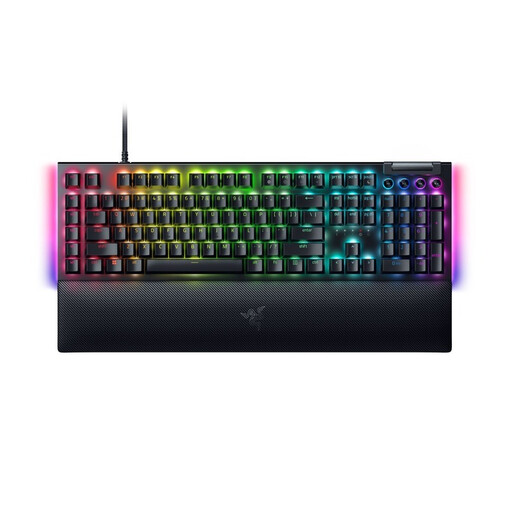 No image available
A full-size gaming keyboard for anyone who wants to use extra programmable keys.
This variant is listed with a German QWERTZ layout and Yellow Switches.
 No image available
The TKL format could suit you if you don’t regularly need a number pad and want to make more room for your mouse.
The model name lists Akko V3 Pro Cream Yellow Switches, hot-swap support and an ISO-DE-QWERTZ layout.
 No image available
The compact layout could work well on a desk where you need more room for your mouse.
The model name lists Low Profile MX Speed Switches, RGB and connectivity via 2.4 GHz, Bluetooth or USB-C.
 No image available
The TKL format is an option if you’re happy to do without an integrated number pad.
The model name lists a German QWERTZ layout, MX2A RED Linear Switches and a wired design.
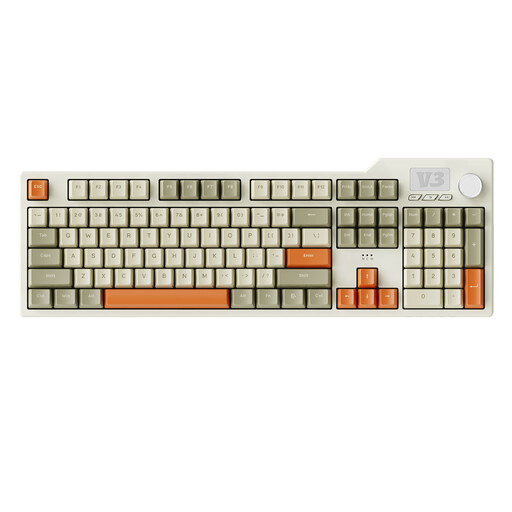 No image available
A full-size model could suit you if you want a number pad and extra programmable inputs.
The model name lists 104 keys, macros, a volume control, PBT keycaps and hot-swap support.
No. Screen size alone doesn’t mean you need a special keyboard. What matters is how the game is controlled and how much room you have for your keyboard and mouse. For example, Frontier Developments documents keyboard and mouse commands for building in Planet Coaster 2.
For Planet Coaster 2 on PC, Frontier Developments says you can reassign the keyboard and mouse controls. For another game, check its settings or documentation to see if this is possible.
Check the exact layout and full switch variant on the product page rather than relying on the model range name alone. Manufacturer claims about noise or typing feel don’t necessarily reflect how the keyboard will sound at your desk.
Your statutory rights against the seller are separate from any voluntary guarantee. Distance purchases made by consumers generally come with a right to cancel. In articles dated 13 August and 28 September 2026, the Verbraucherzentrale says the cancellation period is usually 14 days, and points out that exceptions apply and that the start of the period depends on the circumstances.
For electrical and electronic products it oversees, the Bundesnetzagentur lists checks including correct CE marking, identifiable manufacturer details, and the required user instructions and warnings in German. A retailer’s product information alone doesn’t prove that a specific model complies.