Precision trainers
If you practise fast key presses or frequent changes of direction, look for adjustable actuation and reset points. RTINGS.com describes Rapid Trigger as a feature that can reset a key as soon as it starts moving upwards.


For fast, repeated inputs, low keyboard latency matters. If you change direction frequently, a well-adjusted Rapid Trigger can also be useful. RTINGS.com measures keyboard latency up to the computer separately from the screen’s input lag, so check the gaming mode and the input lag for the picture mode you use, too. If you sit some distance from the screen, a wireless receiver can make it easier to position your keyboard. RTINGS.com considers Bluetooth less suitable for time-critical gaming.
If you practise fast key presses or frequent changes of direction, look for adjustable actuation and reset points. RTINGS.com describes Rapid Trigger as a feature that can reset a key as soon as it starts moving upwards.
If you want to assess your reactions on a TV or large monitor, consider keyboard and screen lag separately. RTINGS.com measures keyboard latency up to the computer and tests screen input lag separately.
If you want to position your keyboard freely in front of the screen, compare wired, wireless receiver and Bluetooth connections, as well as charging requirements. For time-critical gaming, RTINGS.com considers Bluetooth less suitable than a wired or wireless receiver connection.
First, work out whether you mainly practise repeated inputs, or whether screen lag and how far you sit from the screen have a bigger impact on your training.
| What matters | What to check before buying | Who is it most relevant to? |
|---|---|---|
| Repeated inputs | Check whether actuation and reset points are adjustable, and look for independently measured keyboard latency. An advertised polling rate does not represent the entire response chain. | If I practise fast key sequences and changes of direction, I want to be able to adjust the actuation point to suit how I press the keys. Around 36% of consumers prioritise controlled, repeated inputs. |
| Screen lag | Check the gaming mode and input lag at the resolution and refresh rate you actually use. RTINGS.com notes that gaming mode reduces image processing and often reduces input lag as a result. | If I train on a big screen, I want to know whether a delayed picture, rather than the keyboard, is affecting my practice. Around 29% of consumers prioritise screen lag. |
| Connection and positioning | Compare the wired, wireless receiver and Bluetooth options on the specific model; consider cable routing, the receiver and charging requirements. RTINGS.com considers Bluetooth less suitable for time-critical gaming. | If I sit some distance from the screen, flexible positioning matters to me, but I don’t want to rely on Bluetooth alone for time-critical training. Around 21% of consumers prioritise connection and positioning. |
| Keys and layout | Check that the keyboard has the keys you need, the specific ISO-DE or other layout, and the switch type you want. Compact models may have different key arrangements depending on the variant. | If I also use the keyboard outside training, I want to keep the keys I need and a familiar layout. Around 14% of consumers prioritise everyday practicality and key layout. |
RTINGS.com’s keyboard latency measurements end at the computer; screen input lag is a separate part of the signal path.
Check keyboard and screen measurements separately, and take your screen’s gaming mode into account.
RTINGS.com considers Bluetooth less suitable for competitive gaming because of its higher latency.
If you want to play wirelessly and need a fast response, check whether the specific keyboard comes with a wireless receiver.
Compact layouts may omit keys, and keycaps and layouts can differ between variants.
Before buying, check that the variant you’ve selected has the keys you need, the right physical key arrangement and the accessories you expect.
According to the manufacturer, the wired 80HE combines an 80% layout with analogue input, Rapid Trigger and adjustable actuation.
The wired Apex Pro TKL Gen 3 in the DE version has dedicated function keys and, according to the manufacturer, adjustable magnetic switches with Rapid Trigger.
The K2 HE combines a 75% layout with function keys, magnetic switches and several connection options; Keychron offers DE-ISO variants.
The PRO X TKL RAPID, with magnetic analogue switches, and the wireless, conventional mechanical PRO X TKL are different models.
The Alloy Origins 60 is a conventional mechanical alternative in a 60% format.
This selection includes mechanical keyboards with different layouts and connection options, as well as models with magnetic switches and Rapid Trigger.
 No image available
An option to consider if you’re looking for a compact layout with a German key arrangement and several connection options.
75% layout with ISO-DE QWERTZ; Bluetooth, 2.4 GHz and USB-C connections are listed.
 No image available
A wired mechanical option if you want a TKL layout with a German key arrangement.
TKL format, ISO-DE QWERTZ and USB-C connection.
 No image available
An option to consider if you’re specifically looking for a model with magnetic switches and Rapid Trigger for repeated inputs.
The product title lists magnetic switches, Rapid Trigger and an aluminium frame.
 No image available
A wired option to consider if you’re looking for a compact layout with adjustable actuation and Rapid Trigger.
75% layout with TTC magnetic switches; the product description lists adjustable actuation points and Rapid Trigger.
 No image available
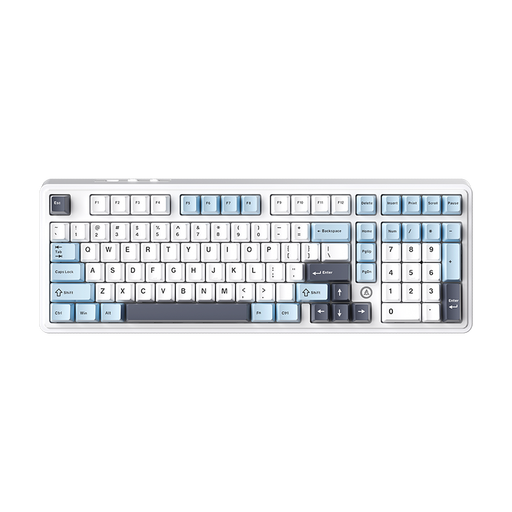
An option to consider if you prefer a layout with plenty of keys and several connection options.
98% layout; the product title lists wired, Bluetooth and 2.4 GHz connections.
No. The polling rate doesn’t describe the total time between pressing a key and seeing the result on screen. RTINGS.com measures keyboard latency up to the computer separately from screen lag. So check the gaming mode and input lag for the picture mode you use, too.
First, check whether your specific model offers adjustable actuation and reset points. Rapid Trigger can reset a key as soon as it starts moving upwards. Try the setting with your repeated inputs, as an especially sensitive setting won’t necessarily suit everyone’s typing style.
Check the specific variant, not just the model name. Wooting’s guide says the ISO and JIS versions of the 80HE are supplied without pre-installed keycaps; Keychron offers DE-ISO variants of the K2 HE.
When you buy as a consumer using distance selling, you generally have a 14-day right to cancel, although statutory exceptions may apply. You must notify the seller that you wish to cancel. Your statutory rights against the seller are separate from any voluntary guarantee.