If you want to be considerate of someone else while watching replays, start with a keyboard whose keys or switches are specifically described as quiet or dampened, then check whether your replay controls are easy to use. A TKL keyboard leaves out the number pad, while a full-size model gives you more keys. Adjustable magnetic switches are mainly relevant if you also use the same keyboard for gaming. Manufacturer claims such as ‘whisper-quiet’ are not a measurement of noise levels in a bedroom.
Who is this choice of keyboard for?
Considerate evening replay-watchers
You watch replays while someone else in the room is asleep or needs some quiet, so keeping key noise to a minimum is your priority. Manufacturers describe certain switches as quiet, but that doesn’t establish a consistent noise level in a bedroom.
Replay analysts who use controls frequently
You pause, switch views or adjust media, and want the controls you actually use to be within easy reach. Dedicated media keys and programmable keys vary by model.
Gamers with limited desk space
You use the same space for watching replays and gaming, and want room to move your mouse without losing access to the keys you need. A TKL keyboard leaves out the number pad.
What should you consider when choosing?
Quiet membrane or Mech-Dome keyboard
A good fit if: Being considerate and having straightforward replay controls matter more to you than individual mechanical switches.
The trade-off: The G213 is a full-size model, while the Apex 3 TKL leaves out the number pad. Manufacturer claims don’t establish a specific noise level in a room.
Mechanical keyboard with a dampened switch option
A good fit if: You prefer mechanical switches and the specific version has switches that are explicitly described as dampened.
The trade-off: CHERRY describes the MX Silent Red as dampened; that description doesn’t automatically apply to every MX BOARD 3.0S version.
Adjustable magnetic gaming keyboard
A good fit if: You game as well as watch replays and want to use adjustable actuation points.
The trade-off: There’s no proven benefit for simply pausing and reviewing replays. Claims about noise dampening are no substitute for listening to the keyboard in your own room.
| What matters |
What to check before buying |
Who is this especially important to? |
| Key noise |
Check the exact switch version, and don’t treat manufacturer claims as measurements taken in your own conditions. |
When I watch replays while someone in the room is asleep or needs quiet, I want to keep disruptive key noise to a minimum. Around 36% of consumers put key noise at the top of their list when buying. |
| Replay controls |
Compare the commands in the software you use with the media and programmable keys on the specific model. |
When I often pause or switch views while watching, I want the controls I need to be easy to reach. Around 29% of consumers prioritise replay controls. |
| Space and layout |
Decide in advance whether you need a number pad and function keys, and how much space you want to leave for your mouse. |
When desk space is limited, I want more room for my mouse without giving up the keys I use regularly. Around 21% of consumers prioritise desk space and layout. |
| Additional gaming features |
Check which switch and software features are included with the specific version, and whether you’ll use them for gaming. |
If I also play competitively on the same keyboard, additional gaming features may matter to me; I don’t necessarily need them just to watch replays. Around 14% of consumers put these features first. |
Which common mistakes should you avoid?
-
Assuming ‘Silent’ applies to an entire model range because one switch has that name
CHERRY lists the MX Silent Red separately, while the MX BOARD 3.0S is available with different switch options. That doesn’t mean other versions are automatically designated as Silent.
Check the full switch name against the exact keyboard version on offer.
-
Assuming media keys work as replay controls in every application
Manufacturers mention media and macro features, but that doesn’t prove that every replay application supports the relevant commands.
Make a note of the commands in your application and check whether you can use them with the keys on the specific model.
-
Choosing the smallest layout without checking which keys you need
TKL leaves out the number pad, while other layouts include a number pad or extra macro keys. A more compact layout won’t necessarily suit every workflow.
First decide which keys you use regularly and how much room you want to leave for mouse movement.
-
Assuming you can return an item free of charge when you cancel
You may have to pay return costs when cancelling an order if the retailer doesn’t cover them and has given you the required information. Your Europe explains these conditions for distance purchases in the EU.
Check the specific retailer’s returns policy before buying.
Depending on the retailer’s policy, you may have to pay return costs when cancelling an order.
Which brands are worth considering?
SteelSeries
For the Apex 3 TKL DE, SteelSeries mentions quiet switches and media keys. The Apex Pro TKL Gen 3 DE also targets gamers with adjustable magnetic switches.
- The Apex 3 TKL DE combines a TKL layout with media controls.
- There’s no like-for-like measurement of either model’s noise level in a bedroom. The magnetic gaming features aren’t a proven advantage for watching replays.
Logitech G
Logitech G describes the G213 Prodigy as having Mech-Dome keys, a full-size layout and dedicated media controls.
- The full-size layout includes a number pad and dedicated media controls.
- Mech-Dome doesn’t mean individual mechanical switches. ‘Whisper-quiet’ is a manufacturer’s description, not an independently measured result.
CORSAIR
CORSAIR describes the K55 RGB PRO DE as having quiet keys, media controls and six macro keys.
- Macro keys may be useful for repeated inputs if the application you use supports custom key assignments.
- What a macro can do depends on the specific application; general claims about noise dampening are no substitute for comparing models under the same conditions.
CHERRY
CHERRY lists several switch options for the MX BOARD 3.0S and describes the MX Silent Red separately as a dampened option.
- The MX Silent Red is a clearly named option for buyers looking for a dampened mechanical switch.
- The MX BOARD 3.0S range doesn’t automatically come with MX Silent Red switches, so check the exact configuration.
Joybuy products
This selection includes compact gaming keyboards as well as models with magnetic switches or switches described as quiet. Pay particular attention to the layout, switch version and the keys your replay application actually supports.
 No image available
CHERRY MX-LP 2.1 Wireless Gaming Keyboard, Low Profile MX Speed Switches, White, German QWERTZ
The compact layout may suit you if you want to make more room for your mouse on your desk.
65% layout; Low Profile MX Speed Switches; tri-mode connection via 2.4 GHz, Bluetooth or USB-C; German QWERTZ.
View at Joybuy
 No image available
Royalaxe E75 TTC Magnetic Switch Keyboard, 75%, Silver-Pink
A good option if you’re looking for a compact layout with magnetic switches and want to use their features for gaming too.
75% layout; TTC magnetic switches; Type-C connection.
View at Joybuy
 No image available
Ticktype DP104 Custom Tri-Mode Wireless Mechanical Keyboard, Powder White, Silent Tactile Switches
This version may appeal if you want a full-size layout with tactile switches described as quiet.
Full-size layout with 108 keys; Silent Tactile Switches; US layout according to the product title.
The US layout differs from German QWERTZ, so check that it suits the way you type.
View at Joybuy
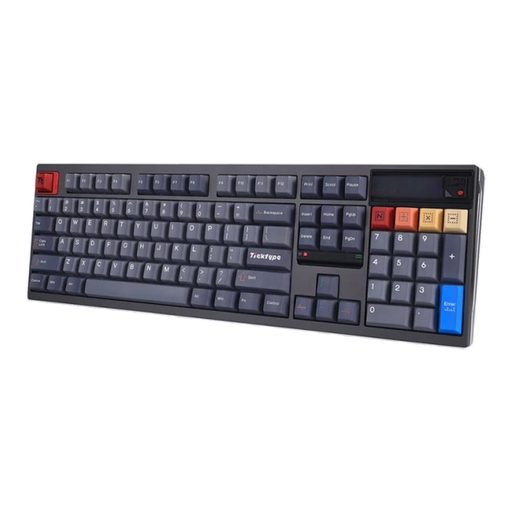 No image available
Ticktype DP104 Custom Tri-Mode Wireless Mechanical Keyboard, Gecha Gray, Silent Tactile Switches
A good option if you want a full-size layout and tactile switches described in the title as Silent Tactile.
Full-size layout with 108 keys; Silent Tactile Switches; US layout according to the product title.
Before buying, check that the US layout matches the key arrangement you’re used to.
View at Joybuy
 No image available
Redragon M68 Magnetic Switch Mechanical Gaming Keyboard, 68 Keys, US Layout
The compact layout may suit you if you want more room for mouse movement while gaming.
68 keys; magnetic switches; Rapid Trigger; 8000 Hz polling rate; US layout according to the product title.
The gaming features aren’t a proven advantage for simply watching replays. Also check whether the US layout suits you.
View at Joybuy
Frequently asked questions
Do I need a magnetic keyboard to watch replays?
No, not just to watch replays. SteelSeries describes the Apex Pro TKL Gen 3’s adjustable actuation points as being for gaming inputs. First check which commands you need for your replay software and whether the key layout suits you.
Can I assign ‘pause replay’ directly to a macro key?
That depends on the replay application you use. CORSAIR describes the K55 RGB PRO as having programmable macro keys, and SteelSeries mentions a macro editor for the Apex 3 TKL. Whether the pause command works depends on the key combination and the input support offered by the application.
Which rights and return costs matter when buying online?
For eligible consumer purchases made at a distance, you generally have a 14-day right to cancel from the date of delivery. According to Your Europe, you may have to pay return costs when cancelling if the retailer doesn’t cover them and has given you the required information. For faulty goods, statutory rights against the seller are separate from a voluntary guarantee; the Verbraucherzentrale says that new goods generally have a two-year statutory guarantee.
Can you put an old keyboard in household rubbish in Germany?
No. The Umweltbundesamt explains that old electrical equipment must be collected separately; municipal recycling centres are one option for handing it in. Whether you can return it to a retailer depends on the relevant conditions.


