Who is this selection for?

Considerate evening gaming

If you’re tending your virtual garden while someone else in the room needs some peace and quiet, the keystroke noise and lighting of a particular keyboard are important factors to consider. SteelSeries and Logitech describe certain models as quiet, but manufacturers’ claims don’t predict the exact noise level in your room.

Gaming at a small desk

If you need to leave room for a mouse beside your keyboard, check whether a TKL or even more compact layout will suit you. TKL layouts omit the number pad, which you may need for other tasks or certain in-game commands; RTINGS describes the Apex 3 TKL as a model without a number pad.

Quick access to frequently used commands

If you want to trigger specific actions directly, compare the keys you need with your game’s key bindings rather than choosing extra features based on their number alone. Corsair lists six macro keys for the K55 RGB PRO (DE); whether they’re useful for a particular game depends on its key bindings.

What should you look for when buying?

Models described as quiet

A good fit if: Being considerate of someone else matters more to you than having individual mechanical switches. SteelSeries describes the Apex 3 TKL’s switches as “Whisper Quiet”, while Logitech describes the G213’s sound as whisper-quiet.

The trade-off: These are manufacturer claims about specific models, not comparable measurements for your room. The Apex 3 TKL has no number pad, while the full-size G213 takes up more space.

Mechanical models with sound dampening

A good fit if: You prefer mechanical switches and can check the exact specification before buying. CHERRY describes the MX2A Silent Red as having integrated dampening, and the XTRFY MX 3.1 as having a dampening structure.

The trade-off: The Silent Red switch isn’t automatically fitted in every keyboard. A dampened case structure also doesn’t prove that one model will be quieter than another in a shared room.

Full-size models with extra keys

A good fit if: Your game’s key bindings make good use of a number pad or custom shortcuts. The G213 has a number pad, while Corsair lists six dedicated macro keys for the K55 RGB PRO (DE).

The trade-off: A full-size keyboard takes up more desk space. Extra keys are only useful if the game in question supports the inputs you want.

Priority What to look for Who is this particularly important to?
Keystroke noise Check the exact switch variant and any dampening; if possible, listen to the larger keys and case under similar conditions too. If I play in the evening while someone else in the room needs some peace and quiet, I want to minimise disruptive keystrokes without assuming that “quiet” means silent. Around 39% of consumers put keystroke noise first.
Space and number pad Measure the available desk space and note which number and gaming keys you need before choosing a compact layout. If I need to fit a keyboard and mouse in a small space, I want to know whether I can manage without a number pad. Around 23% of consumers prioritise space.
Shortcuts Check your game’s key bindings and whether it supports remapping; compare the arrow, function and number keys you need. If I want quick access to frequently used actions, it matters to me whether my game supports the key bindings I want. Around 23% of consumers prioritise shortcuts.
Lighting and connection Check whether the lighting on the specific variant can be dimmed or switched off; make sure its connection matches the computer you use. If the keyboard lighting might be disruptive in the bedroom, or I need a particular connection, I want to check these features in advance. Around 15% of consumers put lighting or connection first.

Common buying mistakes

  • Assuming “Silent” means inaudible

    A switch name doesn’t tell you how loud the complete keyboard will sound when you type. CHERRY describes the integrated dampening on the specific MX2A Silent Red.

    Check the full model and switch variant, and if possible listen to the keyboard under similar conditions.

  • Choosing TKL without checking the key bindings

    You save space by losing the number pad. Missing keys that would otherwise be within easy reach can be a nuisance if you need them for your game or other tasks.

    Before buying, compare the layout with the commands you actually use.

  • Confusing splash resistance with waterproofing

    SteelSeries lists IP32 for the Apex 3 TKL, and Corsair lists IP42 for the K55 RGB PRO (DE). These manufacturer claims don’t promise that the keyboards will withstand exposure to any kind of liquid.

    Don’t place drinks above the keyboard, and follow the care instructions for the specific model.

Key brands at a glance

SteelSeries

The Apex 3 TKL is a TKL option if you can manage without a number pad and are looking for a keyboard the manufacturer describes as quiet.

  • SteelSeries describes the switches as “Whisper Quiet”; RTINGS lists rubber dome switches and programmable keys.
  • RTINGS notes that its latency is high for demanding competitive gaming and that it has no wrist rest. The manufacturer’s claim doesn’t establish a specific noise level.

Logitech G

The G213 Prodigy is a full-size option; the G515 LIGHTSPEED TKL is a separate low-profile, mechanical and wireless model.

  • Logitech describes the G213’s sound as whisper-quiet and lists adjustable lighting levels. For the G515, Logitech specifies a noise-dampening design and three connection options.
  • The G213 takes up more desk space than a TKL model. The noise claims for the G213 and G515 aren’t based on comparable measurements here.

Corsair

The K55 RGB PRO (DE) is a full-size option for anyone whose key bindings would benefit from its six dedicated macro keys.

  • Corsair describes the keys as quiet and lists IP42 protection and a detachable wrist rest.
  • The full-size design needs more desk space. The manufacturer’s claims don’t establish a specific noise level or prove that the macro keys will be useful for every game.

CHERRY XTRFY

The wired mechanical MX 3.1 and the MX2A Silent Red are different things to consider: case dampening and switch type should be checked separately.

  • CHERRY describes the MX 3.1 as having a dampening keyboard structure and the MX2A Silent Red as having integrated noise dampening.
  • The MX 3.1’s case dampening doesn’t mean it comes with MX2A Silent Red switches. Check the exact switch variant of the model on offer.

Joybuy products on this topic

This selection includes keyboards with compact layouts, as well as variants with a German QWERTZ layout or explicitly described dampening features. Check the layout and switches against your own gaming key bindings and the specific product variant.

Akko 5087S V1 TKL, wired mechanical gaming keyboard, black and gold

Akko 5087S V1 TKL, ISO-DE-QWERTZ

The TKL layout could suit you if you want to manage without a number pad and need a German QWERTZ layout.

Wired; V3 Pro Cream Yellow Switches; hot-swappable; RGB; ISO-DE-QWERTZ; black and gold.

View at Joybuy

CHERRY MX-LP 2.1 Wireless gaming keyboard, 65%, German QWERTZ layout, white

CHERRY MX-LP 2.1 Wireless, 65%, German QWERTZ

The compact 65% layout could be a good fit if desk space is at a premium and the missing keys aren’t part of your preferred gaming setup.

Low-profile MX Speed switches; tri-mode (2.4GHz/Bluetooth/USB-C); RGB; German QWERTZ layout; white.

View at Joybuy

Redragon M68, compact mechanical gaming keyboard with US layout

Redragon M68, 68 keys, US layout

The compact layout is an option if desk space is limited; check particularly that the US layout suits the way you type.

Magnetic switches; 68 keys; wired; US layout.

View at Joybuy

AJAZZ AK820 MAX, wireless mechanical gaming keyboard with 75% layout

AJAZZ AK820 MAX, 75%, tri-mode, US-QWERTY

The 75% layout is more compact than a full-size keyboard; note that this variant is listed as US-QWERTY in the title.

Tri-mode connection; Flying Fish Switches; volume dial; RGB; 8000mAh; hot-swappable.

View at Joybuy
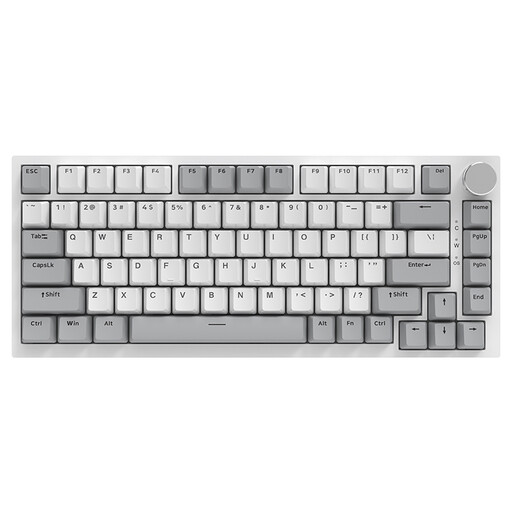
AJAZZ AK820, wired mechanical keyboard with 75% layout and US-QWERTY

AJAZZ AK820, 75%, wired, US-QWERTY

The 75% layout can save desk space if you’re comfortable with the US-QWERTY layout and the keys that aren’t directly available.

83 keys; linear, hot-swappable switches; white backlighting; volume dial; US-QWERTY.

View at Joybuy

Frequently asked questions

Does a game about tending a virtual garden need particularly fast actuation?

Not just because of the gardening described. First, check which inputs your specific game needs. RTINGS considers the Apex 3 TKL suitable for casual gaming, despite its latency being less suited to competitive play; this doesn’t tell us anything about a game that hasn’t been named.

How can I set up my keyboard considerately in a shared bedroom?

Match the game’s key bindings to the keys available and choose a less noticeable lighting level if the model supports it. Logitech lists different brightness levels for the G213; for whether additional lighting effects can be switched off completely, it’s best to check the specific variant.

How do I clean a wired keyboard?

Logitech recommends disconnecting a wired keyboard from the computer or power source before cleaning it, and switching off a wireless keyboard. For other models, follow the relevant care instructions.

What are your rights when buying a keyboard online in Germany?

For an eligible online purchase from a trader, you generally have a 14-day withdrawal period from the date of delivery; exceptions and rules on return costs apply. According to Your Europe’s consumer information, faulty goods are generally covered by a legal guarantee of at least two years from receipt, provided by the seller. An additional manufacturer’s warranty does not replace these rights.