First, measure the available space, including the room you need for your mouse, then think about which keys you want to reach directly. A 60% layout saves desk space, while a 65% layout may give you dedicated arrow keys. For progressive throttle or braking, you need a keyboard with the right controller output, as well as a racing game that supports those inputs; an adjustable actuation point on its own isn’t enough.
Which layout is right for you?
Racing gamers with limited desk space
If you want to keep room for your mouse beside the keyboard, a highly compact layout could be a good fit. HyperX notes that the Alloy Origins 60 has secondary functions printed on the keycaps; check whether these key assignments work for you in games and day-to-day use.
Players who want progressive throttle control
If you want to control throttle or braking progressively with the keys, check whether the keyboard offers suitable controller output and whether your racing game supports it. Wooting describes the 60HE+ as offering analogue inputs, but functionality still depends on the game and its input modes.
Players who want plenty of dedicated keys
If you want to reach additional racing commands or everyday keys without using an Fn combination, compare the specific layouts. HyperX describes the Alloy Origins 65 as having dedicated arrow keys, while CHERRY lists the K5V2 Compact as a 65% layout.
What should you look for when buying?
First, measure the free space on your desk, including the room you need to move your mouse. Then compare the keys and input types you need with the specific model.
| Criterion |
What to check before buying |
Who it matters most to |
| Desk space and room for your mouse |
Compare the dimensions of the specific version with your available desk space, and check the Fn key assignments. |
If you want to leave as much room as possible for your mouse, every centimetre counts on a small desk. Around 31% of consumers prioritise desk space above all else. |
| Progressive vehicle control |
Check the keyboard’s controller output, as well as the axis assignments and input support in the specific game. |
If you want to control throttle or braking through key travel, support in your racing game is essential. Around 31% of consumers prioritise progressive control above all else. |
| Dedicated keys |
Compare your assignments for gear changes, camera and menus with the layout of the version on offer. |
If you often use extra commands or need the same keyboard for everyday tasks, dedicated arrow and navigation keys may matter more than the smallest possible case. Around 25% of consumers prioritise direct access to keys above all else. |
| Cable and setup |
Check the connection options, whether there’s room for a receiver and whether you can use the keyboard while it’s charging. |
If a keyboard cable gets in the way on your desk, consider the connection and setup of the specific model. Around 13% of consumers prioritise a wireless setup above all else. |
Common misconceptions
-
‘Analogue’ or ‘Rapid Trigger’ automatically means progressive throttle
An adjustable actuation point or Rapid Trigger doesn’t, on its own, guarantee a progressive controller axis. Not every game supports using a controller, keyboard and mouse at the same time either.
Check separately whether the model offers controller output and whether your racing game supports the axis you want, along with your other input devices.
-
Choosing based on ‘60%’ alone
On highly compact layouts, some functions may be assigned to secondary keys. This can make it harder to access racing or everyday keys you use often.
Compare your key assignments with the specific layout. If you want dedicated arrow keys, look at 65% models too. If you need more keys, a TKL layout could be an option, as long as it fits on your desk.
-
Treating a manufacturer’s latency figure as a racing-game measurement
Razer specifies that the measurement for the Huntsman V3 Pro Mini 8KHz covers the time from switch actuation to the host device’s USB port. It isn’t an end-to-end measurement of performance in your own racing game.
Only compare figures like these within the stated test conditions. Choose first based on desk space, key assignments and the type of input you need.
Key brands at a glance
Wooting
Worth considering if you want a 60% layout with configurable analogue controller output.
- Wooting describes the 60HE+ as offering analogue inputs and a controller output mode.
- Use in a racing game depends on its input modes; not every game accepts a controller, keyboard and mouse at the same time.
CHERRY XTRFY
The K5V2 Compact is a 65% option if you want a compact layout and replaceable mechanical switches.
- CHERRY lists hot-swappable MX2A-RED switches for this model.
- The manufacturer’s claim about sound-dampening foam isn’t an independent noise measurement and doesn’t confirm analogue controller output.
HyperX
The Alloy Origins 60, Alloy Origins 65 and Alloy Origins Core PBT offer a range of compact layouts.
- HyperX describes printed secondary functions on the Origins 60, dedicated arrow keys on the Origins 65 and a number-pad-free layout on the Core PBT.
- These features apply to the specific models named and shouldn’t be assumed to carry over to other versions. Also check which layout version is on offer.
Logitech G
The PRO X 60 could be a good fit if you want a compact wireless setup with configurable key layers.
- Logitech G lists a 60% layout, wireless connectivity and optical switches for this model.
- These features don’t confirm the presence of analogue controller axes for racing games.
Razer
The Huntsman V3 Pro Mini 8KHz is aimed at buyers who want to configure actuation and reset behaviour in a compact layout.
- Razer lists Rapid Trigger and an adjustable actuation point for this model.
- Razer’s stated latency measurement covers the time from switch actuation to the host device’s USB port. It doesn’t show measured end-to-end performance in a racing game or guarantee an analogue vehicle axis you can use straight away.
Joybuy products for small desks
The Joybuy options below include compact 60% and 65% gaming keyboards. Along with desk space, compare the keys you need, the layout and the connection type.
 No image available
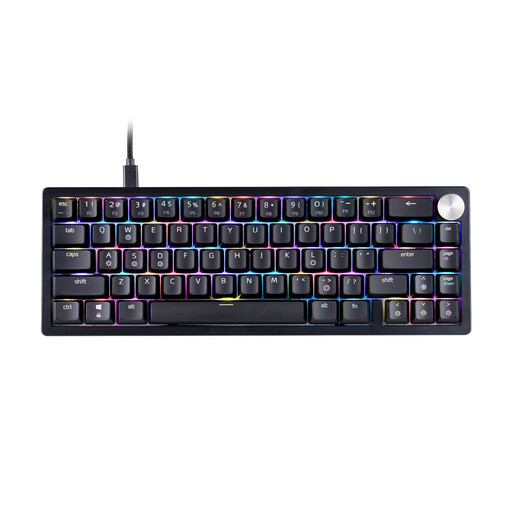
XPG SORCERER MINI 65%, US layout
The 65% layout is a compact option if you want to leave room for your mouse on your desk.
The product description lists mechanical XPG Red switches, RGB lighting and a detachable USB-C cable.
View at Joybuy
 No image available
AULA WIN60HE, 60%, wired
The 60% layout could suit you if saving desk space matters more than having extra functions within easy reach.
The product name lists magnetic switches, hot-swapping, adjustable actuation, Rapid Trigger and an 8000 Hz polling rate. These specifications don’t confirm analogue controller output in racing games.
View at Joybuy
 No image available
Redragon M68, 68 keys, US layout
The compact 65% layout with 68 keys is an option if you want to use less desk space for your keyboard.
The product description lists Hall-effect magnetic switches, adjustable actuation, Rapid Trigger and an 8000 Hz polling rate. These features alone don’t confirm an analogue controller axis.
View at Joybuy
 No image available
Redragon RS68, 65%, 68 keys
The compact layout is an option if you want to save desk space and choose a connection type to suit your setup.
Bluetooth, 2.4 GHz wireless and wired connectivity are listed. The product name also mentions hot-swappable switches and a detachable wrist rest.
View at Joybuy
 No image available
CHERRY XTRFY K5V2 Compact, 65%, German QWERTZ
The 65% layout is a compact option if you’re looking for a German QWERTZ layout and don’t need the smallest format.
This version is listed with hot-swappable MX2A-RED switches and RGB lighting.
View at Joybuy
Frequently asked questions
Does an analogue keyboard give you continuous throttle and braking in every racing game?
No, not just because it has analogue switches. Wooting describes controller output modes for analogue inputs, but you should still check the axis assignments and controller support in your specific game. Not every game processes a controller, mouse and keyboard at the same time.
How do I set up a keyboard for progressive inputs?
On a compatible Wooting model, select a suitable gamepad mode in Wootility and assign the inputs you want. Wooting lists XInput and HID/DirectInput as different modes; check which setting works in the game you’re playing.
What should I do if a switch is faulty?
Before replacing a switch, check the instructions and switch type for your specific model. CHERRY describes the switches on the K5V2 Compact as hot-swappable; this doesn’t automatically apply to other keyboards.
What are my rights when buying a keyboard online in Germany?
When you buy online from a trader in the EU, you generally have a 14-day right to cancel, subject to exceptions, as explained by the Council of the European Union. Faulty goods are also covered by the statutory guarantee; Your Europe states that the minimum period is two years from receipt. A voluntary manufacturer’s warranty doesn’t replace these rights.
How do I dispose of an old keyboard in Germany?
An old keyboard is waste electrical and electronic equipment and should be taken to an authorised collection point. The Federal Ministry for the Environment lists local authority collection points as one option.


