For puzzle adventures at a small desk, a 75% layout is a sensible starting point if you want the arrow and F keys close to hand. TKL could work if you prefer separate keys and have enough room after measuring up; a 96% model keeps the number pad, but needs the space to match. Always compare the dimensions and key layout of the specific model: on smaller layouts, some functions may be assigned to secondary keys.
Who are compact gaming keyboards suitable for?
Gamers short on mouse space
When desk space is limited, the keyboard’s actual width matters. A 75% layout can retain the arrow and F keys; ComputerBase gives the tested Corsair K65 Plus Wireless a width of 32.0 cm. That measurement applies to this specific model, not to every keyboard in this format.
Puzzle solvers who use lots of key commands
If you often use the arrow, function or navigation keys, compare the game’s controls with the keyboard’s layout. On compact models, some functions may be accessed using Fn shortcuts; ComputerBase notes this for the K65 Plus Wireless.
Gamers in shared spaces
If the sound of typing might disturb others or you want to keep your desk flexible, the switch type and connection options are important points to check. CHERRY lists wired, Bluetooth and 2.4 GHz wireless connections for the MX 8.2 TKL Wireless; these features are not standard on all keyboards.
What should you look for when buying?
75% layout
A good fit if: you want to save space on a small desk while keeping the arrow and F keys within easy reach.
The trade-off: Some navigation functions may be assigned to an Fn layer; the exact layout depends on the model.
TKL or MiniTKL
A good fit if: you prefer separate controls and have room for the keyboard and mouse side by side after measuring up.
The trade-off: TKL means there’s no number pad, but it doesn’t define a standard keyboard width; NZXT describes MiniTKL as a smaller TKL variant.
60% layout
A good fit if: keeping the footprint as small as possible is your priority and you’re happy to use secondary key functions for keys that aren’t present as standard.
The trade-off: Check the in-game controls first; on the ET keyboard listed here, the arrow keys are activated with Fn+Space.
96% layout
A good fit if: you regularly need a number pad and the specific keyboard’s width suits your setup.
The trade-off: ASUS lists the ROG Strix Scope II 96 Wireless as 377 mm wide; check the dimensions of the variant you’re considering.
For puzzle adventures at a small desk, it’s worth first checking which keys you actually need and how much room you have left for your mouse.
| Consideration |
What to check when buying |
Who this matters most to |
| Desk space and room for your mouse |
Measure the available width, including the space you want for your mouse, and compare it with the dimensions of the specific variant. |
If I want to leave enough room to move my mouse, I compare the keyboard’s width rather than relying on the format name alone. Around 33% of consumers put mouse space first when gaming at a small desk. |
| Keys within easy reach |
Compare the game’s controls with the layout and check which commands are only available via Fn. |
If I often use the arrow or function keys in puzzle menus and for in-game commands, having them within easy reach matters more to me than the smallest possible keyboard. Around 27% of consumers prioritise these keys for gaming. |
| Typing noise |
Check the switch type and any sound dampening; don’t treat manufacturers’ claims as an independent noise comparison. |
If I play in a shared space, I want to keep typing noise down and assess the specific switch type. Around 20% of consumers are mainly looking for quieter gaming. |
| Connectivity and a flexible setup |
Check that the connection types suit your devices, and bear in mind the conditions attached to battery-life claims when using the keyboard wirelessly. |
If I want to free up desk space for other devices or connect my keyboard in a way that suits me, I compare the available connection options. Around 20% of consumers prioritise a flexible setup. |
Avoiding common buying mistakes
-
Assuming the format name guarantees a particular footprint
A 96% layout can keep a number pad despite its compact arrangement. ASUS lists the ROG Strix Scope II 96 Wireless as 377 mm wide.
Measure the available width and allow for the space you want to keep for your mouse.
-
Ordering the wrong layout or package variant
Corsair offers DE and NA layouts. Razer notes that the BlackWidow V4 75% Barebones version does not include switches or keycaps.
Check the layout and what’s included with the specific version before you decide.
With a Barebones version, you may need to buy switches and keycaps separately.
-
Assuming the maximum battery life applies with the lighting switched on
ComputerBase explains that Corsair’s claim of up to 266 hours for the tested K65 Plus Wireless applies when the lighting is switched off.
Compare battery-life claims alongside their respective conditions, and plan when to charge your keyboard based on how you use it.
Key brands at a glance
Corsair
The K65 Plus Wireless combines a 75% layout with arrow and F keys, as well as several connection options.
- ComputerBase describes the tested K65 Plus Wireless as compact and quiet.
- ComputerBase notes that some functions use Fn shortcuts and that the maximum battery-life claim applies when the lighting is switched off. Corsair offers different layout variants, so check the specific version.
Razer
The BlackWidow V4 75% is a compact option with arrow and F keys.
- Razer lists hot-swappable switches and a tactile switch option designed to be quieter.
- According to Razer, the Barebones version does not include switches, keycaps or a wrist rest. Check what’s included with the version you choose.
CHERRY
The MX 8.2 TKL Wireless is a TKL alternative for buyers who want to switch between wired, Bluetooth and 2.4 GHz wireless connections.
- CHERRY describes this model as having sound dampening and the ability to charge while gaming.
- CHERRY’s advertised latency of under 1 ms applies specifically to this model’s gaming mode.
ASUS ROG
The ROG Strix Scope II 96 Wireless keeps the number pad in a 96% layout.
- ASUS lists dimensions of 377 × 131 × 40 mm for this model, along with wired, Bluetooth and 2.4 GHz wireless connections.
- The number pad takes up space, and ASUS also notes that specifications may vary by region. Check that the specific variant suits your setup.
NZXT
The Function Elite MiniTKL is aimed at buyers considering a smaller TKL format with adjustable magnetic switches.
- NZXT describes the format as a space-saving take on TKL and lists a German ISO variant for European markets.
- Space-saving and a dampened sound profile are manufacturer descriptions. Check that the version on sale has the layout you want.
Joybuy products for small desks
This selection includes compact 60% to 75% gaming keyboards for different needs in terms of desk space and keys within easy reach.
 No image available
CHERRY MX-LP 2.1 Wireless, German QWERTZ layout
The 65% format is a compact option when desk space is limited.
Listed in the product name: Low Profile MX Speed switches, 2.4 GHz wireless, Bluetooth and USB-C. The layout is specified as German QWERTZ; check that the specific key layout suits the keys you need for gaming.
View at Joybuy
 No image available
AJAZZ AK820 MAX 75%, wireless, US layout
The 75% layout is a good choice if you want to save desk space while keeping the arrow and F keys within easy reach.
The product description lists arrow keys and an F-key row, as well as Bluetooth, 2.4 GHz wireless and USB-C. The layout is specified as US QWERTY; check that it suits your typing habits.
View at Joybuy
 No image available
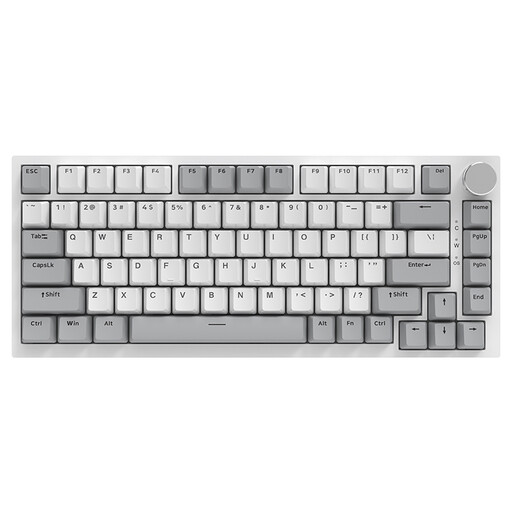
AJAZZ AK820 75%, wired, US layout
This wired 75% keyboard is worth considering if you prefer a compact format and a wired connection.
Dimensions are listed as 327 × 136 mm; the product description also mentions a volume control knob. The layout is specified as US QWERTY.
View at Joybuy
 No image available
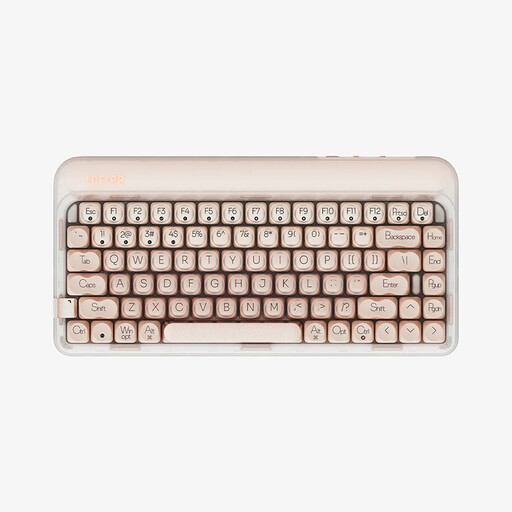
Lofree OE914 75%, 84 keys, US layout
The 75% layout with 84 keys is a compact option if you want to leave room for mouse movement.
The product description lists USB-C, Bluetooth and 2.4 GHz connectivity, as well as replaceable linear switches. The layout is specified as US QWERTY.
View at Joybuy
 No image available
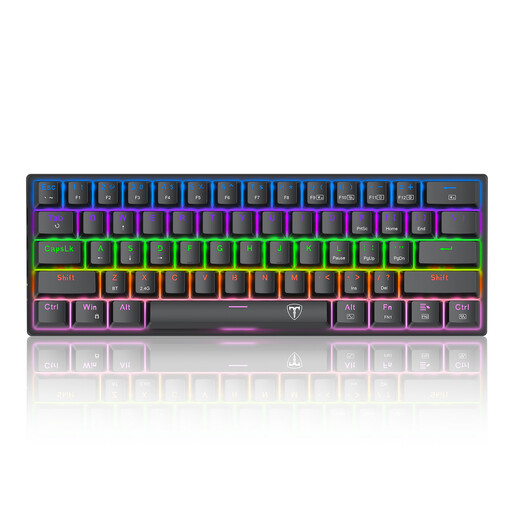
ET 60%, wired, US QWERTY, 61 keys
The 60% format keeps the keyboard footprint small, provided you’re happy to use secondary key functions.
According to the product description, the arrow keys are activated with Fn+Space rather than being available on the standard layer. It also lists blue, clicky switches and a detachable USB-C cable.
View at Joybuy
Frequently asked questions
Is a 60% keyboard automatically the right choice for puzzle adventures at a small desk?
No. First, compare the keys you need in the game with the specific keyboard layout: on the ET keyboard described here, the arrow keys are activated with Fn+Space. Whether the smaller format suits your setup also depends on how much room you actually need for your mouse.
How do I set up a wireless keyboard with multiple devices?
Check the instructions for the model you’ve chosen and the connections available on your devices. The CHERRY MX 8.2 TKL Wireless offers Bluetooth, 2.4 GHz wireless and a USB cable for this model, as well as Bluetooth channels for switching between devices; these features aren’t automatically available on other keyboards.
What should I know about returns and faults when buying online?
For eligible distance purchases from a trader, you generally have 14 days from delivery to withdraw from the contract; exceptions and any return costs should be checked separately. Separately, new goods are covered by a statutory two-year legal guarantee from the seller, starting from the date you receive them. Your Europe – European Union explains these rules for purchases in the EU.


