Players short on mouse space
If there’s little room beside your keyboard, you’ll need space for your mouse. Check whether a 60% layout has the keys you actually use in-game.


For arena matches at a small desk, a 60% keyboard is a good fit if you’re comfortable using secondary functions to access keys that aren’t directly available. If you often need hotkeys at your fingertips, 75% or TKL could be an alternative, provided you have room for the extra width. Adjustable actuation points are worth considering if you want to fine-tune how the keys respond.
If there’s little room beside your keyboard, you’ll need space for your mouse. Check whether a 60% layout has the keys you actually use in-game.
If you use hotkeys often, having them directly to hand matters. With smaller layouts, check which commands are on a function layer and how you can assign them in the game you play.
If you want to configure the actuation point or reset behaviour, compare the features of the specific model. Having an adjustment option alone doesn’t prove it will give you a general gaming advantage.
A good fit if: you want to keep as much room as possible for your mouse in a tight space and are comfortable using secondary functions.
The trade-off: not all function and navigation keys are directly accessible. Wooting and HyperX both offer models in this compact 60% format.
A good fit if: you want a compact layout as well as a function row and more keys you can access directly. Keychron’s K2 HE is a 75% option.
The trade-off: it takes up more width than a 60% keyboard. The K2 HE also has limited compatibility with magnetic switches.
A good fit if: you can do without a number pad but want plenty of familiar keys close to hand. CHERRY XTRFY’s K4V2 RGB TKL is one example of this layout.
The trade-off: TKL takes up more desk width than smaller formats. Check that you’ll still have enough room for your mouse.
| What matters to you | What to look for | Who it matters most to |
|---|---|---|
| Desk space and room for your mouse | Measure the available desk width and the space you need for your mouse. Compare the dimensions of the specific keyboard rather than relying on the percentage alone. | If my keyboard and mouse are competing for limited desk space, I want to keep enough room to move my mouse. Around 31% of consumers might consider mouse space their main reason for buying. |
| Keys within easy reach | Make a note of your in-game hotkeys and check the function layer, arrow keys and key assignments on the specific layout. | When I use lots of hotkeys in games, I don’t want to keep searching for Fn combinations. Around 25% of consumers might particularly prioritise keys they can access directly. |
| Adjustable key response | Check the switch technology, adjustment options and any software required for the exact model. Consider whether you’ll actually use these features. | If I want to fine-tune the actuation point or reset behaviour, I compare the specific settings available. Around 19% of consumers might see this adjustability as their main reason for buying. |
| Noise at your desk | Check the type of switch fitted and listen to a useful sound test carried out under comparable conditions. “Linear” alone doesn’t tell you how loud a keyboard will be. | If I use the same desk for other tasks, I want the typing noise to suit my surroundings. Around 13% of consumers might give noise particular consideration. |
| Upfront cost and customisation | Compare the total price, layout variant, what’s included and the documented compatibility if you might want to replace components later. | I want to know in advance whether the layout and components meet my needs, rather than having to upgrade later. Around 12% of consumers might see the overall cost and effort as their main reason for buying. |
A compact layout saves desk space but gives you fewer functions at your fingertips. The keys you need depend on your in-game key assignments.
Before buying, check your hotkeys and the model’s secondary key assignments. If important commands are awkward to access, you may need time to adjust or end up buying another keyboard.
Keycap labels, the physical key arrangement and your operating system’s keyboard layout aren’t the same thing. ANSI and ISO also have different physical layouts.
Check the exact product variant and look closely at the key images. Wooting describes ANSI and ISO as different physical layouts.
An unsuitable layout may mean you need to buy compatible keycaps or get used to a different arrangement.
Manufacturers’ claims about adjustable switches describe their features, but don’t prove they’ll benefit every player or game.
Only prioritise this technology if you actually want to adjust how the keys actuate, and check what settings the exact model offers.
For the Keychron K2 HE, the manufacturer lists only Gateron Double-Rail magnetic switches as compatible.
Before planning to change the switches, check the compatibility information for your exact model.
Switches that aren’t compatible can’t be used with this model.
The K2 HE is a 75% option with a DE-ISO layout choice, magnetic switches and wireless connectivity in a compact design.
The Apex Pro Mini Gen 3 is a wired 60% option, available from SteelSeries in a German variant.
The K4V2 RGB TKL is a wired mechanical TKL option for anyone who can do without a number pad.
The Alloy Origins 60 is a compact mechanical keyboard. HyperX offers it in a choice of US and DE layouts.
The Huntsman V3 Pro Mini combines a 60% format with analogue optical switches and configurable actuation points.
This selection includes compact 60%, 65% and 75% layouts. Choose based on the hotkeys you need, the space available for your mouse and the key response you want.
 No image available
The 75% layout is a good option if you want a compact format with more keys you can access directly.
Features listed include ISO-DE, Bluetooth, 2,4 GHz and USB-C, as well as hot-swap and RGB lighting.
 No image available
The 75% layout could suit you if you want a compact keyboard with German keys and more direct access than a 60% model offers.
The product description lists ISO-DE, hot-swap, VIA support, Bluetooth, 2,4 GHz and USB-C.
 No image available
The 65% format is a compact alternative. Before choosing it, check which secondary functions you’ll need for your in-game keys.
Features listed include a wired connection, German QWERTZ, hot-swap and MX2A RED switches. The description also mentions N-key rollover and anti-ghosting.
 No image available
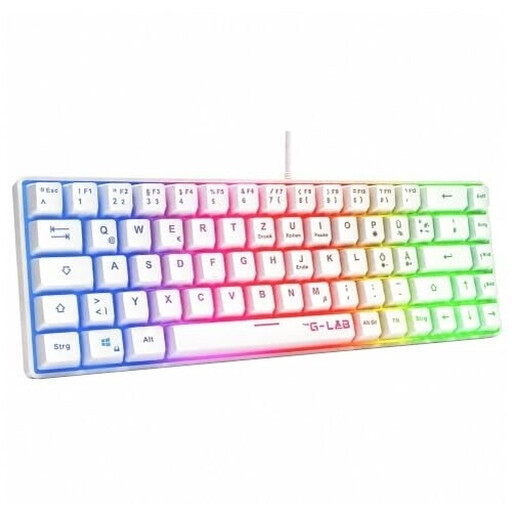
A 60% layout is worth considering if mouse space is a priority and you can access the keys you need using the available assignments.
The product details list a German QWERTZ layout, membrane keys and rainbow lighting. Check that the secondary functions work for your hotkeys.
 No image available
The 60% format can free up room for your mouse. Also check whether the keys you need for your game are directly accessible or available through secondary functions.
The product title lists magnetic switches, adjustable actuation, Rapid Trigger and an 8000 Hz polling rate. These claims alone don’t prove a general gaming advantage.
No. It depends on the keys you use in each game. Before buying, check which commands require a second key layer; Riot Games explains that League of Legends hotkeys can be changed, with some restrictions on individual keys.
Check that the version you order has the physical DE-ISO layout you want, then select the matching keyboard layout in your operating system. Wooting points out that ANSI and ISO differ physically, and that the key labels alone don’t determine which characters your operating system will enter.
No. Keychron lists only Gateron Double-Rail magnetic switches as compatible with the K2 HE and explicitly excludes other magnetic switches.
For a distance contract between a consumer and a trader, you generally have a statutory 14-day right to withdraw; exceptions may apply. The Verbraucherzentrale points out that return postage may be at the consumer’s expense unless the trader covers it. Your statutory rights if goods are faulty are separate from any voluntary guarantee.
The EU product rules that apply to a specific keyboard depend on the product; wireless keyboards may also fall under the rules for radio equipment. The European Commission describes the Radio Equipment Directive as the regulatory framework for radio equipment. Your Europe explains that CE marking is not a certification issued by a central EU body.