Gamers with limited mouse space
If you practise at a small desk and want to keep as much room as possible for mouse movement, a compact layout could suit you. Also consider whether you’d miss having dedicated keys in everyday use.


If you want to leave as much room as possible for mouse movement on a small desk, a 60% layout is a good place to start. If you regularly use the arrow, function or navigation keys directly, it’s worth considering TKL despite its larger footprint. An adjustable actuation point and Rapid Trigger can be useful for repeated inputs, but neither feature, on its own, proves that you’ll react faster. A wireless connection can reduce cable clutter on your desk, but it is not the same as Rapid Trigger.
If you practise at a small desk and want to keep as much room as possible for mouse movement, a compact layout could suit you. Also consider whether you’d miss having dedicated keys in everyday use.
If you practise repeated inputs, check whether you can adjust the actuation point and reset behaviour. These features affect how keystrokes are detected, not your personal reaction time.
If you regularly need the arrow, function or navigation keys as well as gaming, having them readily accessible may matter more than the smallest possible case. Compare the layout with the keys you actually use.
| Buying priority | What to look for | Who it matters to |
|---|---|---|
| Room for your mouse | Measure the space you have for your keyboard and mouse together. Check whether Fn shortcuts are enough for the dedicated keys you lose with a 60% layout. | If I need every bit of free space for mouse movement when practising, a compact layout matters more than extra keys; around 36% of consumers put this need first. |
| Repeated inputs | Check whether the specific model offers Rapid Trigger and an adjustable actuation point. Make sure the settings suit the way you type or play. | Anyone practising repeated key sequences may want to adjust actuation and reset to suit their needs; around 29% of consumers prioritise this level of control. |
| Keys within easy reach | Check which arrow, function and navigation keys are included, and whether the layout meets your needs for DE/ISO keys. | If I regularly need these keys without using Fn shortcuts, I’m more willing to accept a larger case; around 21% of consumers put easy access first. |
| Wireless setup | Check which connection types are supported and the stated battery life under the relevant lighting conditions. | Anyone looking to avoid cables on a small desk and position their keyboard flexibly will want to pay particular attention to wireless connectivity; around 14% of consumers prioritise this. |
A manufacturer’s latency figure may describe only part of the signal path. Razer’s stated measurement runs from switch actuation to the USB port; it is not independent evidence of end-to-end latency for the whole setup or of faster human reactions. RTINGS.com also notes that 8,000 Hz offers limited practical benefit.
Compare what is being measured and the test conditions before choosing a model based on a single figure.
A 60% layout typically lacks dedicated arrow, function and navigation keys. TKL keeps these keys, but takes up more space beside the keyboard.
Think about which inputs you use often, and measure the space available for your keyboard and mouse together.
You may need to use extra Fn shortcuts in everyday use.
Model generation, physical ISO or ANSI layout, and keycap legends are separate features. A similar model name alone does not prove that the layout and version match.
On the product page, compare the full model name, version, switches and what’s included.
The 60HE v2 is a compact, wired option with adjustable magnetic switches and Rapid Trigger.
The Huntsman V3 Pro Mini 8KHz is a 60% option with analogue optical switches and Rapid Trigger.
The Apex Pro Mini Gen 3 is a compact alternative with Hall effect switches, available in the documented wired DE version.
The PRO X TKL RAPID combines Rapid Trigger and adjustable actuation with keys that are easy to reach.
The K70 PRO MINI WIRELESS is a compact option for wireless setups.
This selection from Joybuy includes compact gaming keyboards for small desks, including models with adjustable actuation and Rapid Trigger.
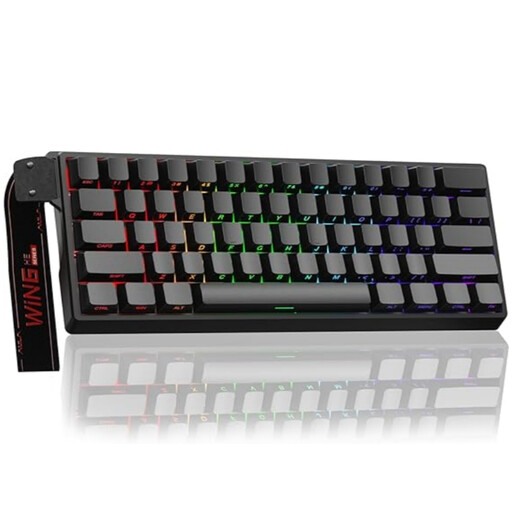 No image available
The 60% layout and adjustable magnetic switches with Rapid Trigger mentioned in the product title make this a good fit for a compact setup with repeated inputs.
The product title lists a wired connection, hot-swappable switches and an 8000 Hz polling rate. The polling rate alone is not independent evidence of a latency advantage.
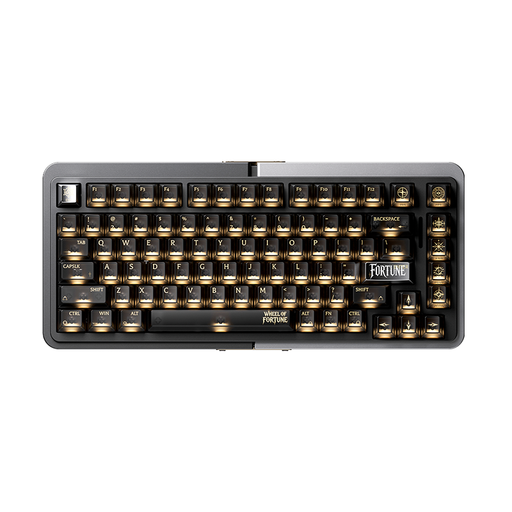 No image available
The product details list magnetic switches and Rapid Trigger for repeated inputs; check that the layout suits your space requirements.
The description lists a detachable Type-C cable and a Rapid Trigger range of 0.2 to 4.0 mm. One limitation is the US layout.
 No image available
The product details list Rapid Trigger and magnetic Hall effect switches for a setup with repeated inputs.
The model is described as a gaming keyboard for FPS games. Before you decide, check the specific adjustment options and the layout of the listing.
 No image available
According to the product details, the compact 68-key layout and Rapid Trigger are designed for a space-saving setup with repeated inputs.
The details list magnetic switches, a metal plate and an adjustable actuation range of 0.2 to 4.0 mm. The polling rate is listed as 8000 Hz; this is not independent evidence of low latency. US layout.
 No image available
The 60% layout and Rapid Trigger mentioned in the product title make this a good fit for a compact setup with repeated inputs.
The details list Hall effect magnetic switches, a wired connection and an 8000 Hz polling rate. The adjustable actuation is listed as 0.01 mm; this is a product specification, not an independent performance test. US layout.
No. A 60% layout typically leaves more room for your mouse, while TKL keeps dedicated arrow, function and navigation keys. Measure the space available, then decide which keys you really need to access directly.
If your specific model offers adjustable actuation points and Rapid Trigger, start with a setting you can control and check that you can make successive inputs without triggering keys unintentionally. These features change how keystrokes are detected; they do not prove that your personal reaction time will improve.
Check the physical ANSI or ISO version and the keycap legends separately. Wooting says that you set the input language in your operating system; this does not automatically determine the physical key shape or the legends on the keycaps.
The CE marking is the manufacturer’s declaration that the product meets the relevant requirements of EU product legislation. The Federal Network Agency lists correct marking and manufacturer details among the points checked during market surveillance. CE marking is not proof of gaming performance.