Which keyboard is right for you?

Gamers with limited mouse space

If you need to fit your keyboard and mouse side by side on a narrow desk, start by comparing their actual dimensions. The Federal Institute for Occupational Safety and Health recommends having enough desk space to position your mouse and keyboard flexibly, as well as space to rest your hands and arms.

Gamers who use lots of shortcuts

If you often switch between camera controls and other commands, check which keys are easy to reach on your preferred layout and whether you can change the in-game key bindings. Colossal Order describes this option for Cities: Skylines II; for other games, check the settings individually.

Gamers sharing a desk

If you also use your desk for writing or with multiple devices, check the exact switch option, the connections supported and whether a wireless keyboard needs charging.

What should you consider when buying?

75% layout

A good fit if: you want to save desk space while keeping plenty of commands within easy reach, without needing an extra layer of keys.

Trade-off: the keys are closer together; on the SKILLER SGK25, some important functions share keys.

TKL (without a number pad)

A good fit if: you can do without a number pad but would like to keep more distinct groups of keys.

Trade-off: check that the specific keyboard will fit on your desk alongside your mouse; connection options vary by model.

Even more compact layout

A good fit if: space is particularly tight and the commands you need are available on the remaining keys or can be remapped in your game.

Trade-off: check the key binding for every command you use regularly. The remapping option described by Colossal Order for Cities: Skylines II doesn’t necessarily apply to other management games.

What matters to you What to look for Who it matters most to
Desk space and room for your mouse Measure the available desk space and compare it with the dimensions of the specific model. Sharkoon lists the wired SKILLER SGK25 as measuring 331 × 139 × 40 mm. If I need room for my mouse on a small desk too, I compare the keyboard’s actual width. Around 36% of consumers say desk space is their top buying priority.
Easy access to commands Compare the commands you use often with the keys that are easy to reach on the specific layout, and check whether the game allows you to remap them. If you often use camera controls and other shortcuts, you’ll want to reach important commands without awkward key combinations. Around 29% of consumers rank easy access to keys as their top priority.
Typing feel and noise Check which switch option is available; don’t treat manufacturers’ claims about sound dampening as a measurement of noise at your own desk. If I also write at the same desk or share the room with others, I pay particular attention to the feel and sound of the switches. For around 21% of consumers, this is their top buying priority.
Connectivity and moving between desks Check that your device supports the stated connection types and, for a wireless keyboard, that you have somewhere to store the receiver and a way to charge it. If you use several devices or want to keep a keyboard cable off your desk, compare the connections available on the specific model. Around 14% of consumers prioritise flexible connectivity above all else.

Common buying mistakes

  • Choosing based only on the layout percentage

    The layout name won’t tell you the keyboard’s exact dimensions or whether the commands you need are easy to reach.

    Measure your available space and compare the key layout with the games you actually play.

  • Assuming every version in a model range is the same

    Layouts, connections and hot-swap features can differ between versions. For example, details for the wireless G515 LIGHTSPEED TKL don’t necessarily apply to the wired G515 TKL.

    Check the full model name, the DE-ISO or QWERTZ layout you want, and the features included with the version on offer.

  • Treating manufacturer claims as proof of a gaming advantage or noise level

    Descriptions of switch speed or sound dampening don’t prove that you’ll have an advantage in your management games or indicate how loud the keyboard will be where you use it.

    Give more weight to having the right keys, a suitable size and the switch option you want than to unsubstantiated performance claims.

Brands to consider

Sharkoon

The wired SKILLER SGK25 is a documented 75% option with a German layout, designed for desks with limited space.

  • Sharkoon lists the dimensions of this model as 331 × 139 × 40 mm, with a detachable cable and hot-swappable 3- or 5-pin switches.
  • Some important keys have more than one function. These details apply to the SKILLER SGK25, not the entire range.

Logitech G

The G515 range includes TKL models for gamers who can do without a number pad.

  • According to Logitech, the G515 LIGHTSPEED TKL supports wireless, Bluetooth and wired data transfer.
  • These three connection options apply to the LIGHTSPEED version and not necessarily to the separately available wired G515 TKL.

Keychron

The K2 Max is a 75% keyboard with several connection options and a choice of ISO layouts.

  • Keychron lists 2.4 GHz wireless, Bluetooth and a wired connection for the K2 Max, as well as a DE-ISO option.
  • According to Keychron, hot-swap is only available on suitably equipped versions. Check that the version you choose has the layout and feature you want.

Razer

The BlackWidow V4 Tenkeyless HyperSpeed is a TKL option for gamers looking for wireless connectivity and replaceable switches.

  • Razer lists 2.4 GHz wireless, Bluetooth and sockets for 3- or 5-pin switches.
  • Manufacturer descriptions of noise or speed aren’t independent measurements and don’t prove an advantage in management games.

Joybuy product selection

This selection includes compact 75% keyboards and a TKL option without a number pad, for gamers weighing up desk space, key layout and connectivity.

Akko 3084B Plus Tri-Mode Mechanical Keyboard, 75 % ISO-DE

Akko 3084B Plus Tri-Mode Mechanical Keyboard, 75 % ISO-DE, Black & Gold

The 75% layout is worth considering if you have limited room for your mouse; the model is listed as ISO-DE.

Bluetooth, 2.4 GHz and USB-C; hot-swap; V3 Pro Cream Blue switches.

View at Joybuy

AJAZZ AK820 MAX 75 % Wireless Mechanical Gaming Keyboard, US-QWERTY

AJAZZ AK820 MAX 75 % Wireless Mechanical Gaming Keyboard, US-QWERTY

The 75% layout is a space-saving option; check that the US-QWERTY layout suits your preferred key arrangement.

Bluetooth, 2.4 GHz and USB-C; 82 keys; volume control; hot-swap; 8000 mAh.

View at Joybuy
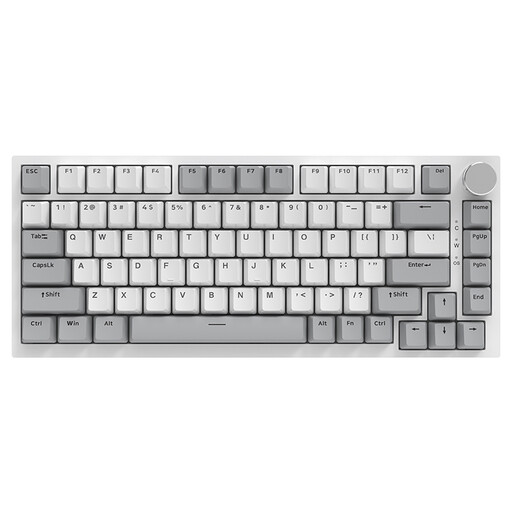
AJAZZ AK820 75 % Wired Mechanical Keyboard, US-QWERTY

AJAZZ AK820 75 % Wired Mechanical Keyboard, US-QWERTY

The wired 75% layout is worth considering for a small desk; bear in mind that it has a US-QWERTY key arrangement.

83 keys; hot-swap; linear switches; white backlighting; volume control.

View at Joybuy
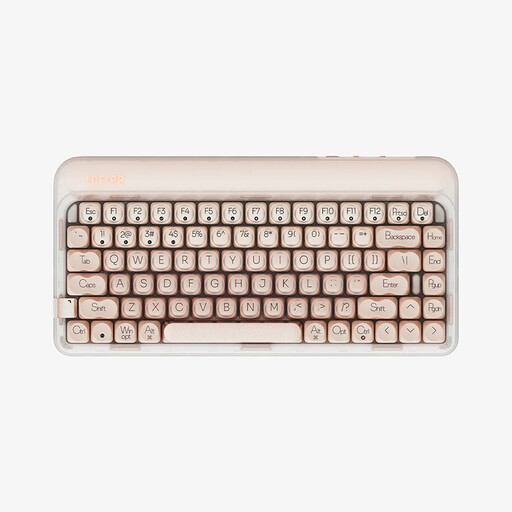
Lofree OE914 75 % Mechanical Tri-Mode Keyboard, US-QWERTY

Lofree OE914 75 % Mechanical Tri-Mode Keyboard, US-QWERTY

The 75% layout is designed to leave more room for your mouse; check that the US-QWERTY layout suits you.

84 keys; USB-C, Bluetooth and 2.4 GHz; hot-swap; linear switches; 4000 mAh battery. The product title also mentions “Free Gift Mouse”; check exactly what’s included before buying.

View at Joybuy

Akko 5087S V1 TKL Wired Gaming Keyboard, ISO-DE QWERTZ

Akko 5087S V1 TKL Wired Gaming Keyboard, ISO-DE QWERTZ, Black & Gold

The TKL design does away with the number pad and has an ISO-DE QWERTZ layout; compare the space it takes up with a 75% model.

Wired; hot-swap; Akko V3 Pro Cream Yellow switches; RGB lighting.

View at Joybuy

Frequently asked questions

How can I check whether a keyboard suits my management games?

Compare your games’ key bindings with the keys that are immediately accessible on the specific layout. According to its developer, Cities: Skylines II lists its shortcuts in the controls menu and lets you change them; check separately whether other games offer the same option.

What should I consider when setting up and connecting my keyboard?

Measure the space you have for your keyboard and mouse, and allow for cable routing. For a wireless keyboard, check that your device supports the stated connection and find out how the specific model is charged.

Can I replace the switches later?

It depends on the version you choose. Sharkoon lists compatible 3- and 5-pin switches for the SKILLER SGK25; according to Keychron, hot-swap on the K2 Max depends on the version.

What are my rights in Germany if a product develops a fault after an online purchase?

Statutory consumer rights are different from a voluntary guarantee, as Germany’s consumer advice centre explains. Online purchases generally also come with a 14-day right to cancel; check for any exceptions and the terms that apply to your situation.

What should I check to make sure a wireless keyboard complies with regulations?

For electrical and radio equipment covered by its checks, the Federal Network Agency looks at things including the CE marking, product identification and manufacturer details. The European Union says that, by adding the CE marking, a manufacturer declares that its product meets the relevant EU requirements; this doesn’t confirm that it’s suitable for your games.