Support players who need lots of direct keybinds
You want to reach important actions directly, but don’t need a number pad. The Razer BlackWidow V4 75% has function keys and arrow keys.


Start by choosing the keys you want to reach directly for your in-game controls, then measure the space available for your keyboard and mouse. A 75% layout gives you function keys and arrow keys in a compact design; TKL models omit the number pad, while 65% and 60% models save even more space but rely more on function layers. Once you’ve found a layout that suits your needs, consider the switch feel, noise and software.
You want to reach important actions directly, but don’t need a number pad. The Razer BlackWidow V4 75% has function keys and arrow keys.
You want room to move your mouse on a small desk and are happy to use function layers for extra inputs. The Wooting 60HE v2 and Razer BlackWidow V3 Mini HyperSpeed are examples of compact layouts; the Razer model has no function key row, navigation cluster or number pad.
You want to take switch noise into account when choosing a keyboard. SteelSeries describes the Apex 3 TKL’s switches as designed to be quiet; this is not a comparative noise measurement.
First decide which requirement matters most to you. Then check the specific layout, switch option and keyboard set-up.
| Consideration | What to check before buying | Who is it most relevant to? |
|---|---|---|
| Keys you can reach directly | Check the specific layout to see whether the function keys and arrow keys are directly accessible or only available through a function layer. | If I want to access important support actions directly, I need to know whether that requires a second key layer. Around 36% of consumers make direct keybinds their main consideration. |
| Room to move your mouse | Measure the usable desk width, including the space you need to move your mouse, and compare it with the dimensions of the specific model. | If I want to move my mouse freely, I’ll measure the available space and decide whether I’m happy to give up direct access to some keys. Around 29% of consumers make mouse space their main consideration. |
| Typing noise | Check the specific switch option and, if possible, listen to it in the conditions in which you practise. | In a shared or noise-sensitive workspace, I want to take typing noise into account while practising. Around 21% of consumers prioritise quiet typing. |
| Profiles and keybinds | Check that the software is compatible with your system, and check the rules of the specific game before setting up automated macros. | If I want to set up profiles or macros, I’ll check that the software and game rules suit the way I play. Around 14% of consumers prioritise customisable keys and profiles. |
A compact layout may move important keys to a function layer. The Razer BlackWidow V3 Mini HyperSpeed has arrow keys but no function key row; the BlackWidow V4 75% has both.
Compare the keys you actually need to access directly with the layout of the specific model.
Extra function layers can mean more set-up and adjustments to your keybinds.
Manufacturers’ claims about switches and actuation are not comparative measurements for your own practice set-up.
First choose the right format and keybinds; then assess the feel and noise of the switches on the specific model.
According to Razer, the Barebones version of the BlackWidow V4 75% does not include switches, keycaps or a wrist rest.
Check the contents, layout and switch compatibility of the exact version on offer.
Depending on the version, you may need to buy compatible switches or other accessories.
The BlackWidow V4 75% and BlackWidow V3 Mini HyperSpeed showcase different compact layouts.
The Apex 3 TKL is a TKL option; the Apex Pro Mini Gen 3 DE is a wired 60% model with an adjustable actuation point.
The Alloy Origins Core is a mechanical TKL keyboard without a number pad.
The 60HE v2 is a 60% option if a smaller footprint and configurable inputs matter more to you than extra groups of directly accessible keys.
According to Logitech G, the PRO X TKL RAPID combines a TKL format with magnetic analogue switches and adjustable actuation.
The Joybuy products below include compact 65%, 60% and 75% layouts. For the US QWERTY models, check carefully that the key arrangement suits your keybinds.
 No image available
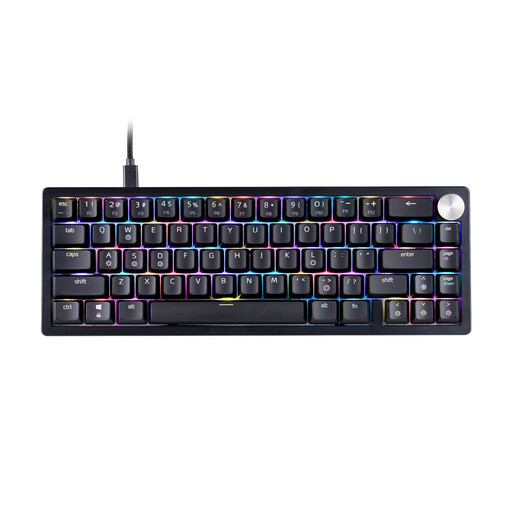
The 65% layout is a compact option if you want to save space on a small desk.
Mechanical XPG Red switches, RGB lighting and a detachable USB-C cable. US QWERTY layout; stated dimensions: 324 × 115 mm.
 No image available
The 60% format could suit you if a small footprint matters more than extra groups of directly accessible keys.
Described as a wired model with magnetic switches, hot-swap, adjustable actuation, Rapid Trigger and an 8,000 Hz polling rate. According to the product information, it is compatible only with Hall effect magnetic switches; conventional mechanical switches will not work. Protect it from liquids and high humidity.
 No image available
The 75% layout with ISO-DE could suit you if you’re looking for a compact design with a German layout.
Mechanical keyboard with VIA compatibility, hot-swap and three stated connection options: Bluetooth, 2.4 GHz and USB-C. This version lists Creamy Rye switches and an 8,000 mAh battery. The built-in battery must not be opened or punctured, or exposed to flames or extreme temperatures, according to the safety information.
 No image available
The compact 65% layout could be an option if you need a smaller footprint and can manage without a number pad.
Mechanical keyboard with Bluetooth, 2.4 GHz and wired connectivity. The product title lists hot-swap and a detachable wrist rest.
 No image available
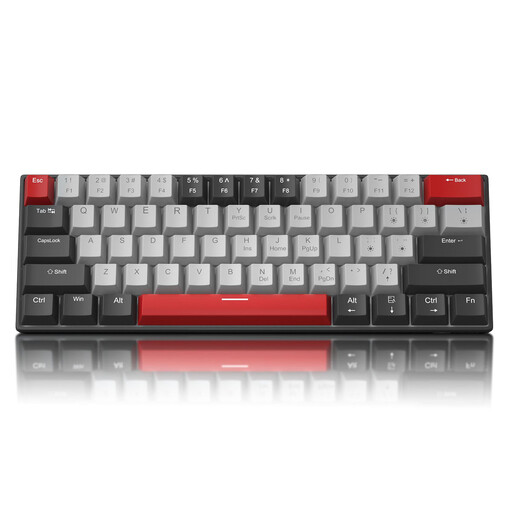
The 60% layout is a compact option if you’re happy to use a function layer for keys you only need occasionally.
Wired gaming keyboard with 61 keys, mechanical switches, blue LED lighting and a detachable USB-C cable. US QWERTY layout; the description says the arrow keys are accessed using a function key combination.
No. If you use function keys directly, the Razer BlackWidow V4 75% has a dedicated row; the BlackWidow V3 Mini HyperSpeed does not. What matters is your specific in-game keybind set-up, not just your role.
First, decide which actions you need in the game and test how to access them on your chosen layout. If you want extra profiles, check that the software is compatible; for automated macros, also check the rules of the specific game.
Follow the instructions for the version you’ve bought. A hot-swap socket is only relevant for changing a switch if the replacement is compatible; Razer lists 3- and 5-pin switches for the BlackWidow V4 75%.
No. Statutory consumer rights apply against the seller; a guarantee is an additional voluntary service with its own terms. According to the Verbraucherzentrale, the first step when a product is faulty is fulfilment of the contract, meaning repair or replacement.
In Germany, consumers who buy at a distance generally have a right to cancel, usually within 14 days of receiving the goods. According to the Verbraucherzentrale, you must notify the retailer that you wish to cancel; statutory exceptions and the circumstances of the specific contract also apply.