If you mostly work at a desk, first check whether the laptop has a suitable video output for your monitor. If you need both displays on the go, without a separate monitor, a model with two integrated displays could be an option. Then match the RAM and graphics memory to your engine, renderer and project size: Unity recommends at least 8 GB of RAM for the Editor, while Epic Games recommends 32 GB of RAM and at least 8 GB of graphics memory for Unreal Engine 5 on Windows. These aren’t blanket requirements for every puzzle level.
Which option is right for you?
Developers with a permanent desk setup
If you want the Editor and test view on your laptop and an external monitor, check the ports on the specific model and how it connects to the monitor. Microsoft explains how to arrange multiple displays in Windows; MSI lists HDMI 2.1 and DisplayPort over USB-C for the Katana 15 HX B14WFK-487.
Developers on the move who need two displays
If you often work in different places and don’t want to carry a separate monitor, a laptop with two integrated displays could suit you. ASUS lists two integrated screens for the ROG Zephyrus Duo GX651; check the full model variant and its display layout.
Developers working on demanding Unreal levels
If your engine, renderer and project scope demand more, compare the RAM and graphics memory of the specific model with Epic’s recommendations for Unreal Engine 5 on Windows: 32 GB of RAM and at least 8 GB of graphics memory.
What should you look for when buying?
First decide whether you want the second workspace built into the laptop or provided by an external monitor. Then check the specific display connection and the features your project actually needs.
Laptop plus external monitor
A good fit if: you mainly work at a desk and have a suitable monitor.
Consider: the monitor and, if needed, its cable take up space. You’ll need to take them with you when you move, or have them ready at your other workspace.
Laptop with two integrated displays
A good fit if: you want the Editor and test view visible at the same time on two built-in displays, even when you’re on the move.
Consider: the display layout is fixed. According to ASUS, the ASUS ROG Zephyrus Duo GX651AR-SR042W has 32 GB of RAM, which cannot be upgraded via a memory slot.
| Priority |
What to check before buying |
Who is it important to? |
| Two usable workspaces |
Choose between an integrated second display and an external monitor. For an external display, the laptop output, monitor input and display settings you want to use all need to be compatible. |
If I want to see the Editor and test view at the same time, I need two workspaces arranged to suit me. Around 36% of consumers make screen layout a priority. |
| Performance for your engine and project |
Check the engine version, renderer and project size. Unity recommends at least 8 GB of RAM for the Editor; Epic recommends 32 GB of RAM and at least 8 GB of graphics memory for Unreal Engine 5 on Windows. |
If my Unreal Engine 5 project grows, I want to compare the RAM and graphics memory with Epic’s recommendations. Around 29% of consumers prioritise engine performance. |
| Overall specification and upgrade options |
Include a monitor in your setup if you need one, and check the full model details to see whether it has RAM slots and whether they’re occupied. ASUS says the GX651AR-SR042W cannot be upgraded via a RAM slot; MSI lists two SO-DIMM slots for the B14WFK-487. |
If I want to adapt my setup as my project grows, upgradeability matters to me. Around 21% of consumers see cost and future upgrades as their main concerns. |
| Moving between locations and working position |
Check the device’s weight, the peripherals you’ll need and how the displays are actually arranged at your intended workspace. The BAuA cites frequent changes of location as a factor in the overall weight of work equipment. |
If I change workspaces often, I want to use two displays without always carrying a separate monitor. Around 14% of consumers prioritise moving between locations and ergonomic use. |
Common buying mistakes
-
Assuming “two screens” means a particular design without considering where you’ll work
A laptop with two integrated displays and a laptop paired with an external monitor solve different space and mobility needs.
First decide whether the second display needs to be built into the device when you’re on the move. For an external monitor, check the video connection; for a Duo, check the full model variant and display layout.
-
Applying Unreal Engine recommendations to every small puzzle project
Published requirements apply to specific engines and conditions. A simple 2D prototype won’t automatically need the same performance as a more demanding Unreal Engine project.
Start with the engine version, renderer and project size. Choose extra performance headroom based on a specific need, rather than the device category alone.
-
Assuming every model in a range has the same specification
Specifications and upgrade options can vary between models. ASUS says the GX651AR-SR042W has fixed RAM and no upgrade slot; MSI lists two SO-DIMM slots for the B14WFK-487.
Before ordering, check the full model number, RAM configuration and the connections you need.
Key brands at a glance
ASUS ROG
The ROG Zephyrus Duo GX651 is a documented model variant with two integrated displays.
- For the GX651AR-SR042W, ASUS lists an RTX 5070 Ti laptop GPU with 12 GB of graphics memory and 32 GB of built-in RAM.
- According to ASUS, the RAM in this variant cannot be upgraded via a memory slot.
MSI
The Katana 15 HX B14WFK-487 is a documented option for connecting an external monitor.
- For this variant, MSI lists HDMI 2.1, DisplayPort over USB-C and two SO-DIMM slots.
- The listed 16 GB of RAM is below Epic’s Windows recommendation of 32 GB for Unreal Engine 5. That doesn’t mean it’s unsuitable for smaller projects.
Acer Predator
The Predator Helios Neo 16 AI PHN16-73-9816 is a documented variant for comparing the display and engine hardware.
- For this variant, Acer lists 32 GB of RAM, an RTX 5070 laptop GPU with 8 GB of graphics memory and a 2560 × 1600-pixel display.
- The specifications for this variant don’t confirm a specific external video output, so check the monitor connection separately.
HP OMEN
The OMEN MAX 16-ak0693ng is a documented laptop variant with external video outputs.
- For model number BJ0V6EA, HP lists 32 GB of RAM, an RTX 5070 Ti laptop GPU with 12 GB of graphics memory, HDMI 2.1 and DisplayPort over USB-C.
- The German Joybuy description contains a conflicting Radeon specification. Before ordering, check the exact model configuration and graphics chip details.
Joybuy products for use with an external monitor
This selection features gaming laptops for a setup combining the laptop display with an external monitor. Check that each model’s specific configuration suits your project and monitor.
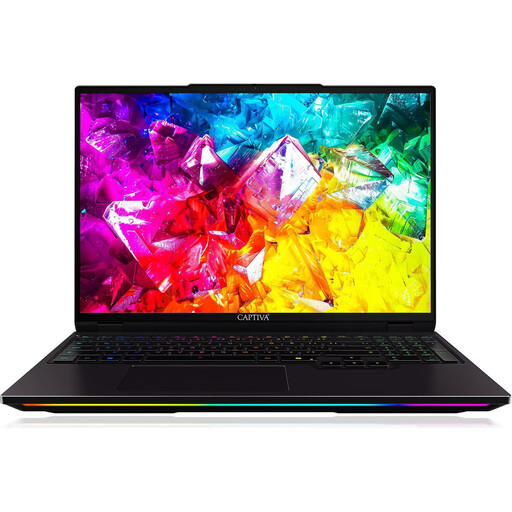 No image available
Captiva I92-069 gaming laptop
An option if you want to split the Editor and test view between your laptop and an external monitor.
Intel Core Ultra 9 275HX; GeForce RTX 5080 with 16 GB GDDR7; 32 GB DDR5; 1 TB SSD; 16-inch WQXGA IPS display with 300 Hz; Windows 11 Home.
View at Joybuy
 No image available
THUNDEROBOT Radiant 16 gaming laptop
Could work well in a setup with an external display, provided the connection on the specific laptop variant is compatible with your monitor.
Intel Core i7-14700HX; RTX 5070 with 8 GB GDDR7; 32 GB RAM; 16-inch display with 240 Hz.
View at Joybuy
 No image available
MSI Raider 18 HX A2WH-1088
An option for a laptop-and-monitor setup; check that the video output matches the input on your external display.
Intel Core Ultra 9 275HX; GeForce RTX 5070 Ti with 12 GB; 32 GB DDR5; 1 TB SSD; 18-inch QHD+ display with 240 Hz.
View at Joybuy
 No image available
HP OMEN MAX 16-ah0698ng
If you’re planning to use two separate workspaces, check in advance that it connects to your external monitor.
Intel Core Ultra 9 275HX; GeForce RTX 5090 with 24 GB; 64 GB RAM; 2 TB SSD; WQXGA display with 240 Hz; Windows 11 Home.
View at Joybuy
 No image available
HP OMEN MAX 16-ak0693ng
Check the exact graphics configuration before ordering: the product description contains a conflicting Radeon specification.
AMD Ryzen AI 9 HX 375; listed in the product title: GeForce RTX 5070 Ti with 12 GB; 32 GB RAM; 1 TB SSD; WQXGA display with 240 Hz; Windows 11 Home.
View at Joybuy
Frequently asked questions
Do I always need a powerful gaming GPU for a puzzle level?
No, not necessarily. Godot lists minimum requirements for simple 2D or 3D projects, and Unity points out that RAM requirements depend on a project’s size and complexity. For Unreal Engine 5 on Windows, Epic recommends, among other things, 32 GB of RAM and at least 8 GB of graphics memory. Choose your setup based on your engine and project.
How do I set up a second external screen?
Connect the monitor using a video output that’s compatible with your specific laptop variant and the monitor. Once Windows detects both displays, you can identify them in the display settings and arrange them to match their actual positions.
What should I consider when working in different places?
Consider how easy the displays are to read, how they’re arranged and the total weight of the equipment you’re carrying. The BAuA cites how often you change location as a factor in the importance of overall weight when planning flexible working arrangements.


