You don’t automatically need a particularly powerful gaming laptop to create a simple 2D menu. What matters is what your development software requires, and whether the display and ports suit your shared desk. If you’re also developing and testing a larger 3D game, memory, graphics performance and cooling become more important. You’ll also need to consider the space available and the effort involved in setting everything up. Godot Engine lists 4 GB of RAM as the minimum for simple projects, while Unity Technologies recommends at least 8 GB for Unity 6.0 and notes that larger projects may need more.
Who is this laptop for?
Designers of simple 2D menus
If you mainly design interfaces and simple scenes, don’t assume you need extra performance just because a laptop is labelled ‘gaming’. The right specification depends on your software and the scale of your project. Godot Engine and Unity Technologies explain the requirements for their development environments.
Developers who test games regularly
If you test the game as well as working on its menu, compare the specific memory, SSD and graphics specifications rather than looking only at the model range. The configurations listed by HP Deutschland and Lenovo Deutschland show just how much individual models can vary.
People using a shared desk
If you often set up and pack away your workspace, check that the display, ports and space needed for the laptop and power supply suit the desk you actually use. Also make sure the air vents can stay clear while you work.
What should you look for?
First, check what your development software and the project as a whole require. Then make sure the display, ports and space needed for the laptop suit your shared workspace.
| Consideration |
What to check before buying |
Who is this especially important for? |
| Performance for your software and project |
Compare the editor version, project scope, RAM, graphics and supported operating system. |
If I’m developing the menu and game in the same project, I check the requirements for the whole workflow. Around 31% of consumers prioritise suitable performance for their software and project. |
| Working at a shared desk |
Check the laptop’s dimensions, ports, power supply and air vent positions against the desk. |
If I regularly set up and pack away my laptop, I need room to position and connect it without blocking the vents. Around 25% of consumers prioritise ease of use in a shared workspace. |
| Menu graphics and display |
Check the resolution and screen finish; consider whether you’ll need to use an external monitor. |
If I’m designing interface elements, I want to assess them clearly on screen and take reflections in my workspace into account. Around 25% of consumers prioritise the display and menu graphics. |
| Total cost and after-sales support |
Check the operating system, software you’ll need, what’s included, the seller and the warranty terms for the specific configuration. |
If I want to avoid extra set-up, I check in advance which operating system is installed and what’s included. Around 19% of consumers focus first on the total cost and after-sales support. |
Common buying misconceptions
-
Assuming minimum requirements are right for every laptop
The minimum requirements for a development environment apply to specific conditions and aren’t a substitute for checking the project as a whole. Unity Technologies notes that larger, more complex projects may need more memory.
Choose a laptop based on the editor version you use and the scope of the complete project, not just the menu prototype.
-
Judging a whole laptop’s suitability by its GPU name
Configurations can differ not only in graphics, but also in memory, SSD, operating system and display. The name of the graphics unit alone won’t tell you whether a particular model suits your workflow.
Compare the full model number and the specifications you actually need for development and game testing.
-
Overlooking the operating system and ventilation
The HP Victus 15-fa2750ng is listed with FreeDOS. Blocked air vents can also affect airflow.
Check the operating system and what’s included with the specific configuration, and position the laptop so its air vents remain clear.
Brands and specific configurations to consider
HP
The Victus 15-fa2750ng is a specific configuration to compare for menu design and game testing.
- HP Deutschland lists 16 GB of RAM, a 512-GB SSD, an anti-glare 15.6-inch FHD display and an RTX 5050 for this configuration.
- This configuration comes with FreeDOS. These specifications apply to the model listed, not to every Victus laptop.
Lenovo
The Legion Pro 5 83LT002QGE is a documented configuration for menu design and more demanding game testing.
- Lenovo Deutschland lists 32 GB of RAM, a 1-TB SSD, an RTX 5060 and a 16-inch OLED display for this configuration.
- The display on this specific configuration is glossy. Check whether reflections could be distracting in your workspace.
Captiva
The Ultimate Gaming R92-225GE is an example of a much higher-spec configuration for extensive 3D work.
- Captiva lists a Ryzen 9 9955HX, 64 GB DDR5, an RTX 5090 and 2 TB of storage for this model.
- These manufacturer specifications don’t demonstrate any particular benefit for simply designing a menu. Check the full model number when considering an offer.
Joybuy product selection
The following Joybuy picks are suited to menu design and regular game testing. Check that the display, ports and clear ventilation space work with your shared workspace.
 No image available
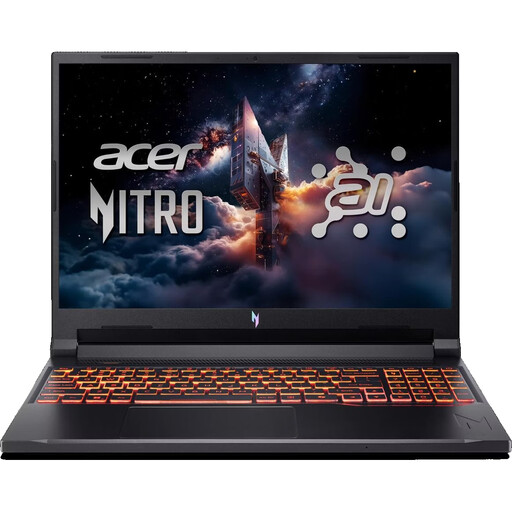
Acer Nitro V 16 AI ANV16-42-R0W6
For menu design and game testing, if you want to compare an anti-glare display with the listed specifications.
16-inch WUXGA IPS display, 180 Hz and anti-glare; Ryzen 7 260, RTX 5070 with 8 GB, 32 GB DDR5 and 1 TB SSD. Windows 11 Home and Wi-Fi 6E are also listed in the product title.
For intensive use, place it on a hard, flat surface and keep the air vents clear.
View at Joybuy
 No image available
MSI Crosshair 16 Max HX E2WGXK-023
An option for menu design and game testing if you want to factor a QHD+ OLED display into your decision.
16-inch QHD+ OLED display with 165 Hz, Intel Core Ultra 9 275HX, RTX 5070 with 12 GB, 16 GB DDR5 and 1 TB SSD. Windows 11 Home is listed.
When positioning the laptop, ensure there’s enough airflow and keep the vents clear.
View at Joybuy
 No image available
MSI Katana A15 AI B8VG-459
For menu design and game testing, if a matt display is important for your shared workspace.
15.6-inch FHD IPS matt display; Ryzen 9 8945HS, RTX 4070, 16 GB DDR5 and 1 TB SSD. HDMI 2.1 and USB-C with DisplayPort are listed.
The laptop is listed as weighing 2.25 kg and measuring 359 × 259 × 24.9 mm.
View at Joybuy
 No image available
MSI Stealth A16 AI+ Mercedes-AMG Motorsport A3XWGG-052
For larger projects and game testing, if you want to compare the specifications and weight with your workspace.
16-inch QHD+ OLED display, Ryzen AI 9 HX 370, RTX 5070, 32 GB DDR5 and 2 TB SSD. Windows 11 Home is listed; the laptop weighs 2.1 kg.
The OLED display is glossy, which may be inconvenient if reflections are distracting at your shared desk.
View at Joybuy
 No image available
THUNDEROBOT Radiant S16
For menu design and game testing, if you want to compare a QHD+ display with the specific configuration.
16-inch QHD+ display with 2560 × 1600 pixels and 240 Hz, Ryzen 7 7745HX, RTX 5060, 16 GB DDR5 and 1 TB SSD. USB-C, HDMI and Mini DisplayPort are listed.
Use the laptop on a hard, flat surface to keep its air vents clear.
View at Joybuy
Frequently asked questions
Do I definitely need a powerful dedicated graphics card for a simple game menu?
No, not for this task alone. Godot Engine lists integrated graphics as one possible minimum configuration for simple projects. The hardware you need for the game as a whole depends on the project and the software you use.
What should I bear in mind when setting up at a shared desk?
Position the laptop so its air vents remain clear, and keep them clean. Dell lists blocked vents, dust and heavy workloads as possible causes of noisy fans or overheating. This isn’t a noise measurement for the models mentioned here.
What rights do I have if a product is faulty or I buy online?
For consumer purchases in the EU, there is generally a statutory minimum period of two years during which you can claim for faulty goods. A voluntary manufacturer’s warranty does not reduce these rights. With a typical online purchase from a trader, you generally have 14 days from delivery to cancel, subject to applicable exceptions. Your Europe explains these EU rules.
What does the CE mark mean on a laptop with Wi-Fi or Bluetooth?
The CE mark is not an official quality mark for performance, nor does it mean that every laptop has undergone an individual safety inspection. The European Commission explains that the mark does not mean a government authority has approved the product as safe. The Bundesnetzagentur lists CE marking and manufacturer information among the aspects it considers in its market surveillance.


