For mostly small 2D icons, suitable software, a screen that’s comfortable to work on and everyday practicality usually matter more than a particularly powerful gaming graphics card. This task alone doesn’t mean you need a dedicated GPU. If you also model or render in Blender, or regularly play demanding games, check the GPU, video memory and RAM against the specific programmes and device configuration. In a small or shared student room, desk space, the power adapter, fan noise and portability should also factor into your decision.
Who is this comparison for?
2D icon designers
If you mainly create small vector or raster graphics, check the requirements of your specific software and the available working area on the screen. Inkscape doesn’t specify general minimum requirements; Adobe publishes its own requirements for Photoshop.
3D asset creators
If you also model or render inventory items in Blender, check GPU compatibility, VRAM and RAM against your specific workflow and software version. Blender distinguishes between minimum requirements and recommended specifications.
Students with limited workspace
If your desk is small or your room is shared, and you regularly take your laptop with you, the casing, power adapter, noise and battery life all matter. CHIP describes the tested Lenovo Legion Pro 5 16IAX10H 83LU004UGE as having a bulky casing and heavy power adapter, with fans that are clearly audible when gaming.
Which buying criteria matter in a student room?
First decide whether your main focus is 2D icons, regular gaming or additional 3D work. Your device requirements will depend on this.
| Priority |
What to check before buying |
Who it matters to |
| Screen for 2D work |
Check the resolution and panel of the exact model variant. Adobe recommends at least 1920 × 1080 pixels for Photoshop on Windows; ASUS lists 100% sRGB as a manufacturer specification for the TUF Gaming A16 FA608UH-RV027W. |
If I want to assess small icons clearly, I focus on the resolution and the specific panel rather than just a high refresh rate. Around 26% of consumers put 2D screen work first. |
| 3D and gaming performance |
Check the software version, rendering method, GPU, VRAM and RAM of the model on offer. For Windows, Blender lists 8 GB RAM and 2 GB VRAM with the appropriate graphics APIs as minimum requirements, and recommends 32 GB RAM and 8 GB VRAM. |
If I also want to model, render or play games, I check the requirements of those programmes and games. Around 21% of consumers prioritise 3D or gaming performance. |
| Noise and desk space |
Compare the device’s dimensions, including room for cables and the power adapter, with your desk. Only apply noise observations to the specific configuration that was tested. |
If I work at a small or shared desk, space and consideration for others in the room matter to me. Around 21% of consumers put a quiet, space-saving workspace first; CHIP describes the tested Lenovo Legion Pro 5 16IAX10H 83LU004UGE as bulky, with fans that are clearly audible when gaming. |
| Portability and battery life |
Check the weight with the power adapter and battery life under conditions that reflect how you’ll use it. Don’t assume video playback results are the same as battery life during work. CHIP measured just over 6 hours of Full HD video playback and just over 3 hours of ordinary use on the Lenovo LOQ 15IRX10 83JE001RGE. |
If I regularly take my laptop to university, I consider the combined weight of the laptop and power adapter, as well as battery life for the work I actually do. Around 16% of consumers prioritise portability above all else; the CHIP figures quoted apply to the tested configuration. |
| Features suited to your workflow |
Before comparing devices, decide which software you’ll actually use and check its requirements against the specific configuration. Also check the upgrade options and what’s included with the particular model. |
If I’m mainly creating 2D icons to begin with, I want to choose specifications that suit my current workflow and avoid paying for performance I won’t use. Around 16% of consumers rank suitable specifications as their main buying priority. |
Which buying mistakes should you avoid?
-
Assuming that “gaming” means it’s suitable for every icon project
2D drawing, working in Photoshop and rendering in Blender all have different requirements. The gaming label alone doesn’t tell you what specifications your particular workflow needs.
First decide which 2D, 3D and gaming programmes you’ll actually use, then compare their requirements with the device’s full configuration.
-
Assuming video playback time equals a full working day
On the Lenovo LOQ 15IRX10 83JE001RGE tested by CHIP, battery life during ordinary use was considerably shorter than during video playback.
Check the test method, and if you regularly travel to university, factor in both the laptop and its power adapter.
-
Assuming similar models have identical specifications
GPU, VRAM, operating system and screen can vary across a laptop range. A range name or similar-looking product image therefore doesn’t confirm the specifications of the specific model on offer.
Compare the model number, screen, RAM, GPU, operating system and included items for the exact variant. MSI, for example, lists different configurations within the Cyborg 15 A13V range.
Which brands are worth considering?
Lenovo
LOQ and Legion Pro cover a range of gaming laptop configurations; the full model name and intended use are what matter.
- CHIP gave the tested LOQ 15IRX10 83JE001RGE a positive assessment for Full HD gaming.
- CHIP measured short battery life during ordinary use on this LOQ. On the tested Legion Pro 5 16IAX10H 83LU004UGE, the fans were described as clearly audible when gaming, and the casing and power adapter as bulky and heavy. These findings apply to the specific models tested.
ASUS
The TUF Gaming A16 range includes various configurations; check the specific screen variant if you’ll be doing 2D work.
- For the TUF Gaming A16 FA608UH-RV027W, ASUS lists a 16-inch screen with 1920 × 1200 pixels and 100% sRGB, as well as 16 GB RAM.
- These are manufacturer specifications for this variant, not independent measurements of colour reproduction or battery life. Other A16 configurations may differ.
HP
The Victus range includes various models, including configurations with dedicated graphics.
- HP lists 16 GB RAM, a 1 TB SSD, a 15.6-inch FHD screen and an RTX 5060 with 8 GB for the Victus 15-fb3770ng.
- These manufacturer specifications don’t provide independent test results for colour accuracy, noise levels or battery life.
MSI
The Cyborg 15 A13V range offers a variety of 15.6-inch configurations.
- MSI’s specifications show that the range includes different GPUs, VRAM options and operating systems.
- Options include both Windows and FreeDOS models, so check the exact model number and configuration of the product on offer.
Joybuy models for 2D icons with extra 3D work or gaming
The Joybuy models below are selected for icon work alongside additional 3D modelling or gaming. The screen, storage and other features vary by model variant.
 No image available
HP OMEN MAX 16-ah0698ng
Selected for additional 3D work or GPU rendering; check your programmes’ requirements against the specific configuration.
16-inch WQXGA screen with 2560 × 1600 pixels, 64 GB RAM, 2 TB SSD and RTX 5090 with 24 GB video memory; 240 Hz, Windows 11 Home.
View at Joybuy
 No image available
MSI Stealth A16 AI+ Mercedes-AMG Motorsport A3XWGG-052
Selected for additional 3D work; check the software and rendering requirements against the model variant on offer.
16-inch QHD+ OLED screen with 2560 × 1600 pixels, 32 GB RAM, 2 TB SSD and RTX 5070 with 8 GB video memory; stated weight: 2.1 kg.
View at Joybuy
 No image available
MSI Titan 18 HX Dragon Edition Draco Epic A2WJ-1218
Selected for additional 3D work; check that the 18-inch size will fit the space available on your desk.
18-inch screen with 3840 × 2400 pixels, 96 GB RAM, 4 TB SSD and RTX 5090 with 24 GB video memory; Mini-LED, 240 Hz, Windows 11 Home.
View at Joybuy
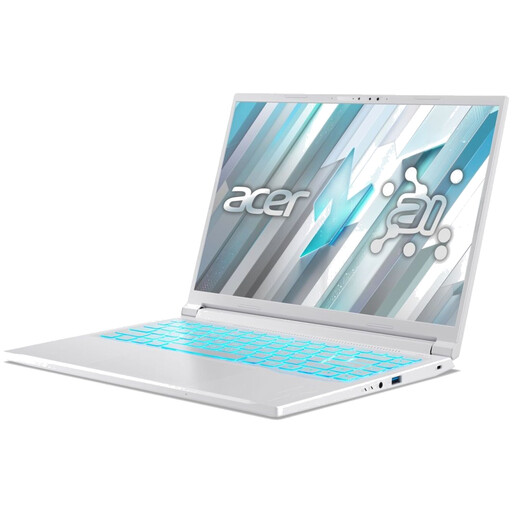 No image available
Acer Nitro V14 AI
Selected for 2D work and regular gaming; check the screen resolution and compare the configuration with the requirements of your programmes and games.
14.5-inch WUXGA screen with 1920 × 1200 pixels, 16 GB RAM, 1 TB SSD and RTX 5050 with 8 GB GDDR7; stated weight: 1.60 kg.
View at Joybuy
 No image available
MSI Crosshair 16 Max HX E2WGXK-023
Selected for additional 3D work and gaming; check the GPU, video memory and RAM against your planned workflow.
16-inch QHD+ OLED screen with 2560 × 1600 pixels, 16 GB RAM, 1 TB SSD and RTX 5070 with 12 GB video memory; 165 Hz, Windows 11 Home.
View at Joybuy
Frequently asked questions
Do I need a dedicated gaming graphics card just to create a single 2D inventory icon?
No, the task itself doesn’t mean you need one. Inkscape doesn’t specify general minimum requirements; for Photoshop, the requirements of the version you use are what matter. If you’ll also be gaming or doing 3D work, check the relevant requirements separately.
What should I check before installing Blender on my laptop?
Check the operating system, CPU, RAM, graphics API, VRAM and drivers against the requirements of the Blender version you’re using. If you want to use Cycles with the GPU, check its separate requirements too; Blender’s general specifications don’t cover every rendering workflow.
What are my legal rights when buying a laptop online in Germany?
For a typical online purchase as a consumer, you generally have a 14-day right to withdraw from the contract; exceptions and the specific terms of the contract should be taken into account. The Verbraucherzentrale explains the right of withdrawal in Germany. If goods are faulty, the seller is legally responsible for providing a minimum two-year guarantee from the date you receive them, as stated by the European Union for purchases of goods. This is separate from any voluntary manufacturer’s guarantee.
Where can I dispose of an old laptop in Germany?
Waste electrical equipment should be taken to an authorised collection point. The German Federal Ministry for the Environment lists local collection points and manufacturers as possible options; retailers also take back equipment under certain legal conditions. Check the specific return options for your device and the retailer in question.


