Map creators with limited desk space
If you need to leave room for a mouse and other controls beside your laptop, check the dimensions, ports and ventilation clearance together with the screen size.


Choose your laptop based first on the map editor you use and its requirements. Then check whether the laptop, mouse and clear airflow paths will all fit on your desk. A 14 to 14.5-inch model may leave you more room to work; if you don’t use a second monitor, you may prefer a 16-inch display. Epic Games recommends 32 GB of RAM and 8 GB of graphics memory for UEFN and Unreal Engine as reference points, not as universal minimum requirements for every map editor.
If you need to leave room for a mouse and other controls beside your laptop, check the dimensions, ports and ventilation clearance together with the screen size.
If you’re working on maps in a specific editor, check the RAM, graphics memory and operating system of the exact laptop configuration against the editor’s documented requirements.
If you work directly on your laptop’s display, consider whether the extra room for the map view and tool windows is worth the larger footprint of the device.
First, decide which editor you’ll use and how much workspace you need. Then measure your desk, allowing room for your mouse, cables and clear ventilation openings.
The proportions below relate to consumers choosing a gaming laptop for map editing at a small desk. Each row describes the main priority for that group.
| Priority | What to check when buying | Who it matters most to |
|---|---|---|
| Desk space and ventilation | Measure the laptop’s dimensions and port positions, allowing room for the power supply, mouse and clear ventilation openings. | If I need room for a mouse and accessories beside the laptop, I measure the full footprint, including the airflow paths. Around 29% of consumers put desk space and ventilation first. |
| Performance for the map editor | Choose your editor and version, then check the operating system, RAM, dedicated graphics memory and SSD in the exact configuration. | If I use UEFN or Unreal Engine, I compare the specifications with Epic Games’ recommendations: 32 GB of RAM and 8 GB of graphics memory. Around 29% of consumers prioritise editor performance. |
| Screen workspace | Compare the display size, resolution and chassis dimensions of each version; assess the screen at the scaling setting you plan to use. | If I want to see the map view and tool windows at the same time without a second monitor, I weigh up a larger display against the desk space it needs. Around 21% of consumers prioritise screen workspace. |
| Fan noise and maintenance | Check tests of the exact configuration under load and make sure the ventilation openings are clear when you set it up. | If noise and maintenance matter during longer work sessions, I check how the specific model’s fans behave and allow for clear airflow paths. Around 21% of consumers prioritise quiet operation and ease of maintenance. |
Epic Games publishes separate requirements for UEFN; these are not the same as the requirements for simply playing Fortnite.
Check the documentation for the editor and version you’ll actually use against the full specifications of the laptop.
Even a compact laptop needs room for its ports and clear ventilation openings. A larger display also means a bigger footprint.
Measure your desk and the laptop, and allow for your mouse, cables, power supply and airflow paths in your planned setup.
Depending on the space available, you may need to rearrange your mouse, cables and accessories.
According to ASUS, the RAM in the ASUS ROG Zephyrus G14 GA403GM-QS069X is soldered on and cannot be upgraded.
Check upgrade options against the full model number. If the memory is soldered on, choose the right capacity before you buy.
If the soldered-on memory is too limited, you may need a different laptop rather than an upgrade.
The Zephyrus G14 is a compact laptop range. For the GA403GM-QS069X version, ASUS Germany lists a 14-inch display, 32 GB of RAM and an RTX 5060 Laptop GPU with 8 GB of VRAM.
For the 14.5-inch Predator Helios Neo 14 PHN14-51, Acer lists 32 GB of RAM, a 1 TB SSD and an RTX 4060 with 8 GB of VRAM for the NH.QRPEG.004 reference model.
HP describes the OMEN Transcend 14 as a compact gaming and creative laptop with an OLED display.
Lenovo describes the 14.5-inch Legion Slim 5 Gen 8 as a compact gaming laptop range with an OLED display and RTX 40 Series graphics.
According to Razer’s German website, the Blade 14 is aimed at buyers looking for a slim 14-inch gaming laptop.
The Joybuy laptops below include compact 14.5-inch and larger 16-inch gaming models. Weigh up screen space against desk space, and check the specifications against your map editor’s requirements.
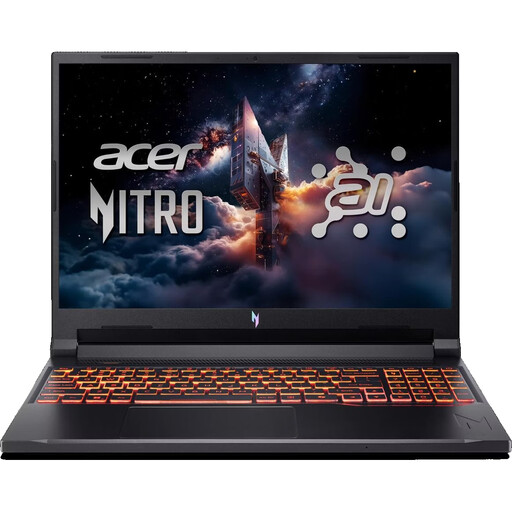 No image available
A better fit if you want more editor space without a second monitor and can allow for a larger footprint.
Listed specifications include a 16-inch WUXGA display with a 180 Hz refresh rate, an AMD Ryzen 7 260, an NVIDIA RTX 5070 with 8 GB, 32 GB DDR5, a 1 TB SSD, Wi-Fi 6E and Windows 11 Home.
For use, place the laptop on a hard, flat surface and keep the ventilation openings clear.
 No image available
A better fit if you’d like to work on a larger built-in display and have enough desk space for the laptop.
The listing specifies a 16-inch QHD+ OLED display, a Ryzen AI 9 370, 32 GB of RAM, an RTX 5070 with 8 GB, a 2 TB SSD and Windows 11.
The 32 GB of RAM and 8 GB of graphics memory match Epic Games’ recommendations for UEFN and Unreal Engine; still, check the requirements for your specific editor and project. Keep the ventilation openings clear under heavy load.
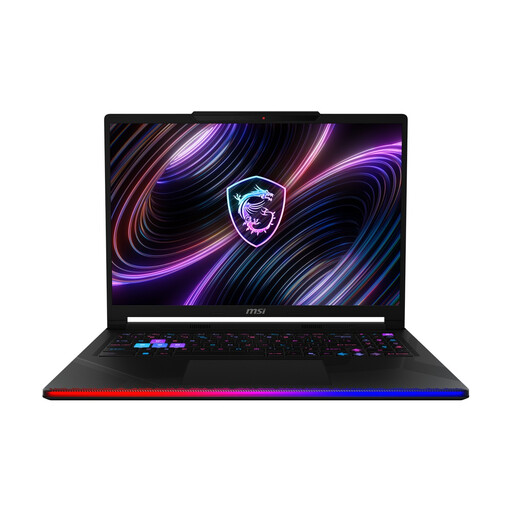 No image available
A better fit if a larger screen matters more to you than keeping the footprint as small as possible.
The product title specifies a 16-inch OLED WQXGA display, 32 GB DDR5 RAM, a 2 TB SSD and Windows 11 Home.
Keep the ventilation openings clear during use and place the laptop on a firm, flat surface.
 No image available
A better fit if desk space is your priority and the specifications suit the editor you use.
Listed specifications include a 14.5-inch WUXGA display with a 120 Hz refresh rate, an AMD Ryzen AI 7 350, an RTX 5050 with 8 GB GDDR7, 16 GB DDR5, a 1 TB SSD and Windows 11 Pro.
Epic Games recommends 32 GB of RAM for UEFN and Unreal Engine; the 16 GB listed here falls short of that recommendation. Check the requirements for your editor version and project before buying. For intensive use, place the laptop on a hard, flat surface and keep the ventilation openings clear.
It depends on the editor and project. Epic Games lists 16 GB as the minimum for UEFN and recommends 32 GB or more; for Unreal Engine, it specifies 32 GB of RAM and 8 GB of graphics memory. Unity notes that larger, more complex projects need additional RAM. So check your editor’s requirements, not just those of the game.
Place it on a firm, flat surface and keep the ventilation openings clear. Allow space for your mouse, cables and accessories too, and follow the manufacturer’s care instructions when cleaning it.
No. When you buy from a business seller as a consumer, you have statutory rights; these are separate from a manufacturer’s guarantee. According to the European Union, the legal guarantee lasts for at least two years from the date you receive the goods.
For a distance contract with a business seller, you generally have 14 days from delivery to withdraw from the purchase. Check the specific terms and returns policy before buying; the same distance-selling rules do not apply in the same way to purchases from private individuals.