Artists working by a bright window
If daylight falls on or beside your screen, reflections and brightness with everyday content matter at your actual workspace.


Start by choosing a display that’s easy to see at your actual window-side workspace. Then consider your colour workflow, drawing input and gaming performance. Peak HDR brightness doesn’t tell you how bright the display is during everyday painting, or how reflective it is. For colour-critical work, consistent lighting and a suitable monitor profile matter too.
If daylight falls on or beside your screen, reflections and brightness with everyday content matter at your actual workspace.
If you assess skin tones, materials and shading, consider the panel specifications alongside a controlled colour workflow.
If you want to paint and play games on the same laptop, check your software requirements, GPU configuration and stylus support separately.
A good fit if: Reflections by the window are your main concern and the specific configuration is listed as having an anti-glare finish.
The trade-off: An anti-glare finish alone doesn’t prove colour accuracy or sufficient brightness with everyday content.
A good fit if: Colour decisions and a suitable painting surface are your priorities, but gaming matters too.
The trade-off: A creator model isn’t automatically an equivalent replacement for every gaming GPU. And a touchscreen doesn’t automatically support a stylus.
A good fit if: Gaming performance and a fast display matter more, and you can reduce reflections at your workspace by adjusting the laptop’s position or controlling the light.
The trade-off: Brightness varies by model and between SDR and HDR modes. A glossy panel can be distracting by a window.
| Priority | What to check before buying | Who is most affected? |
|---|---|---|
| Visibility by a window | Display finish and brightness specification for the exact configuration; consider SDR and HDR separately. | If daylight falls on or beside my painting area, a clear, easy-to-see workspace comes first. Around 36% of consumers here prioritise visibility by a window. |
| Colour assessment | Colour gamut for the specific configuration, plus a monitor profile and lighting that stays as consistent as possible. | If I need to assess colours reliably for further image editing, a controlled colour workflow matters to me. Around 29% of consumers here prioritise colour accuracy. |
| Painting software and games | Check the requirements of the programmes and games you actually use against the RAM and GPU in the full configuration. | If you run demanding games as well as painting software, check how the specific configuration performs with the applications you use. Around 21% of consumers here prioritise gaming performance. |
| Stylus input | Check support for the specific stylus and what’s included; if you’re using a graphics tablet, check the ports and drivers too. | If I want to draw directly on the laptop, I need confirmed support for the stylus input I want to use. Around 14% of consumers here prioritise stylus input. |
Manufacturers list SDR and HDR figures separately. A glossy panel can also reflect distracting light by a window, even if its brightness specification is high.
Compare like-for-like brightness figures and check the finish of the exact model configuration.
Adobe describes a monitor profile and stable lighting as part of making reliable colour decisions. A colour gamut specification alone doesn’t prove that your workspace is profiled.
Consider your monitor profile and keep lighting as consistent as possible, rather than choosing on the basis of a DCI-P3 figure alone.
A laptop’s touchscreen specification doesn’t, by itself, confirm support for a compatible stylus or that one is included.
Check the stylus model, compatibility and what’s included with the full configuration. If you’re using a separate graphics tablet, check that the drivers and ports are suitable too.
ROG Zephyrus is aimed at gaming with creative use in mind, while ProArt is more focused on creator applications.
The Legion Pro 7i range includes gaming configurations with a large OLED display; the exact specification matters.
The Blade 16 combines gaming and creator features in a slim design.
The OMEN Transcend 14 is a compact gaming option for buyers who also work creatively.
Joybuy options for gaming and creative work. For each configuration, check the display finish, drawing method and the requirements of your applications.
 No image available
The product specifications list an anti-glare display and gaming graphics. Even so, check how easy it is to see at your own window-side workspace.
14.5 inches, WUXGA (1920 × 1200), IPS, 120 Hz; AMD Ryzen AI 7 350, NVIDIA GeForce RTX 5050 8 GB GDDR7, 16 GB DDR5 and 1 TB SSD.
 No image available
The product specifications list an anti-glare display and gaming graphics. Check that the finish suits the lighting conditions at your workspace.
14.5 inches, WUXGA (1920 × 1200), IPS, 120 Hz; AMD Ryzen AI 5 340, NVIDIA GeForce RTX 5050 8 GB GDDR7, 16 GB DDR5 and 1 TB SSD.
 No image available
The product description lists a matte panel and a DCI-P3 colour gamut. These specifications don’t replace checking how the display looks in your working conditions.
16 inches, 240 Hz, 500 nits, matte panel, 100 % DCI-P3, Intel Core i7-14700HX, NVIDIA GeForce RTX 5070 and 32 GB RAM.
 No image available
The product description lists a matte display and a larger screen area. Check that the size and gaming configuration suit your workspace.
17.3 inches, Full HD, 144 Hz, matte IPS display, AMD Ryzen 9 7940HX, NVIDIA GeForce RTX 4060 8 GB, 16 GB RAM and 1 TB SSD.
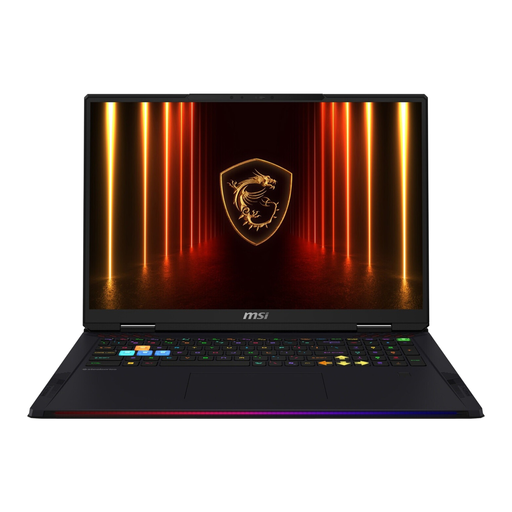 No image available
The stated 18-inch screen may be useful for painting and gaming. Also consider the device’s size and weight in relation to your workspace.
18 inches, WQUXGA, 120 Hz, Intel Core Ultra 9 285HX, NVIDIA GeForce RTX 5090 with 24 GB, 64 GB RAM and 4 TB SSD.
No, not on their own. Check for reflections and whether the brightness figure applies to SDR or only HDR. Razer lists separate figures for the Blade 16 by model and operating mode.
Adobe recommends a profiled display and stable lighting at your workspace. Assess colours in consistent lighting where possible; an advertised colour gamut coverage figure isn’t a substitute for this step.
No. Adobe describes painting in Photoshop with a graphics tablet and explains its stylus features. If you want to draw directly on the laptop display, check stylus support and compatibility with the exact device configuration.
If a device is faulty, you generally have statutory consumer rights against the seller. These are separate from any voluntary manufacturer’s warranty. The Verbraucherzentrale states that, for new goods, these rights generally last for two years from delivery or receipt. For a consumer purchase made remotely, there is generally a 14-day cancellation period; the European Union notes that statutory conditions and exceptions apply.