What should you look for in a laptop?
Start by matching your choice to your engine and the scale of your project. Then compare screen space and desk space, along with the full specification of the exact model variant.
| Consideration |
What to check before buying |
Who it matters most to |
| Engine and project scale |
Check the engine you use, project size and graphics features. Compare RAM and graphics memory separately with the relevant requirements. |
If I’m designing a simple 2D level, I don’t want to choose performance my project doesn’t need; more complex scenes may have different requirements. Around 36% of consumers say engine and project performance is their main consideration. |
| Screen space |
Check the screen size, native resolution and aspect ratio of the exact variant. Make sure the display will be easy to read at your planned scaling setting. |
If I’m working on the editor and level view directly on my laptop, I need enough visible space for tools and previews. Around 29% of consumers prioritise the workspace available on the built-in screen. |
| Desk space |
Consider the space available on your desk, the laptop’s width and depth, and room for a mouse, power supply and any required connections. |
If I’m using my laptop and mouse at the same time while working from home, both need to fit comfortably on my desk. Around 21% of consumers pay particular attention to desk space and their setup. |
| The right model variant |
Compare the full model number, operating system, RAM configuration, SSD capacity and what’s included in the box. |
If I want to avoid buying the wrong product because of similar model names, I need to know exactly what this device includes. Around 14% of consumers make configuration certainty their top priority. |
Joybuy laptops for puzzle level design
The following models are aimed at puzzle level designers who work on a built-in 16- or 18-inch display. For Unreal projects, compare RAM and graphics memory separately with Epic Games’ recommendations for development on Windows: 32 GB RAM and at least 8 GB of graphics memory.
 No image available
MSI Raider 18 HX A2WH-1088
The 18-inch display gives you a built-in workspace for the editor and level view. For Unreal projects, check the separate memory specifications.
Intel Core Ultra 9 275HX; NVIDIA GeForce RTX 5070 Ti with 12 GB of graphics memory; 32 GB DDR5 RAM; 1 TB SSD; QHD+ at 240 Hz; Windows 11 Home.
Joybuy
 No image available
MSI Stealth A16 AI+ Mercedes-AMG Motorsport A3XWGG-052
The 16-inch display is suited to working with the editor and level view directly on your laptop. Also check the graphics memory specification of the exact variant against your project’s needs.
16-inch QHD+; Ryzen AI 9 370; 32 GB RAM; 2 TB SSD; RTX 5070; Windows 11.
Joybuy
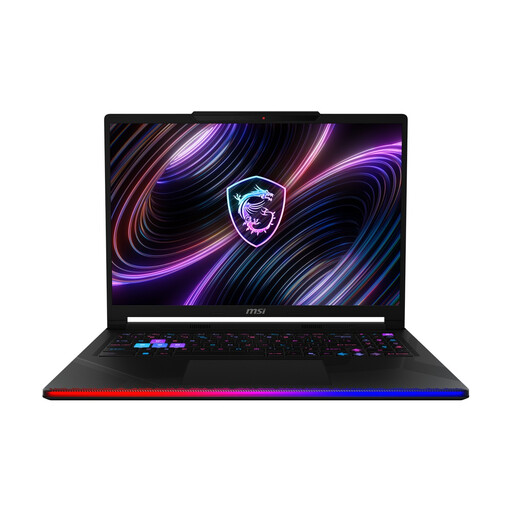 No image available
MSI Raider 16 Max HX B2WJ-071
The listed RAM specification matches Epic’s recommendation for Unreal development on Windows. Check the graphics memory separately for your exact configuration.
16-inch OLED, WQXGA; Intel Core Ultra 9 290HX; NVIDIA GeForce RTX 5090; 32 GB DDR5 RAM; 2 TB SSD; Windows 11 Home.
Joybuy
 No image available
Acer Nitro V 16 AI ANV16-42-R1HB
The 16-inch display gives you a built-in workspace. With 16 GB RAM, this variant falls short of Epic’s 32 GB RAM recommendation for Unreal development on Windows, so make sure it suits the scale of your project.
16-inch WQXGA; Ryzen 7; 16 GB RAM; 1 TB SSD; RTX 5060; Windows 11 Home.
Joybuy
 No image available
MSI Crosshair 16 Max HX E2WGXK-023
The 16-inch display is well suited to working on a laptop. Its 12 GB of graphics memory meets Epic’s separate graphics memory recommendation for Unreal, but its 16 GB RAM falls short of the 32 GB RAM recommendation.
16-inch QHD+ OLED at 165 Hz; Intel Core Ultra 9 275HX; NVIDIA GeForce RTX 5070 with 12 GB of graphics memory; 16 GB DDR5 RAM; 1 TB SSD; Windows 11 Home.
Joybuy
Frequently asked questions
Do I need a particularly powerful graphics card for a simple 2D puzzle level?
Not just because it’s a puzzle game. Godot publishes minimum requirements for simple projects, while Unity notes that resource requirements can increase with a project’s size and complexity. Check the requirements of your chosen engine and the graphics API it supports before deciding on a GPU class.
Can I connect an external monitor to view my level?
That depends on the connections available on the exact laptop variant and the input on your monitor. ASUS lists HDMI 2.1 and USB4, among other connections, for the TUF Gaming A16 FA608UH-RV027W. Check the connections on both devices and allow space for the cables and screen.
What should I check when setting it up for the first time?
Check the full model number, the operating system actually supplied and the software environment required for your engine. Unity lists supported operating system versions and graphics APIs; laptop variants with similar names can have different specifications.
Are the manufacturer’s guarantee and your statutory rights the same thing?
No. The Verbraucherzentrale distinguishes between your statutory rights against the seller and a voluntary guarantee. In general, the retailer is responsible for ensuring the goods were free from defects when delivered for two years; check the scope and terms of any guarantee separately.
Can I return a laptop bought online in Germany?
According to the Verbraucherzentrale, consumers buying online generally have a 14-day right to cancel, starting from the day they receive the goods. Tell the retailer you wish to cancel and check the terms of your specific purchase.


