What should you look for when buying?
First, measure the available space, including room for your controls and cables. Then compare the exact laptop configuration with the games you play, and check whether the built-in display suits the way you use it.
| What matters |
What to check before buying |
Who is it important to? |
| Desk space and ventilation |
Compare your desk’s width and depth with the dimensions of the exact model; allow for ports and ventilation openings. |
If I need room for a mouse or controller as well as my laptop, I measure the space and plan for cable routes. Available desk space is a key consideration for around 33 % of consumers. |
| Performance for the games you play |
Choose your game and preferred settings; compare the operating system, exact laptop GPU, memory and available SSD space with the official game requirements. |
If I want to play particular racing games with my preferred settings, I compare the full configuration rather than just the graphics card name. Around 27 % of consumers prioritise whether a laptop is suitable for their games. |
| Display and controls |
Consider the screen size and laptop dimensions together; if you use a steering wheel, also check that it’s compatible with the game and PC. |
Without a second monitor, I need a good view of the race but still want room for my controls. Around 20 % of consumers focus on this balance between display and control space. |
| Total cost and set-up |
Check the operating system, power adapter and what’s included with the exact offer; factor in any software and accessories you need. |
If I want a complete set-up that’s ready for gaming, I check the operating system and any set-up required before deciding. Around 20 % of consumers prioritise the total cost and effort involved in getting started. |
Gaming laptops at Joybuy
The range includes compact models and gaming laptops with larger built-in displays. What matters is how much room is left for controls, cables and clear ventilation openings once you’ve measured up.
 No image available
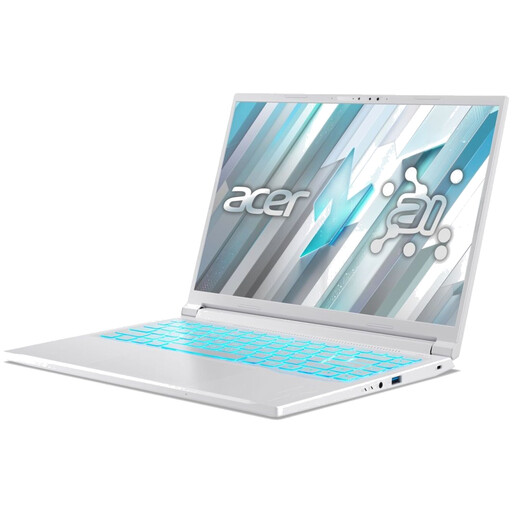
Acer Nitro V14 AI gaming laptop, 14.5 inches
The listed footprint of 325,7 × 236,8 mm is worth noting if you have a small desk. Keep the vents clear while gaming.
14.5-inch WUXGA display (1920 × 1200) with 120 Hz; AMD Ryzen AI 5 340; NVIDIA GeForce RTX 5050 with 8 GB GDDR7; 16 GB DDR5; 1 TB PCIe Gen4 SSD; Windows 11 Pro.
The product specifications list an English international keyboard.
View at Joybuy
 No image available
MSI Katana A15 AI B8VG-459
The 15.6-inch display gives you a larger built-in screen than a compact model, but it also takes up more desk space.
15.6-inch display with 144 Hz; AMD Ryzen 9 8945HS; NVIDIA GeForce RTX 4070; 16 GB RAM; 1 TB SSD; Windows 11 Home.
Use the laptop on a hard, flat surface while gaming, and keep the vents clear.
View at Joybuy
 No image available
THUNDEROBOT Radiant S16
The 16-inch display gives you more screen space on the laptop itself, but on a small desk it competes for room with a mouse, controller or steering wheel.
16-inch QHD+ display with 240 Hz; AMD Ryzen 7 7745HX; RTX 5060 laptop GPU; 16 GB RAM; 1 TB NVMe SSD.
Use it on a hard, flat surface while gaming and keep the vents clear.
View at Joybuy
 No image available
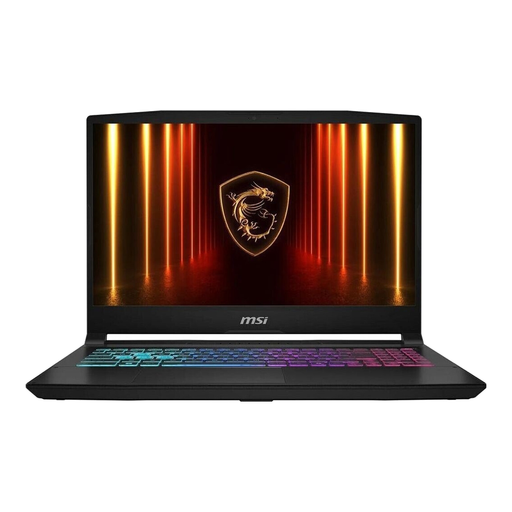
MSI Katana 15 HX B14WFK-487
The listed dimensions of 359 × 262 mm help you check whether there’s still room for your controls alongside the 15.6-inch display.
15.6-inch FHD display with 144 Hz; Intel Core i7-14650HX; RTX 5060; 16 GB DDR5; 512 GB SSD; Windows 11 Home.
The product description lists a weight of around 2,4 kg. Don’t block the vents while gaming.
View at Joybuy
 No image available
MSI Thin 15 B13UC-3475NN
The 15.6-inch display gives you a built-in screen, but it takes up more room on a small desk than a compact model.
15.6-inch FHD display with 144 Hz; Intel Core i5-13420H; RTX 3050; 16 GB RAM; 512 GB SSD.
According to the product specifications, no operating system is pre-installed, so you’ll need to install one before using it for gaming. Use the laptop on a flat surface with good ventilation while you play.
View at Joybuy
Frequently asked questions
Is a particular RTX model enough to ensure smooth gameplay?
No. The graphics card name alone doesn’t guarantee a particular frame rate. First decide which game, resolution and graphics settings you’re aiming for, then compare the exact laptop model with the game requirements. If you experience performance issues, Forza Support recommends adjusting the graphics settings or render resolution.
How should I set up a gaming laptop on a small desk?
Measure the available space, including room for your controls and cables, and keep the vents clear. Lenovo recommends not blocking the vents or fans while the laptop is in use.
Will my steering wheel work with my racing game?
It depends on the exact steering wheel model and game. Check the compatibility list for the PC version of the game in question. Forza Horizon 5, for example, lists PC steering wheels from Logitech, Thrustmaster and Fanatec. The brand name alone doesn’t confirm that every model is compatible.
What rights do I have when buying online in Germany?
Consumers generally have a 14-day right to cancel an online purchase, subject to statutory exceptions. If you buy from a business seller, faulty goods are also covered by a statutory warranty of at least two years. This is separate from any voluntary guarantee.
Does the seller have to take back my old laptop when I buy a new one?
Not in every case. Certain retailers are required to take back old devices. A like-for-like take-back applies to an old device of the same type and with essentially the same function. Before ordering, check whether the seller in question offers take-back and what conditions apply.


