For a shared bedroom, choose a laptop that meets the requirements of the specific strategy games you play, then check how it performs under your intended gaming load and in the power mode you plan to use. Paradox Interactive lists 16 GB of RAM as the minimum and 32 GB as the recommended amount for Europa Universalis V; these requirements and the desktop components listed are not a blanket performance guarantee for laptop hardware. A quiet mode may limit the performance available for gaming, while a larger display takes up more space.
Who is this selection for?
Considerate night-time gamers
You play in a room where someone else is sleeping or working, and want to weigh up the noise levels and power mode of the specific configuration. A manufacturer’s claim about quiet operation is no substitute for measuring noise under your gaming load.
Fans of complex campaigns
You choose a laptop based on the strategy games you actually play, comparing the processor, memory and graphics card in the full model configuration against the requirements of each game.
Gamers short on desk space
You need room for a mouse, power adapter and cables as well as your laptop and screen, so you’re weighing a larger map view against the space it takes up on a shared table.
What should you look for when buying?
First, check that the specific configuration can run your games. Then compare noise levels, display size and space requirements, as well as the full specification of the variant.
| What matters |
What to look for when buying |
Who it matters most to |
| Fan noise in a shared room |
Look for noise measurements for the exact model and power mode you’ll use. Also check that your games run well enough in that mode; a mode name alone isn’t a measurement. |
If I play at night while someone else sleeps or works in the same room, I want to know how noisy the laptop is under my gaming load. Around 36% of consumers put noise levels first. |
| Performance for the games you play |
Compare the processor, RAM and GPU in the full configuration with each game’s requirements. Paradox Interactive lists 16 GB of RAM as the minimum and 32 GB as the recommended amount for Europa Universalis V; the desktop processors and graphics cards listed aren’t directly comparable with laptop components. |
If I’m planning long campaigns in the specific strategy games I play, I want to compare their requirements with the components in the full model. Around 29% of consumers give gaming performance top priority. |
| Map readability and desk space |
Compare the screen size and dimensions of the specific variant with your desk. Screen size alone doesn’t tell you how easy maps and text will be to read. |
If I want to see maps and menus clearly while keeping space for my mouse and cables, the display needs to suit my setup. For around 21% of consumers, striking a balance between readability and space is the top priority. |
| Total cost and specification |
Check the operating system, full model number and specification of the specific offer. If you’re considering a FreeDOS version, factor in the extra setup work. |
If I need to keep an eye on my total spending, I want to know exactly what’s included before buying. Around 14% of consumers put total cost first. |
Gaming laptop buying pitfalls
-
Assuming “quiet cooling” means quiet gaming
A manufacturer’s description or a Quiet mode doesn’t tell you how loud the specific configuration will be when running your game.
Where possible, compare noise measurements for the exact model and power mode you’ll use.
-
Comparing only the laptop range name
MSI offers different display and graphics options within the Katana 15 HX B14W range, as well as versions with Windows 11 or FreeDOS. The range name alone doesn’t give you the full details of the offer.
Check the full variant number and the specification of the specific offer.
With a FreeDOS version, you’ll need to allow time to set up the operating system yourself.
-
Assuming desktop gaming hardware performs the same in a laptop
Europa Universalis V lists specific desktop processors and graphics cards. A similar-sounding name doesn’t prove that a laptop component offers the same performance.
Compare the exact laptop configuration with the game’s requirements and relevant tests for that model.
Brands to consider
Lenovo
LOQ models give you a starting point for comparing more compact gaming laptops and the specific specifications available for each one.
- Lenovo Germany lists the selectable Quiet, Balance, Performance and Extreme modes for the LOQ Essential 15IRX11.
- These modes apply to the model mentioned. They don’t confirm the noise levels of another LOQ model or how loud it gets while gaming.
HP
The OMEN 16 is a 16-inch option. Consider its screen space, exact specification and noise levels together.
- HP lists Windows 11 Home, 32 GB of RAM and an RTX 5070 with 8 GB for the OMEN 16-ap0793ng.
- HP describes the cooling as quiet; this is a manufacturer’s claim, not an independent noise measurement under a specific gaming load.
MSI
The Katana 15 HX B14W range shows why you need the full variant number to compare specifications.
- The range includes variants with different display resolutions, including QHD and Full HD.
- The range includes both Windows 11 and FreeDOS versions. The specifications don’t tell you how noisy the laptop will be while gaming.
Gaming laptops at Joybuy
You can compare these gaming laptops’ listed processor, RAM and graphics specifications with the requirements of your strategy games, as well as considering screen size and available desk space. Check noise levels separately for the specific variant and power mode you want to use.
 No image available
HP OMEN 16-ap1099ng
The listed configuration gives you specifications to compare with your games’ requirements; check noise levels separately for this variant.
16-inch WQXGA IPS display, AMD Ryzen 9 8940HX, 24 GB RAM, 1 TB SSD, GeForce RTX 5070 and Windows 11 Home.
View at Joybuy
 No image available
MSI Crosshair 16 Max HX E2WGXK-023
Compare the listed components with the requirements of the specific strategy games you play, and make sure the 16-inch format suits the space you have available.
Intel Core Ultra 9 275HX, 16 GB DDR5, NVIDIA GeForce RTX 5070 with 12 GB, 1 TB SSD, 16-inch QHD+ OLED display with 165 Hz and Windows 11 Home.
View at Joybuy
 No image available
MSI Stealth A16 AI+ Mercedes-AMG Motorsport A3XWGG-052
The listed processor, RAM and graphics specifications help you compare the laptop with your games; remember to factor in the 16-inch format when planning your setup.
AMD Ryzen AI 9 370, 32 GB RAM, 2 TB SSD, RTX 5070 and 16-inch QHD+ OLED display.
View at Joybuy
 No image available
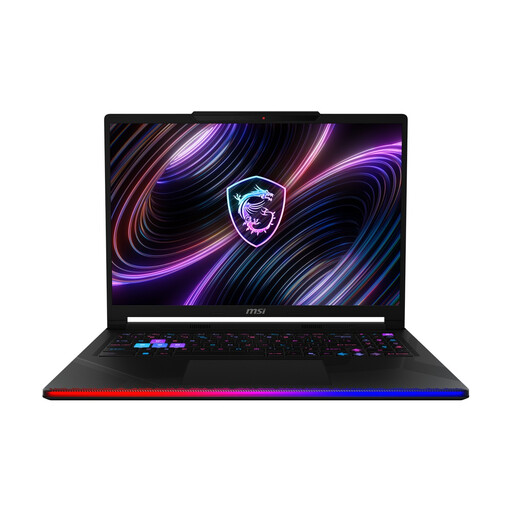
MSI Raider 16 Max HX B2WJ-071
Compare the listed configuration with your games’ requirements, and bear the 16-inch display in mind when planning your setup.
Intel Core Ultra 9 290HX, 32 GB DDR5, NVIDIA GeForce RTX 5090, 2 TB SSD and 16-inch OLED WQXGA display.
View at Joybuy
 No image available
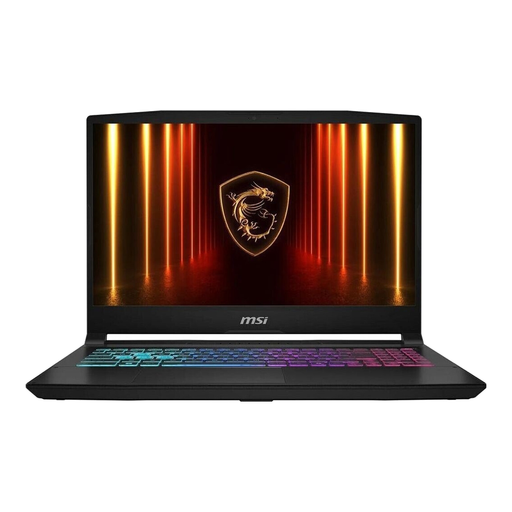
MSI Katana 15 HX B14WFK-487
The 15.6-inch format may help you balance map visibility with desk space. Also check that the configuration suits the games you play.
15.6-inch display, Intel Core i7, 16 GB RAM, 512 GB SSD, RTX 5060 DDR5 and Windows 11.
View at Joybuy
Frequently asked questions
Are a strategy game’s minimum requirements a reliable general buying guide?
No. Check the requirements for each game, and distinguish between minimum and recommended specifications. Paradox Interactive lists 16 GB of RAM as the minimum and 32 GB as the recommended amount for Europa Universalis V; the desktop processors and graphics cards listed don’t guarantee the same performance from similarly named laptop components.
How should I set up a gaming laptop in a shared bedroom?
Place the laptop on a stable surface and keep the air vents clear. MSI’s user manual warns against covering the vents. If your model has a quiet mode, check that your games run well enough in it rather than relying on the mode’s name alone.
What should I know about returns and faults when buying a laptop online?
For a typical online purchase from a trader, EU rules generally give you 14 days from delivery to withdraw from the contract; check for exceptions and any return postage costs. This is separate from your statutory rights if the product is faulty, which EU rules protect for a minimum of two years from receipt. A voluntary manufacturer’s warranty doesn’t replace these rights. The European Union’s Your Europe website explains these conditions.
Can I put an old laptop in household rubbish?
No. Waste electrical equipment must be collected separately. The German Environment Agency recommends checking for a suitable local collection or take-back scheme.


