First, choose a laptop that suits the game or editor you use, then check how the fans behave on the exact configuration under a comparable workload. For Minecraft: Java Edition, Minecraft recommends a target of 1080p at 60 FPS with ‘Fancy’ settings, 16 GB RAM and 6 GB of graphics memory; Roblox Studio has different requirements. A smaller device takes up less desk space, while a larger screen needs more room on a shared desk.
Who is this selection for?
People sharing a room who need some peace and quiet
If you game or build in the same room as someone who needs peace and quiet, check measurements for the exact laptop configuration and weigh quieter operating modes against performance. Notebookcheck describes this kind of trade-off between profile, noise and performance on a specific A18 configuration.
Active world-builders
Match the RAM, graphics and screen to the specific game or editor, rather than choosing based on the GPU name alone. Minecraft and Roblox Studio publish different requirements.
Buyers short on desk space
If you need to set the laptop up and put it away regularly, compare the screen size and chassis dimensions with the space available. The documented Lenovo and ASUS configurations differ in screen size, among other things.
What should you look for when buying?
Start by deciding which application you’ll use and how you plan to use it. Then compare the exact configuration, the space it needs and the features required for a ready-to-use computer.
| Concern |
What to look for |
Who is most affected? |
| Fan noise in a shared room |
Check independent measurements for the complete model variant and the operating profile you want. Make sure the air vents are unobstructed where you plan to set it up. |
If I game or build in the same room, I want to avoid disturbing others with fan noise as much as possible; around 33% of consumers put peace and quiet in a shared room first. |
| Performance for sandbox applications |
Match the game or editor, edition and settings with the operating system, RAM and graphics on the exact configuration. Minecraft recommends 16 GB RAM and 6 GB of graphics memory for its Java Edition target; Roblox Studio has its own requirements. |
Anyone looking to build a particular world in Minecraft or an editor needs a configuration that suits the application they’ll actually use; around 27% of consumers prioritise suitable performance. |
| Desk and workspace footprint |
Compare the screen size and chassis dimensions with your desk, and allow space for the power adapter and clear air vents. |
If desk space is limited or I need to put my laptop away often, footprint is my main concern; around 20% of consumers see the space it takes up as their most important buying consideration. |
| Total cost and usable features |
Check the complete product code to see whether an operating system is included and whether the application you need will run on it. Distinguish optional warranties from your statutory rights. |
If I’m looking for a device I can use straight away, I want to factor in the features I need and any setup costs; around 20% of consumers focus on the total cost. |
Common buying misconceptions
-
Applying a quiet test result to a different model variant
Notebookcheck described a trade-off between noise and performance depending on the operating profile of the ASUS TUF Gaming A18 FA808UP-S8022W with RTX 5070. This does not confirm the noise levels of the A18 FA808UM-S8012W with RTX 5060.
Check the full model code, graphics configuration and tested operating profile before applying noise claims to your purchase decision.
-
Assuming similar model names mean identical devices
Names such as FA808UM and FA808UH, or LOQ 15AHP11 and LOQ 15AHP10, identify different model specifications. Being part of the same product family does not mean that their features or identities match.
Compare the full model number and listed specifications rather than relying on the family name alone.
-
Overlooking a missing operating system when comparing models
One documented MEDION ERAZER configuration is supplied without an operating system. So check whether the device comes with the software you need for your application.
Check the operating system and what’s included with the exact configuration, and allow for any setup or licence you may need.
You may need to pay extra for setup or an operating system licence.
Relevant brands at a glance
ASUS
The TUF configurations listed range from the 16-inch A16 to the 18-inch A18, offering different screen sizes for shared desks.
- The documented configurations each come with 16 GB RAM and an RTX 5060.
- Notebookcheck described a trade-off between noise and performance on one A18 configuration with RTX 5070. This finding does not automatically apply to the RTX 5060 variant.
Lenovo
The documented LOQ and Legion configurations differ in screen and features.
- One LOQ configuration is listed with a 15.3-inch matte display and 16 GB RAM.
- One documented Legion 5 configuration has 32 GB RAM and a glossy OLED display, but is supplied without an operating system. These details apply only to the configuration listed.
MSI
The Katana 15 HX range includes several configurations, which differ in areas such as their graphics cards.
- MSI lists the B14WGK, B14WFK and B14WEK variants with different GPU configurations.
- The series name alone is not enough to compare performance, nor does it prove that the fans are quiet.
MEDION
The ERAZER range includes the Deputy 15 P1 and larger Defender models, among others.
- The documented Deputy 15 P1 is listed with 16 GB RAM and an RTX 5060.
- This configuration is explicitly supplied without an operating system. Before buying, check which software and setup you’ll need.
Joybuy laptops to compare with your needs
The gaming laptops below list features you can compare with the requirements of your sandbox application. For a shared bedroom, you should also check how the fans behave under load on the exact configuration.
 No image available
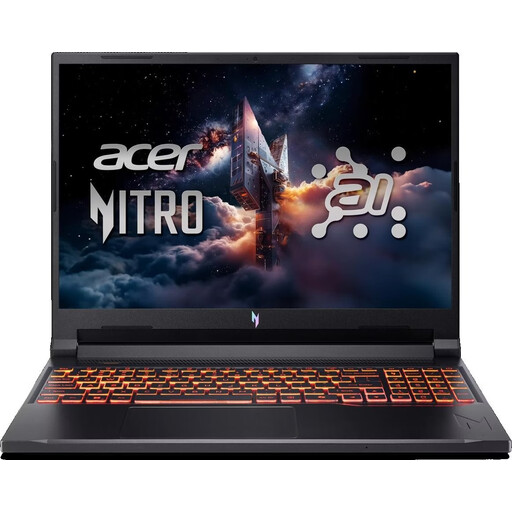
Acer Nitro V 16 AI (ANV16-42-R1PE)
To compare with your sandbox application: 16-inch WUXGA display, AMD Ryzen 5 240, NVIDIA GeForce RTX 5050 with 8 GB, 16 GB DDR5, 512 GB SSD and Windows 11 Home. Bear in mind that this model is listed with a US keyboard layout.
Joybuy
 No image available
MSI Crosshair 16 Max HX E2WGXK-023
For comparison with demanding applications, this model is listed with an NVIDIA GeForce RTX 5070 with 12 GB, 16 GB DDR5 and Windows 11 Home. It has a 16-inch QHD+ OLED display with a 165 Hz refresh rate and a 1 TB SSD.
Joybuy
 No image available
MSI Stealth A16 AI+ Mercedes-AMG Motorsport A3XWGG-052
The listed specifications to compare with your application include 32 GB RAM, an NVIDIA GeForce RTX 5070 with 8 GB and Windows 11 Home. The 16-inch QHD+ OLED display and 2 TB SSD are further features of this configuration.
Joybuy
 No image available
THUNDEROBOT Radiant S16
For comparison with a sandbox application, this model is listed with 16 GB DDR5 RAM and an NVIDIA GeForce RTX 5060. It also comes with a 16-inch QHD+ display with a 240 Hz refresh rate and a 1 TB SSD.
Joybuy
 No image available
ASUS ROG Strix G17
Compare the listed configuration with your application’s requirements: AMD Ryzen 9 7940HX, NVIDIA GeForce RTX 4060 with 8 GB, 16 GB RAM and 1 TB SSD. On a shared desk, the 17.3-inch FHD display with a 144 Hz refresh rate takes up more room than the 16-inch models.
Joybuy
Frequently asked questions
Do I need a high-end gaming laptop for Minecraft: Java Edition?
No. Minecraft recommends a target of 1080p at 60 FPS with ‘Fancy’ settings, 16 GB RAM and 6 GB of graphics memory, and says that a high-end gaming PC isn’t required. This is not a performance guarantee for other settings or add-ons.
What should I check if I’m creating a world in Roblox Studio?
Compare the editor’s requirements with the laptop separately from those of a game. Roblox Studio recommends Windows 11 and 8 GB RAM; also check that the operating system on the complete laptop configuration is supported.
How should I set up a gaming laptop in a shared bedroom?
First, compare the chassis and screen with the available desk space, and keep the air vents clear where you set it up. Check the noise level of your preferred operating profile for the exact model variant; you can’t necessarily apply a test result for a different configuration.
What are the rules on online purchases, cancellations and faults in Germany?
According to Verbraucherzentrale, online consumer contracts generally come with a 14-day right to cancel, starting from the conclusion of the contract or receipt of the goods; you must notify the retailer that you wish to cancel. Your statutory rights against the seller are separate from a voluntary guarantee.
Can an old laptop go in household waste?
No. Germany’s Federal Ministry for the Environment classifies computers as waste electrical and electronic equipment and warns against disposing of them improperly in household waste. Contact your local authority for information about your nearest collection point.


