Gamers with limited desk space
If you need room for a mouse and airflow around your laptop, its dimensions and port positions matter more than screen size alone. Lenovo recommends keeping the vents clear.


When desk space is limited, a 14- to 14.5-inch model is a sensible place to start. Check its actual dimensions, too, and allow room for your mouse, cables and unobstructed vents. The specific game is what matters when choosing the specs: Wube Software recommends less RAM and graphics memory for Factorio without the expansion than for Space Age, while the official wiki lists more demanding graphics recommendations for Satisfactory. A larger laptop may also work if there’s room for it and its power adapter on your desk, and its specs suit the games you play.
If you need room for a mouse and airflow around your laptop, its dimensions and port positions matter more than screen size alone. Lenovo recommends keeping the vents clear.
If you want to play Satisfactory, compare the game’s requirements with the CPU, graphics card and RAM in the specific laptop configuration. The official Satisfactory Wiki recommends an RTX 2070 or RX 5700, or equivalent graphics with 8 GB VRAM, along with 16 GB RAM.
It’s worth checking the requirements separately for the base game and Space Age: Wube Software recommends 8 GB RAM and a DirectX 11-compatible graphics card with 2 GB VRAM for Factorio without the expansion, compared with 16 GB DDR4 RAM and 4 GB VRAM for Space Age.
A good fit if: you need space for a mouse and clear vents alongside the laptop.
The trade-off: A smaller screen doesn’t mean you can skip checking the laptop’s actual dimensions. In its review of the ASUS ROG Zephyrus G14 GU405AR, Notebookcheck reported loud fans at full GPU power; this won’t necessarily apply to other models.
A good fit if: you’ve measured the available space, including room for your mouse and cables, and a larger screen suits the way you use your laptop.
The trade-off: The larger format takes up more desk space. The Lenovo Legion 5i 83F0005RGE also comes with a 245-W power adapter, so allow room for that, too.
A good fit if: you mainly play Factorio without Space Age and don’t choose a particularly powerful graphics card just because you play factory-building games.
The trade-off: The base game’s recommended specs don’t apply to Space Age or Satisfactory, so check their requirements separately.
| What matters when buying | What to check | Who is this most important to? |
|---|---|---|
| Desk space and room to use your laptop | Plan for the laptop’s width and depth, mouse space, cable connections and clear vents together. | If I need room for a mouse and airflow on a small desk, I measure the specific laptop, including its ports. Around 33% of consumers put available desk space first. |
| 3D game requirements | For Satisfactory, the official wiki recommends 16 GB RAM and an RTX 2070 or RX 5700, or equivalent graphics with 8 GB VRAM. Check laptop models separately. | If Satisfactory or a similar 3D factory-building game matters to me, I compare the requirements with the exact GPU and RAM configuration. Around 33% of consumers prioritise suitability for more demanding 3D games. |
| Specs for the game you play most | For Factorio without Space Age, Wube Software recommends 8 GB RAM and a DirectX 11-compatible GPU with 2 GB VRAM. For Space Age, it recommends 16 GB DDR4 RAM and 4 GB VRAM. | If I mainly play Factorio without the expansion, I don’t want to choose graphics performance I don’t need. Around 17% of consumers put specs suited to their main game first. |
| Cooling and long-term use | Keep the vents clear and check reviews for fan noise and performance profiles on the exact configuration. Also check whether the RAM can be upgraded or is soldered on. | If comfortable noise levels and suitable RAM for the long term matter to me, I look for measurements of the exact configuration. Around 17% of consumers pay particular attention to noise, cooling and future usability. |
Factorio without the expansion, Space Age and Satisfactory have different recommendations for RAM and graphics. Choosing a laptop based on genre alone may mean it doesn’t suit the game you actually play.
Decide which games and expansions you’ll play first, then check their requirements separately.
Graphics performance and the actual specs can also vary between configurations. Acer’s product page for configuration NH.QW8EG.005 lists an RTX 5060, while the more general Nitro V 14 AI series page lists configurations up to an RTX 4050.
Compare the full model code and check the GPU power rating, VRAM and RAM type for that exact configuration.
Screen size doesn’t tell you how much room the laptop, plugs and mouse will take up, or whether its vents will be unobstructed.
Measure your usable desk space and allow room for the laptop, mouse, cables and airflow.
The ROG Zephyrus G14 range is a compact line-up. Check the specs against the full model code.
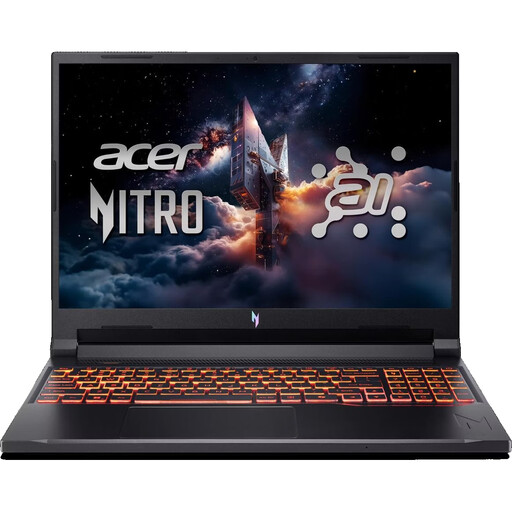
The Nitro V 14 AI is a 14.5-inch option with a matte IPS display. The specs vary by configuration.
At 15.1 inches, the Legion 5i Gen 10 is a larger alternative if you have enough desk space.
This selection includes a 14.5-inch model and larger 16-inch gaming laptops. Compare the listed dimensions and specs for each configuration with the space on your desk and the requirements of your games.
 No image available
The 14.5-inch format is worth considering if you want to compare a more compact laptop’s dimensions with the space on your desk.
14.5-inch WUXGA (1920 × 1200), 120 Hz; AMD Ryzen AI 7 350; NVIDIA GeForce RTX 5050 with 8 GB GDDR7; 16 GB DDR5 RAM; 1000 GB PCIe Gen4 SSD; dimensions 325,7 × 236,8 mm.
 No image available
This 16-inch model is worth considering if it fits on your measured desk and you want to compare its specs with the requirements of your games.
16-inch WUXGA, 180 Hz; AMD Ryzen 7 260; NVIDIA RTX 5070 with 8 GB graphics memory; 32 GB DDR5 RAM; 1 TB SSD; dimensions 360,4 × 275,6 mm; weight 2,44 kg.
 No image available
The 16-inch format is worth comparing if you have enough desk space and want to check the exact GPU and RAM specs against the games you play.
Intel Core Ultra 9 275HX; NVIDIA GeForce RTX 5070 with 12 GB; 16 GB DDR5 RAM; 1 TB SSD; 16-inch QHD+ OLED, 165 Hz.
 No image available
If a 16-inch laptop fits on your desk, compare its listed dimensions and graphics configuration with the space you have and the games you play.
16-inch QHD+; AMD Ryzen AI 9 370; NVIDIA RTX 5070 with 8 GB graphics memory; 32 GB DDR5 RAM; 2 TB SSD; stated graphics power 95 W; dimensions 35,6 × 26 × 1,99 cm; weight 2,1 kg.
 No image available
This 16-inch model is worth comparing if the larger screen and laptop fit on your available desk space.
AMD Ryzen 7 7745HX; NVIDIA GeForce RTX 5060; 16 GB DDR5 RAM; 1 TB SSD; 16-inch QHD+, 240 Hz.
No, the recommended specs differ. For Factorio without the expansion, Wube Software recommends 8 GB RAM and a DirectX 11-compatible GPU with 2 GB VRAM; for Space Age, it recommends 16 GB RAM and 4 GB VRAM. The official Satisfactory Wiki recommends 16 GB RAM and an RTX 2070 or RX 5700, or equivalent graphics with 8 GB VRAM. These figures don’t guarantee a particular level of performance from a laptop model.
Place it on a hard, flat surface and keep the vents clear. Also allow room for your mouse, cables and power adapter; screen size alone won’t tell you whether the laptop will fit on your desk.
For consumer purchases, statutory rights relating to faulty goods are generally against the seller; an additional guarantee is voluntary and has its own terms. The German consumer advice centre (Verbraucherzentrale) states that new goods generally come with a two-year statutory warranty. For your specific purchase, check who the seller is and what terms apply to any additional guarantee.
In Germany, consumers who buy online generally have a 14-day right to cancel, starting from the day they receive the goods. Check for possible exceptions and the terms of your specific contract. The right to cancel is separate from your statutory rights if goods are faulty.
According to guidance from Germany’s Federal Environment Agency, old electrical equipment should not go in household rubbish. Check with your local council’s collection point to find out how to return it.