When building in a game, the specific CPU, GPU and RAM configuration should match its requirements. Keen Software House recommends 16 GB of RAM for Space Engineers, but this is neither a promise of a particular frame rate nor a benchmark for Blender. In a shared bedroom, measured noise under load and the laptop’s actual footprint matter too: Notebookcheck rated the Lenovo Legion 5 15AGP11 it tested as loud under load. That finding cannot be applied to LOQ models or other devices.
Who should consider this buying decision?
In-game spaceship builders
If you mainly design and test ships in a game, compare the requirements of that specific game rather than relying on general gaming claims. Space Engineers is one example; Keen Software House recommends 16 GB of RAM for it.
Gamers in a shared room
If someone else shares your bedroom, noise during longer sessions, desk space and clear ventilation openings may affect your choice. ASUS notes that demanding programmes can raise temperatures, which can increase fan speeds and noise.
3D modellers who also game
If you create your own spaceship models as well as play games, check the requirements of your 3D application separately from those of the game. The Blender Foundation recommends a three-button mouse for the best experience.
What should you look for when buying?
First, decide whether you’ll be building in a game or using a 3D programme as well. Then check the noise under load and the footprint of the exact laptop variant.
| What matters |
What to check before buying |
Who will this matter most to? |
| Gaming and building performance |
Compare the game, version and recommended requirements with the CPU, GPU and RAM in the full configuration. |
If I mainly build and test in a game, I want to assess the components against that game’s exact requirements. Around 33% of consumers put gaming performance first. |
| Fan noise under load |
Look for measurements or reviews of the exact variant under a comparable workload; a cooling system’s name tells you nothing about its noise level. |
If someone else is in the room, noise during longer sessions matters more to me than how quiet the laptop is when idle. Around 27% of consumers prioritise consideration for the people they live with. |
| Space at a shared workstation |
Check the dimensions of the chassis and leave room for the power adapter, mouse and other devices, as well as clear ventilation openings. |
If I share a desk, I need enough clear space alongside the laptop. Around 20% of consumers prioritise the space it takes up. |
| Suitability for creating your own 3D models |
Check the programme, version and project requirements separately; meeting a game’s requirements does not prove that a laptop is suitable for rendering. |
If I model a spaceship in a 3D programme, I want to consider its requirements separately. Around 20% of consumers give priority to their modelling application. |
Buying mistakes to avoid
-
Quiet when idle means quiet when gaming
Fan speeds can increase during demanding tasks. Notebookcheck rated the Legion 5 15AGP11 it tested as loud under load. This finding applies to the test device, not automatically to other Lenovo models.
Check measurements or reliable reviews of the exact configuration under a workload similar to yours. Also consider when you plan to use the laptop in your shared room.
-
A similarly named model has the same configuration
The ASUS TUF Gaming A18 FA808UM-S8012W described by ASUS has an RTX 5060. A variant listed on Joybuy with the model number FA808UH-S8017W is specified with an RTX 5050, so it is not the same configuration.
Compare the full model number, graphics card, memory and specific sales variant before treating two offers as equivalent.
-
A large display alone makes a suitable workstation
A larger display takes up more space. You’ll also need room for the power adapter and mouse, and the ventilation openings must remain clear.
Measure the available space before buying and compare it with the dimensions of the exact variant.
Key brands at a glance
ASUS
The TUF Gaming A18 range is worth considering if a large built-in display matters more to you than a compact footprint.
- For the German FA808UM-S8012W model, ASUS lists an 18-inch display, Ryzen 7 260, RTX 5060 Laptop GPU, 16 GB of RAM and a 1 TB SSD.
- The manufacturer’s specifications do not indicate noise under load or suitability for every 3D project. A different model number may mean different specifications.
Lenovo
The LOQ 15AHP11 range has a smaller display than the 18-inch model mentioned above; compare the specifications of each variant individually.
- Lenovo Germany lists LOQ configurations with a 15.3-inch display, 16 GB of RAM and an RTX 5050 Laptop GPU.
- Notebookcheck’s review of a different model, the Legion 5 15AGP11, describes that test device as loud under load. This is not a noise assessment of the LOQ.
Acer
The Nitro V 16 is a 16-inch range, sitting between smaller formats and 18-inch models.
- Acer lists configurations in the range with up to a Core 9 270H and an RTX 5070 Laptop GPU.
- ‘Up to’ does not describe every variant. The manufacturer’s specifications do not confirm a noise level suitable for a shared bedroom.
MSI
The Katana 15 HX B14W range is worth comparing if you’re considering different display and graphics configurations.
- MSI offers FHD or QHD displays and different graphics specifications, depending on the variant.
- The model suffix matters. The specifications listed do not confirm the configuration or noise under load of every variant sold in Germany.
Joybuy products for designing spaceships at a shared workstation
The Joybuy offers below include gaming laptops with 16-inch and 18-inch displays. Compare them with the requirements of the specific game you play and the space you have available.
 No image available
THUNDEROBOT Radiant 16, RTX 5070, 32 GB RAM
The 16-inch format may suit a more compact workspace. Compare the specifications with the requirements of your specific game rather than assuming a particular frame rate.
The product name lists an RTX 5070, 32 GB of RAM and a 16-inch display with a 240 Hz refresh rate. Keep the ventilation openings clear while gaming.
Joybuy
 No image available
MSI Crosshair 16 Max HX E2WGXK-023
The 16-inch format can be compared with the space available at a shared desk; the components should match the game you actually play.
The listed specifications include a Core Ultra 9 275HX, RTX 5070 with 12 GB, 16 GB DDR5, a 1 TB SSD and a QHD+ OLED display with a 165 Hz refresh rate. Keep the ventilation openings clear while gaming.
Joybuy
 No image available
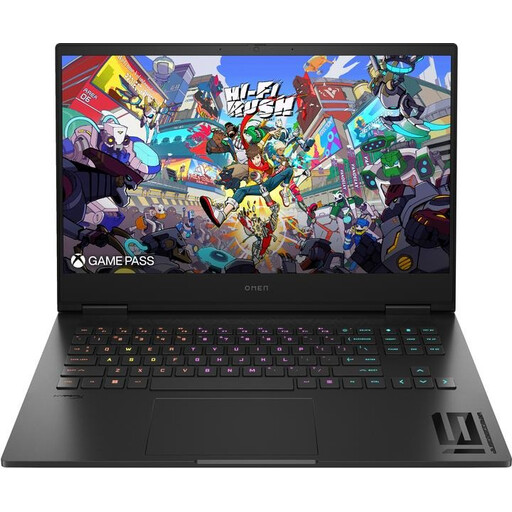
HP OMEN 16-wf1473ng
The matt 16.1-inch display and listed weight of around 2.39 kg may be relevant when weighing up a shared workstation; neither tells you how noisy the laptop is under load.
The listed configuration includes a Core i7-14700HX, RTX 4060, 16 GB of RAM and a 512 GB SSD. Under heavy load, use a flat, well-ventilated surface and keep the ventilation openings clear.
Joybuy
 No image available
MSI VenturePro A16 AI+ A3HWEG-003, Solid Gray
The 16-inch format may be a useful size to compare when desk space is limited; remember to allow room for the power adapter and mouse too.
The product name lists a Ryzen AI 7 350, RTX 5050, 16 GB of RAM and a 1 TB SSD. Keep the ventilation openings clear during gaming or creative work.
Joybuy
 No image available
MSI Titan 18 HX Dragon Edition Draco Epic A2WJ-1218
The 18-inch format gives you a larger built-in display, but takes up more space at a shared desk. Allow extra room for the power adapter and peripherals, and keep the ventilation openings clear.
The listed specifications include a Core Ultra 9 290HX Plus, RTX 5090 with 24 GB, 96 GB DDR5, a 4 TB SSD and a UHD+ Mini LED display with a 240 Hz refresh rate.
Joybuy
Frequently asked questions
Are the Space Engineers requirements enough for modelling in Blender too?
No. The Space Engineers requirements relate to the game, not Blender projects. Check the requirements for your version of Blender and your project separately; the recommendation of 16 GB of RAM for Space Engineers is not a general guarantee of 3D rendering performance.
Can I use a gaming laptop on a blanket or bed?
ASUS recommends using a firm, flat surface and keeping the ventilation openings clear. Soft surfaces can obstruct cooling; this general manufacturer guidance does not prove that a particular model will remain quiet on a particular surface.
What are my rights if I only notice the noise after buying online?
According to the Verbraucherzentrale, online contracts generally come with a 14-day right to cancel, starting from the day you receive the goods. Exceptions and the terms of the specific contract should be checked. If the product is faulty, your statutory rights against the seller are separate from any voluntary guarantee.
What marking must a laptop offered for sale in Germany carry?
Products covered by relevant EU harmonisation legislation must carry the CE marking where that legislation requires it. The Bundesnetzagentur monitors affected products; the CE mark is not an independent quality or noise certification. The conformity of a specific sales variant must be assessed separately.


