Who is this setup right for?

Tileset artists working at a shared desk

If you mainly draw and edit 2D tiles, you need a comfortable amount of screen space without taking up the shared area all the time. For longer periods of screen work, the DGUV recommends using an external monitor and a separate keyboard and mouse where possible.

People who move between workspaces

If you regularly set up and pack away your workspace, you’ll need to weigh portability against screen size. A more compact laptop is easier to put away, while a larger built-in display can give you more room to work.

Tileset artists and 3D game developers

If you regularly play demanding games or work on larger 3D projects as well as creating tilesets, graphics performance becomes more important. Godot lists supported integrated graphics as a minimum option for simple projects with some renderers; this doesn’t apply to other software or more complex projects.

What should you look for when buying?

Buying priority What to check Who should pay particular attention?
Screen space and image quality Check the screen size, resolution and panel of the exact model. A high refresh rate alone doesn’t guarantee good colour reproduction; Notebookcheck criticised the colour gamut on the Acer Nitro V 16 ANV16-41-R5AT it tested. If I want to keep tiles, tools and references in view on the built-in display for long periods, usable screen space comes first. Around 29% of consumers prioritise screen space and image quality.
Consideration for others and ergonomics Allow room for the laptop, power supply and ventilation openings. Noise measurements should match the exact configuration; for longer work sessions, the DGUV recommends separate input devices and, where possible, an external monitor. When I work at a shared desk, I make sure the noise level and working position are comfortable for others too. Around 23% of consumers put consideration for others and ergonomics at a shared desk first.
Portability and setting up Compare the weight and screen size of the specific model with the space available. Check which connections you’ll need for an external monitor and other accessories. If I regularly change workspaces and take my laptop with me, being able to set up and pack away easily matters most to me. Around 18% of consumers prioritise moving between locations frequently.
Cost in relation to how you’ll use it First, work out which software you’ll use and the scale of your projects. Then compare processor, graphics, memory and storage requirements. Godot’s recommendations for simple projects aren’t general buying advice for other applications. If I mainly create 2D tilesets, I don’t want to pay for features I’m unlikely to use much. Around 18% of consumers put keeping costs down first.
Extra performance for games and 3D Check the GPU and cooling performance of the exact model against the games and projects you actually have in mind. Gaming rankings such as Notebookcheck’s assess gaming laptops, not specifically how well they handle 2D tileset work. If I regularly play demanding games or work on 3D projects, extra graphics performance becomes a deciding factor in my choice. Around 12% of consumers prioritise demanding gaming or 3D work.

Avoid common buying mistakes

  • Assuming a high refresh rate means good colour reproduction

    A high refresh rate alone doesn’t tell you how accurately you’ll be able to judge colours. Notebookcheck criticised the colour gamut on a specific Acer Nitro V 16 configuration it tested; the result doesn’t automatically apply to other models.

    Check the panel and independent display measurements for the exact model you’re considering.

  • Choosing a high-end GPU just because you’re “developing games”

    For simple Godot projects, the documentation lists supported integrated graphics as a minimum option with some renderers. More complex 3D work or demanding games may call for more.

    Before choosing a GPU, distinguish between creating tilesets and the other tasks you’ll actually do regularly.

  • Assuming a compact laptop is a complete long-term workstation

    A smaller laptop won’t automatically give you an ergonomic setup for long sessions. For this, the DGUV recommends a separate keyboard and mouse and, where possible, an external monitor.

    Before buying, check what can stay set up at the shared desk and which connections you’ll need.

  • Overlooking OLED care when toolbars stay on screen

    ASUS warns that OLED laptops may retain images when bright, high-contrast content is displayed unchanged for long periods.

    Follow the care instructions for the specific laptop and check whether automatic screen-off settings or available OLED care features suit your workflow.

Key brands at a glance

ASUS ROG

The Zephyrus G14 is a compact gaming laptop range. ASUS lists a 14-inch OLED display and a weight of around 1.5 kg for the GA403.

  • The screen size and weight figures can help when comparing compact laptops; they come from ASUS and don’t automatically apply to every configuration.
  • A 14-inch display offers less screen space. ASUS also warns that OLED screens may retain images when bright, high-contrast content stays on screen for long periods.

Lenovo

Lenovo describes OLED versions of the Legion 5 Gen 10 range with a 15-inch display and AMD processors.

  • According to Lenovo, the range includes OLED models.
  • This information about the range doesn’t mean every model on sale has the same display. Check the panel and other specifications of the exact model.

HP

For the HP OMEN Transcend 14-fb1775ng, the HP Store lists a 14-inch display with a resolution of 2880 × 1800 pixels and a 120 Hz refresh rate, 32 GB RAM and an RTX 5060 with 8 GB.

  • These specifications describe a specific model, making it easier to compare like with like.
  • They don’t apply to every OMEN Transcend 14. The manufacturer’s specifications don’t guarantee low noise levels or any particular advantage for tileset work.

Acer

The Acer Store lists the Nitro V 16 configuration NH.QP0EG.002 with a matt 16-inch IPS display, a resolution of 2560 × 1600 pixels, 16 GB RAM and an RTX 4060.

  • The display resolution, panel type and graphics card are specified for this particular configuration.
  • Notebookcheck criticised the colour gamut and fan control under load on a different Nitro V 16 model, the ANV16-41-R5AT. Its test results don’t apply to the NH.QP0EG.002.

MSI

MSI positions the Stealth 16 AI Studio range for people who want to combine gaming and creative work in a slim 16-inch laptop.

  • MSI lists a weight of 1.99 kg and a height of 19.95 mm for the range.
  • These figures apply to the range; specifications can vary between models. They don’t prove that the laptop will run quietly at a shared desk.

Joybuy products

The gaming laptops below have built-in displays ranging from 15.6 to 17.3 inches. Weigh up the screen space they offer at a shared desk against the room they take up and the features you need for gaming or graphics work.

MSI Thin 15 B13UC-3475NN gaming laptop

MSI Thin 15 B13UC-3475NN

The 15.6-inch display gives you built-in screen space for tileset work; check that it’s enough for your shared workspace.

15.6 inches, Full HD, 144 Hz, Intel Core i5-13420H, 16 GB RAM, 512 GB SSD and GeForce RTX 3050.

For longer sessions, check whether there’s room for an external monitor and separate input devices at your desk.

View at Joybuy

Thunderobot Radiant 16 gaming laptop

Thunderobot Radiant 16

The 16-inch display can give you built-in screen space for tiles, tools and references; make sure you have enough desk space for it.

16 inches, matt 500-nit display with 240 Hz and 100% DCI-P3, Intel Core i7-14700HX, 32 GB RAM, 1 TB SSD and GeForce RTX 5070.

Its larger size takes up more room at a shared desk than a compact laptop.

View at Joybuy

MSI Stealth A16 AI+ Mercedes-AMG Motorsport A3XWGG-052

MSI Stealth A16 AI+ Mercedes-AMG Motorsport A3XWGG-052

The 16-inch OLED display offers more built-in screen space; if toolbars stay on screen, follow the manufacturer’s OLED care advice.

16 inches, OLED, Ryzen AI 9 370, 32 GB RAM, 2 TB SSD, RTX 5070 and Windows 11.

Compare the screen space with the room actually available at your shared desk.

View at Joybuy
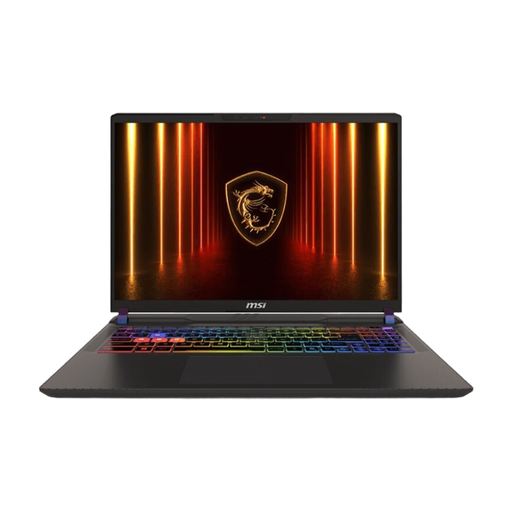
MSI Vector 16 HX AI A2XWHG-476

MSI Vector 16 HX AI A2XWHG-476

The 16-inch QHD+ display gives you built-in screen space for tileset tools and references; check that the laptop will fit on your shared desk.

16 inches, QHD+, Core Ultra 9 275HX, RTX 5070 Ti, 16 GB RAM, 1 TB SSD and Windows 11.

Choose the graphics performance to suit the games or projects you actually use regularly.

View at Joybuy

HP OMEN 17-db1071ng gaming laptop

HP OMEN 17-db1071ng

The 17.3-inch display gives you plenty of built-in screen space; bear in mind how much room it will take up at a shared desk.

17.3 inches, Full HD, 144 Hz, AMD Ryzen AI 7, 16 GB RAM, 1 TB SSD, Windows 11 and USB-C Power Delivery.

Its larger size can make it more awkward to carry and clear away from your workspace.

View at Joybuy

Frequently asked questions

Do I need a powerful dedicated graphics card for 2D tilesets?

Not necessarily. Aseprite documents how to create tilesets and tilemaps; Godot lists supported integrated graphics as a minimum option for simple projects with some renderers. Check the requirements of the software and projects you use, especially if you’re also working in 3D or playing demanding games.

How can I set up a laptop for longer sessions at a shared desk?

If there’s room, the DGUV recommends using a separate keyboard and mouse and, where possible, an external monitor for longer work sessions. Plan for the space and connections you’ll need before buying; this recommendation isn’t a general legal requirement for private buyers.

What should I know about OLED and drawing tools that stay open on screen?

ASUS warns that OLED laptops may retain images when bright, high-contrast content stays unchanged on screen for long periods. Follow the care instructions for the specific laptop and check whether automatic screen-off settings or available OLED care features suit your workflow.

What are my rights when buying online in Germany?

For a standard distance purchase from a business seller, you generally have a 14-day right to cancel, starting from delivery; exceptions and rules on return costs apply. New goods bought from a trader are covered by a statutory guarantee period of at least two years. The information provided by Your Europe, the European Union’s consumer portal, varies depending on the circumstances; for marketplace purchases, check who your contracting party is.

What should I do with my old laptop?

According to the Federal Environment Ministry, electrical and electronic waste must be handed over to an authorised collector, such as a local collection point, a manufacturer or a retailer required to take it back. Whether a particular retailer is required to accept it depends on the legal conditions.