What should you look for?
First, decide whether you’ll mainly be writing dialogue or also developing and playing games. Then weigh up screen size, noise and portability to suit your room and daily routine.
| Consideration |
What to check before buying |
Who it matters to |
| Suitable performance |
Check your software, engine version, project scope and any games you also play; then compare the CPU, RAM and GPU in the exact model. |
If I mainly write in Twine, I want a suitable specification rather than graphics power I won’t use. Around 25% of consumers put their software’s requirements first. |
| Desk space |
Check the screen format and chassis dimensions. Remember to allow space for a mouse, notes and any external devices you may need. |
If my desk is small, I want to read dialogue comfortably without losing too much space for other things. Around 20% of consumers prioritise having a suitable workspace. |
| Noise levels |
Compare independent measurements for the exact configuration, workload and intended operating mode. |
If I share a room or have long writing sessions, quiet operation matters to me. Around 20% of consumers give noise levels top priority. |
| Extra gaming performance |
Compare the requirements of your specific games and projects with the GPU, graphics memory, RAM and display resolution you want. |
If I want to play specific games or develop more demanding projects alongside my dialogue work, extra graphics performance matters. Around 20% of consumers put this need first. |
| Portability and battery life |
Consider the laptop and power adapter separately, and look for battery tests carried out under a comparable workload. |
If I take my laptop out regularly, I need enough battery life for my work away from a mains socket. Around 15% of consumers prioritise portability and working on the go. |
Twine’s documentation doesn’t say that you need a dedicated GPU to write dialogue. Godot’s minimum requirements are specifically for simple projects and don’t guarantee performance for larger games. Configurations within the same laptop range can also differ, so compare full model and product numbers rather than just the range name.
In CHIP’s test, the Lenovo LOQ 15IRX10 83JE001RGE lasted just over three hours during typical use. That result applies to the exact configuration tested and can’t be assumed to apply to other LOQ models. ASUS lists a 90 Wh battery capacity for the TUF Gaming A16 FA608UH-RV027W, but that alone doesn’t tell you how long it will last under your workload.
Gaming laptops at Joybuy
The models below are aimed at people working on additional gaming or graphics projects alongside dialogue. For writing in Twine alone, a dedicated gaming GPU isn’t necessary.
 No image available
HP OMEN 16-ap1099ng, Ryzen 9 8940HX, 24 GB RAM, 1 TB SSD, RTX 5070
An option if you need extra graphics performance for games or projects alongside dialogue work. Check that you have room on your desk for the 16-inch laptop.
16-inch display with 2560 × 1600 pixels; AMD Ryzen 9 8940HX; 24 GB RAM; 1 TB SSD; GeForce RTX 5070; Windows 11 Home.
View at Joybuy
 No image available
HP OMEN 16-ap1071ng, Ryzen 7 8745HX, 16 GB RAM, 1 TB SSD, RTX 5060
For extra gaming or graphics-intensive projects. Check that the specifications meet the requirements of the specific applications you use.
16-inch display with 1920 × 1200 pixels; AMD Ryzen 7 8745HX; 16 GB RAM; 1 TB SSD; GeForce RTX 5060; Windows 11 Home.
View at Joybuy
 No image available
MSI Thin 15 B13UC-3475NN, Core i5-13420H, 16 GB RAM, 512 GB SSD, RTX 3050
The listed German QWERTZ keyboard layout may be worth considering if you type frequently. Check whether the graphics performance is sufficient for your games and development projects.
15,6-inch Full HD display with 144 Hz; Intel Core i5-13420H; 16 GB RAM; 512 GB SSD; GeForce RTX 3050 with 4 GB graphics memory. The product description states that no operating system is pre-installed.
View at Joybuy
 No image available
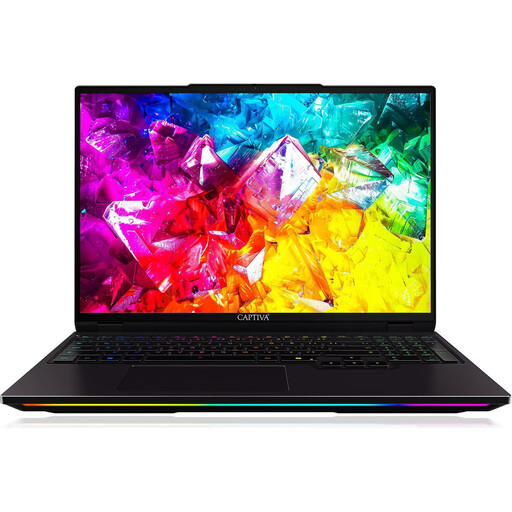
Captiva I92-069, Core Ultra 9 275HX, 32 GB RAM, 1 TB SSD, RTX 5080
This configuration is designed for additional graphics projects or gaming. If space is limited or you’ll be carrying it around regularly, bear in mind the listed laptop weight and power adapter.
16-inch display with 2560 × 1600 pixels and 300 Hz; Intel Core Ultra 9 275HX; 32 GB RAM; 1 TB SSD; GeForce RTX 5080 with 16 GB GDDR7; Windows 11 Home; laptop weight 2,60 kg; 420 W power adapter.
View at Joybuy
 No image available
HP OMEN 17-db1071ng, Ryzen AI 7, 16 GB RAM, 1 TB SSD, RTX 5050
The 17,3-inch format takes up more room, and its listed weight is worth bearing in mind if you plan to carry it around regularly.
17,3-inch Full HD IPS display with 144 Hz; AMD Ryzen AI 7; 16 GB RAM; 1 TB SSD; GeForce RTX 5050 with 8 GB graphics memory; Windows 11.
View at Joybuy
Frequently asked questions
Do I need a dedicated graphics card to create a branching dialogue story in Twine?
No. Twine’s documented browser and desktop versions don’t require a dedicated graphics card for writing and linking passages. If you also develop or play games, check the requirements for each one.
How can I set up a comfortable space for longer writing sessions in a student room?
Check that your laptop, input devices and notes will fit on your desk. For longer work sessions, the German Social Accident Insurance recommends using an external keyboard and mouse, and an external monitor where possible. This is ergonomic guidance, not a legal requirement when buying a laptop.
How can I back up my Twine dialogue story?
If you use Twine in a browser, back up your work regularly, as it’s linked to the browser profile you’re using. Twine describes the archive feature for your library and ‘Publish to File’ for individual stories.
Can I return a laptop bought online in Germany without giving a reason?
For an online purchase from a business seller, you generally have 14 days from delivery to cancel, as Your Europe explains. Exceptions and possible return costs may apply. Purchases from private individuals aren’t covered by the right to cancel in the same way.
Who should I contact if there’s a fault?
For your statutory warranty rights, contact the seller; a manufacturer’s guarantee is separate and voluntary. The Verbraucherzentrale explains that if there’s a fault, you can initially ask the seller to put it right by repairing or replacing the product.


