Which display setup is right for you?

Tile set creators on the move

If you want to keep your editor and references in view at the same time in different locations, an integrated second display could take the place of an additional monitor. ASUS describes the ROG Zephyrus Duo GX651 as having two integrated OLED touchscreens; check the specifications and design of the exact model you’re considering.

Tile set creators at a desk

If you mostly work at a fixed desk, you can pair your laptop display with an external monitor. Lenovo lists HDMI and USB-C with DisplayPort 1.4 for the LOQ-15IRX10 range; make sure the ports on the exact version you’re buying are compatible with your monitor.

Tile set creators with additional games or 3D projects

If you work on demanding games or 3D projects as well as tile sets, choose a graphics card that suits those applications. Godot’s minimum requirements for simple projects vary partly according to the renderer, so they don’t establish that a particular GPU is needed for every game.

What should you look for when buying?

Two integrated displays

A good fit if: you want to use two workspaces on the move without carrying a separate monitor.

The trade-off: You’re choosing a specialised design, so check the weight, display layout and keyboard arrangement for your mobile workspace.

Laptop display plus external monitor

A good fit if: your second screen will mostly stay at a fixed workstation.

The trade-off: You’ll need a monitor and possibly a suitable cable. When you’re away from it, you’ll only have your laptop display.

Criteria What to check before buying Who it matters most to
Two workspaces on the move Check that two usable displays are actually built in, and that their layout, the laptop’s weight and the keyboard suit your mobile workspace. If you want to see your editor and references at the same time while you’re out and about, a second screen that doesn’t require an external monitor is essential. Around 34% of consumers put this need for two mobile screens first.
External monitor Match the video outputs on the complete model variant to your monitor’s input and cable. Lenovo lists HDMI and USB-C with DisplayPort 1.4 for the LOQ-15IRX10 range; check the exact variant. If your second screen will mostly stay at your desk, you’ll need a port that works with your monitor. Around 33% of consumers prioritise a connection for a fixed monitor.
Additional games or 3D Compare the requirements of your games and projects with the GPU, RAM and display in the full configuration. Godot’s minimum requirements apply to simple projects and don’t guarantee performance in every game. If you’ll also be playing more demanding games or working on 3D projects, choose a graphics card suited to those applications. Around 33% of consumers prioritise this additional performance requirement.

Common buying misconceptions

  • “Two screens” means two external monitors

    Your laptop display plus one external monitor already gives you two screens. Adding two external monitors to your laptop display would give you three, which requires support explicitly listed in the specifications.

    Decide how many screens you want to use at once before you start looking. Then check the video outputs on the exact laptop variant and the monitor’s inputs.

    Relevant brands at a glance

    ASUS ROG

    The Zephyrus Duo range is worth considering if you want two integrated displays.

    • ASUS describes the GX651 as having two integrated OLED touchscreens and several usage modes.
    • For the GX651AR-SR042W variant, ASUS lists an RTX 5070 Ti and 32 GB RAM. This doesn’t confirm the specifications of every variant or establish a particular benefit for tile set work.

    Lenovo

    The LOQ-15IRX10 range is worth considering if you want to use your laptop display with an external monitor.

    • Lenovo lists HDMI, USB-C with DisplayPort 1.4 and support for the internal display plus two external screens for the range.
    • Display, GPU and other specifications vary by configuration. Check the ports on the specific model.

    HP OMEN

    The documented OMEN 16 configuration is an example of a gaming laptop whose specifications are worth checking for additional applications.

    • For the OMEN 16-ap0793ng, HP lists 32 GB RAM, a 1 TB SSD and an RTX 5070.
    • These specifications don’t confirm what other OMEN variants include. For the specific configuration, also check that it has the monitor outputs you need.

Joybuy products for using an external monitor

This selection features gaming laptops for tile set work with a laptop display and an external monitor. Some configurations also include details relevant to gaming or 3D applications.
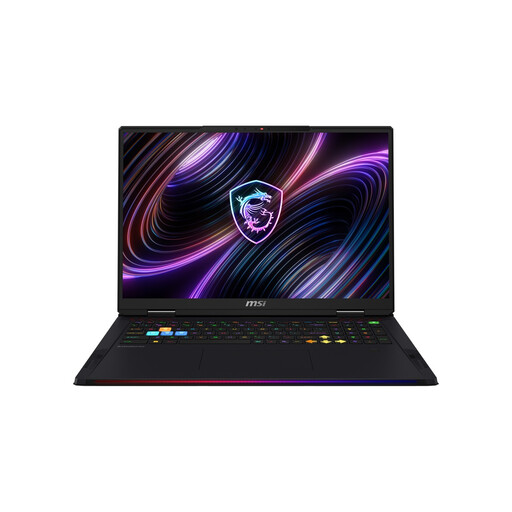
MSI Raider 18 Max HX A2WI-1075 gaming laptop

MSI Raider 18 Max HX A2WI-1075

HDMI and DisplayPort are listed for connecting a laptop display and an external monitor.

18-inch Mini LED display with WQUXGA, Intel Core Ultra 9 290HX, GeForce RTX 5080, 32 GB DDR5 RAM and 2 TB SSD.

View at Joybuy

HP OMEN 16-ap1099ng gaming laptop

HP OMEN 16-ap1099ng

HDMI 2.1 is listed as a video output for connecting an external monitor; check that it matches your monitor’s input.

16-inch QHD display, AMD Ryzen 9 8940HX, 24 GB RAM, 1 TB SSD and GeForce RTX 5070.

View at Joybuy

HP OMEN 16-ap1071ng gaming laptop

HP OMEN 16-ap1071ng

HDMI 2.1 is listed for connecting an external monitor; also check that you have the right connection for your monitor.

16-inch IPS display, AMD Ryzen 7 8745HX, 16 GB RAM, 1 TB SSD and GeForce RTX 5060.

View at Joybuy

HP OMEN MAX 16-ak0693ng gaming laptop

HP OMEN MAX 16-ak0693ng

HDMI 2.1 and USB-C are listed for connecting an external monitor; check that they’re compatible with your monitor.

16-inch WQXGA display, AMD Ryzen AI 9 HX 375, 32 GB RAM, 1 TB SSD and GeForce RTX 5070 Ti 12 GB.

View at Joybuy
MSI Katana A15 AI B8VG-459 gaming laptop

MSI Katana A15 AI B8VG-459

HDMI 2.1 and USB-C with DisplayPort are listed for connecting an external monitor.

15.6-inch FHD touchscreen, AMD Ryzen 9 8945HS, 16 GB RAM, 1 TB SSD and GeForce RTX 4070.

View at Joybuy

Frequently asked questions

How do I set up my laptop display and an external monitor as two workspaces?

Connect the monitor using a video output supported by your specific laptop. Microsoft Support explains how to identify recognised displays in Windows under “System > Display” and arrange them by position. Before you start, check that your laptop output, cable and monitor input are compatible.

Do I need a particularly powerful graphics card for simple 2D tile sets?

Not necessarily. Aseprite describes tilemaps as a way to work with tile sets, while Godot lists integrated graphics as a minimum option for simple projects with some renderers. If you also play games or work on more complex 3D projects, check their specific requirements.

What should I check about RAM and SSD before buying?

Check the documentation for the full model variant to see its RAM and SSD specifications and whether upgrades are possible. Lenovo lists two RAM slots and two M.2 SSD slots for the LOQ-15IRX10 range; this doesn’t mean every version on sale has the same specifications or allows the same upgrades.

Is a manufacturer’s warranty the same as your statutory rights?

No. According to the European Union’s consumer information, covered purchases from a trader have a legal guarantee of at least two years from the date the goods are received. A voluntary manufacturer’s warranty is separate; check who the seller is and what warranty terms apply to the specific offer.

Can I cancel an online laptop purchase in Germany?

For covered distance purchases by consumers, you generally have a 14-day right to cancel from the date you receive the goods. The Verbraucherzentrale notes that you must notify the seller of your decision to cancel; statutory exceptions and the terms of the specific purchase still apply.