First, decide whether you’ll be using an animated video, an interactive 3D simulation or the laptop’s own display. Each option has different requirements, and an aquarium screensaver alone doesn’t call for top-tier gaming performance. If you’re using an external monitor or TV, the connection, resolution and refresh rate you want must be supported by the specific laptop and screen models. General gaming tests don’t prove how well a laptop will run a particular aquarium, or what frame rate it will achieve at 4K.
Who this setup is right for
An aquarium on an external screen
If you want to use a monitor or TV you already own, check the video output on the specific laptop and the display settings available. Microsoft notes that the refresh rates on offer depend on the screen and the rates it supports.
Creating a 3D aquarium
If you want to arrange fish and decorations in an interactive scene, compare the requirements of your chosen software with the specification of the exact laptop model. BitBros describes Behind Glass as a customisable 3D aquarium; that doesn’t guarantee how it will perform at a particular resolution.
An aquarium running in the background
If you want an animated aquarium background while you get on with other tasks, the playback format and pause settings matter. Wallpaper Engine says backgrounds pause when you’re gaming or using maximised applications.
What to look for when buying
First decide whether your aquarium will be a background or an interactive 3D scene. Then check how you’ll connect the screen and the specification of the exact laptop variant.
| Criteria |
What to check before buying |
Who it matters most to |
| Output to a large screen |
For an external screen, check its inputs and the laptop’s output, then match these against the resolution and refresh rate available in Windows. |
If I want to show my aquarium on a TV or monitor, the connection needs to work; around 36% of consumers prioritise external display output. |
| Interactive 3D performance |
Compare the requirements of your chosen software with the GPU and memory in the full model configuration. |
If I want to create or simulate an aquarium, the laptop needs to be suitable for that specific software; around 29% of consumers prioritise interactive 3D performance. |
| Running in the background |
Check the playback format, video frame rate and whether it pauses during games or when windows are maximised. |
If I want the aquarium to stay visible while I’m doing other things, playback and pause settings matter; around 21% of consumers prioritise background playback. |
| Other uses while you’re out and about |
Compare the weight and independent battery test results for the specific variant, bearing in mind how you’ll use it. |
If I also want to use the laptop on the go or for other games, portability and battery life matter too; around 14% of consumers prioritise using their laptop for multiple purposes. |
Avoid common buying mistakes
-
Assuming the laptop screen’s refresh rate also applies to an external screen
The built-in display and a connected monitor are separate display setups. You can’t work out the mode you’ll get from the laptop’s display specifications alone.
Compare the outputs on the exact laptop variant with the screen’s inputs, then check the available modes in Windows.
Depending on the connections, you may need a different compatible cable or a suitable connection.
-
Treating a video aquarium and an interactive 3D simulation as the same workload
Wallpaper Engine supports animated backgrounds, among other things, while Behind Glass describes a customisable 3D aquarium. A gaming test doesn’t automatically tell you how a particular aquarium application will run.
Choose your application first, then compare its requirements with the exact laptop specification. Only apply test results to the conditions that were actually tested.
-
Assuming a similarly named model is the same as the one tested
Specifications and connections can vary within a product range. A similar model name doesn’t prove that the GPU or ports are identical.
Check the full model or product number and the features that matter for your screen before applying test results to a product listing.
Brands to consider
Lenovo
The LOQ range can be considered by looking at the tested LOQ 15IRX10 83JE001RGE and the range’s video output specifications.
- CHIP rated the tested model as suitable for Full-HD gaming. Lenovo lists HDMI and USB-C video output for the range; check that these specifications apply to the exact variant.
- CHIP notes limitations at higher resolutions and poor battery life on the tested device. This isn’t a test of aquarium performance.
MSI
The Cyborg 15 A13VE-888DE is one specific example of a gaming laptop with documented external display outputs.
- For this variant, MSI lists HDMI 2.1 supporting up to 4K at 60 Hz, as well as DisplayPort over USB-C.
- MSI gives the RTX 4050 Laptop GPU in this variant a maximum Graphics Power of 45 W. This doesn’t tell you how it will perform in a particular aquarium simulation.
Acer
The Nitro V 15 ANV15-51, product number NH.QNBEG.004, is a specific Full-HD gaming laptop you can use for comparison.
- For this variant, Acer lists Windows 11 Home, 16 GB of memory, an RTX 4050 with 6 GB and an HDMI port.
- These specifications apply to NH.QNBEG.004. They don’t confirm an external 4K refresh rate, and you shouldn’t assume other variants have the same features.
HP
The VICTUS 15-fb3770ng is a specific example of a VICTUS configuration listed for Germany.
- For this model, HP lists Windows 11 Home, 16 GB of memory and an RTX 5060 with 8 GB.
- The specification alone doesn’t confirm that it has the connections you need for your planned screen, or how it will perform with your chosen aquarium software.
Joybuy product selection
These gaming laptops include options for use with the built-in display, as well as configurations to compare against the requirements of interactive 3D software. Check the exact specification and the connection you need for your application.
 No image available
HP OMEN 16-ap1071ng
An option to consider if you’re comparing a gaming laptop with a built-in display for your chosen aquarium application.
Specifications listed in the product name: 16-inch QHD, AMD Ryzen 7 8745HX, 16 GB, 1 TB SSD, GeForce RTX 5060 and Windows 11 Home.
Joybuy
 No image available
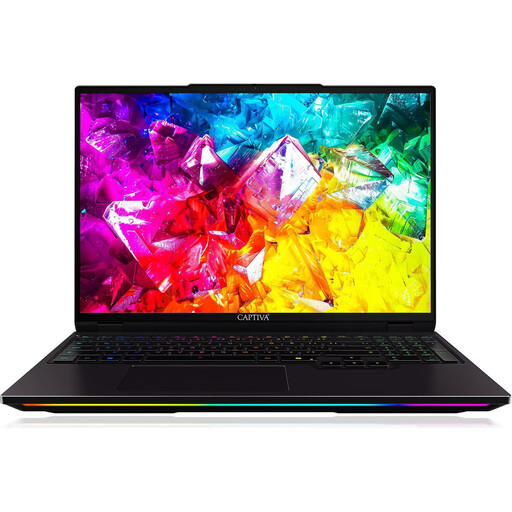
Captiva I92-069 Ultimate Gaming Laptop
A configuration to compare with the requirements of interactive 3D aquarium software.
Specifications listed in the product name: 16-inch WQXGA, 300 Hz, Intel Core Ultra 9 275HX, GeForce RTX 5080 with 16 GB GDDR7, 32 GB DDR5, 1 TB SSD and Windows 11 Home.
Joybuy
 No image available
THUNDEROBOT Radiant 16
An option to compare with an interactive 3D simulation; check that the specification meets your chosen software’s requirements.
Specifications listed in the product name: 16-inch, 240 Hz, Intel Core i7-14700HX, RTX 5070, 32 GB and 8 GB GDDR7.
Joybuy
 No image available
MSI Raider 18 HX A2WH-1088
An option to consider if you’d like a larger built-in display for your aquarium scene.
Specifications listed in the product name: 18-inch QHD+ at 240 Hz, Intel Core Ultra 9 275HX, GeForce RTX 5070 Ti with 12 GB, 32 GB DDR5, 1 TB SSD and Windows 11 Home.
Joybuy
 No image available
HP OMEN MAX 16-ah0698ng
A performance-focused configuration to compare with the requirements of interactive 3D aquarium software.
Specifications listed in the product name: 16-inch WQXGA at 240 Hz, Intel Core Ultra 9 275HX, GeForce RTX 5090 with 24 GB, 64 GB RAM, 2 TB SSD and Windows 11 Home.
Joybuy
Frequently asked questions
Do I need a dedicated gaming graphics card for an aquarium background?
Not just for the background. Wallpaper Engine supports different types of animated backgrounds. First choose the application and scene you want, then check their requirements before making the GPU a deciding factor.
How do I set up a virtual aquarium on an external screen?
Connect the laptop and screen using a connection they both support. Select the external screen in Windows and check the available resolution and refresh rate. Microsoft notes that available refresh rates depend on the screen and the rates it supports.
What ongoing costs should I check for aquarium software?
Check whether your chosen application requires a licence or offers optional content. Overlay Games says Virtual Aquarium: Overlay Desktop Game is free to play, with extra content available separately. This doesn’t tell you what other aquarium applications cost.
What rights do I have when buying a laptop online in Germany?
For a consumer purchase, the seller is responsible for statutory rights relating to faulty goods; EU information states that these rights generally last for at least two years. Online purchases usually come with a 14-day right to cancel, which you must notify the other party to the contract about, as explained by the Verbraucherzentrale. A voluntary manufacturer’s guarantee doesn’t replace these statutory rights.


