3D scene creator
You’re modelling and rendering a virtual spaceship. Choose your RAM, graphics memory and rendering method to suit the size of your scenes. For Windows, the Blender Foundation recommends 32 GB of RAM and 8 GB of VRAM.


Choose a laptop based on your software and the size of your 3D scenes or CAD assemblies, not just because it’s labelled “gaming”. For larger projects, the Blender Foundation recommends 32 GB of RAM and 8 GB of VRAM on Windows. Autodesk recommends at least 32 GB of RAM and a dedicated GPU with 8 GB of graphics memory for larger or more complex Fusion designs. At a permanent desk, a larger display can give you more screen space to work with, while a more compact device is easier to move between workspaces. Noise levels and exact specifications depend on the configuration.
You’re modelling and rendering a virtual spaceship. Choose your RAM, graphics memory and rendering method to suit the size of your scenes. For Windows, the Blender Foundation recommends 32 GB of RAM and 8 GB of VRAM.
You design components or larger assemblies and want to match the specifications to your specific CAD software and workflow. For larger or more complex Fusion designs, Autodesk recommends 32 GB or more of RAM and a dedicated GPU with at least 8 GB of graphics memory.
You move between workspaces or have limited desk space. Weigh up portability against the screen space available on the laptop itself, and check how fan noise might affect you during the tasks you’ll be doing.
Start by deciding which software you’ll use and the scale of your projects. Then weigh up display size, desk space and how often you’ll need to move your laptop.
| What you need | What to check before buying | Who it matters most to |
|---|---|---|
| Performance for complex 3D scenes | Check your software version and scene size, as well as RAM, dedicated graphics memory and supported rendering methods. | If I work on large 3D scenes, RAM and graphics memory are my priorities; around 36% of consumers prioritise this extra capacity for 3D work. |
| CAD work with larger assemblies | Check your CAD software and version, assembly size, CPU, RAM and graphics memory. | For large CAD assemblies, I want to match the specifications to my design workflow; around 29% of consumers put CAD assembly work first. |
| Desk space for working | Compare the display size and resolution with the space available, and check that you have the monitor and peripheral connections you need. | If I want to use the model view and tools without an external monitor, the screen space on the laptop itself matters to me; around 21% of consumers prioritise space on their home-office desk. |
| Portability and noise levels | Check the dimensions and weight, as well as independent noise tests for the exact configuration. | If I need to change where I work and keep an eye on fan noise, I want to weigh up both factors together; around 14% of consumers prioritise flexibility and quiet operation. |
For larger Blender or Fusion projects, RAM, the actual amount of graphics memory and your specific workflow all matter too.
Compare the full configuration with your software’s recommendations and the scale of your projects.
Specifications and behaviour can vary between configurations. Notebookcheck’s report of loud fans at full GPU power referred to the GU405AR they tested; it won’t necessarily apply to every configuration or operating mode.
Check the full model number and, if noise levels matter to you, look for a review of that exact configuration.
A larger device takes up more desk space, leaving less room for things such as your mouse, cables or other devices.
Measure the available space and take the chassis dimensions, ports and any external monitor you already have into account.
The ROG Zephyrus range includes the 14-inch GU405AR-SY006W, an example of a more compact laptop where you’ll need to weigh up portability and specifications.
The Legion Pro 5 is a 16-inch product range that you can consider when comparing screen space and specific configurations.
The Predator Helios Neo 16 AI is a 16-inch product range where it’s worth checking the display and the specific configuration together.
The Raider 18 HX AI range is a large-format option if screen space matters at a permanent workstation.
The Joybuy products below are gaming laptops with built-in displays for 3D and CAD work. Check each configuration against your software, project scale and workspace.
 No image available
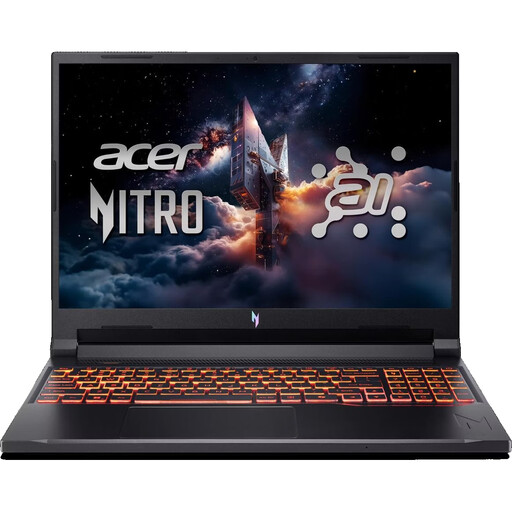
The 16-inch format may be useful for viewing models on the built-in display; check the specifications against your specific workflow.
16-inch WUXGA, AMD Ryzen 7 260, RTX 5070 with 8 GB of graphics memory, 32 GB DDR5 RAM and a 1 TB SSD. For Blender on Windows, the Blender Foundation recommends 32 GB of RAM and 8 GB of VRAM. For larger or more complex Fusion designs, Autodesk recommends at least 32 GB of RAM and a dedicated GPU with 8 GB of graphics memory.
Keep the ventilation openings clear and use the laptop on a hard, flat surface.
 No image available
For larger 3D or CAD projects, compare the specifications with your software requirements and project scale.
16-inch, Intel Core i7-14700HX, RTX 5070 with 8 GB GDDR7, 32 GB of RAM and a 1 TB SSD.
Keep the ventilation openings clear and use the laptop on a hard, flat surface.
 No image available
The 18-inch display is designed for a permanent workspace with plenty of room. Check that the large format will fit your desk.
Intel Core Ultra 9 275HX, RTX 5070 Ti with 12 GB of graphics memory, 32 GB DDR5 RAM, 1 TB SSD and an 18-inch QHD+ display with 240 Hz.
Keep the ventilation openings clear and use the laptop on a hard, flat surface.
 No image available
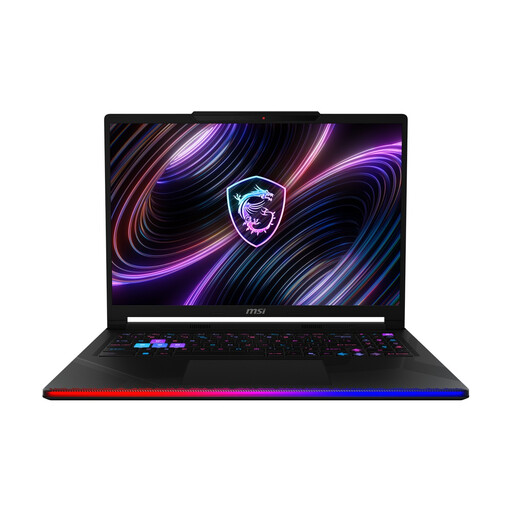
If you mainly work on the built-in display, compare the 16-inch format with your available desk space and software requirements.
16-inch WQXGA OLED display, Intel Core Ultra 9 290HX, GeForce RTX 5090, 32 GB DDR5 RAM and a 2 TB SSD.
Keep the ventilation openings clear and use the laptop on a hard, flat surface.
 No image available
For larger Blender or Fusion projects, bear in mind that the listed RAM falls short of the recommendations for more demanding workflows.
17.3-inch Full HD display with 144 Hz, AMD Ryzen AI 7, RTX 5050 with 8 GB of graphics memory, 16 GB of RAM and a 1 TB SSD. For Blender on Windows, the Blender Foundation recommends 32 GB of RAM and 8 GB of VRAM. For larger or more complex Fusion designs, Autodesk recommends 32 GB or more of RAM and at least 8 GB of graphics memory.
Keep the ventilation openings clear and place the laptop on a hard, flat surface.
No. It depends on the software and version you use, and the scale of your project. Blender and Autodesk Fusion distinguish between basic use and more demanding work; their recommendations aren’t blanket requirements for every project.
Keep the ventilation openings clear and follow the device manufacturer’s care instructions. ASUS points out that dust and other particles can block the openings and affect performance.
No. Under EU consumer law, when you buy from a retailer you’re entitled to a legal guarantee of at least two years from the date you receive the goods. A commercial guarantee is separate; also check the guarantee and service terms for the specific offer.
For distance purchases made by consumers in the EU, there’s generally a 14-day right to cancel, although statutory exceptions and the specific contract terms apply. This is not the same as a voluntary exchange or a manufacturer’s guarantee.