If Cities: Skylines II is your main game, use its published requirements as a guide. Paradox Interactive specifies 16 GB RAM and recommends a desktop graphics card, while the published requirements for Anno 1800 and the original Cities: Skylines are lower. Next, compare the laptop’s full configuration with relevant game tests, and check the headset connection, fan noise under load, display and storage. A laptop graphics card’s name alone is no guarantee of a particular frame rate or quiet operation.
Which laptop is right for you?
Players of demanding city-building simulations
If you mainly want to play a demanding game such as Cities: Skylines II, compare the game’s requirements with the laptop’s full configuration and relevant tests. Paradox Interactive specifies 16 GB RAM for the game, among other requirements, and recommends a desktop graphics card.
Headset users in a shared workspace
If you play with a headset and don’t want to disturb others in the room, check that the connection is compatible and look for independently measured fan noise under gaming load. A headphone socket won’t tell you how noisy the laptop gets while gaming.
City-building players without a second monitor
If you want maps and menus to be easy to read on the built-in screen, consider the display size, resolution and your preferred scaling settings when choosing a laptop. Also think about desk space and how often you’ll need to carry it.
What should you consider when buying?
The published requirements from Paradox Interactive for Cities: Skylines II and Ubisoft for Anno 1800 differ considerably. Start with the game you actually want to play as your benchmark, and assess headset connectivity and fan noise separately.
| What to consider |
What to look for |
Who should care? |
| Performance in your chosen game |
Decide which game and settings you’ll use; compare the CPU, RAM and laptop GPU in the full configuration with relevant tests. Don’t assume desktop and laptop graphics cards are equivalent based on their model numbers alone. |
If Cities: Skylines II is my main game, I want to assess the full configuration using relevant tests rather than relying on the GPU name. Around 36 % of consumers put suitability for their most demanding city-building game first. |
| Headset and fan noise |
Check the plug and connection type against the exact model variant; look for noise measurements under gaming load and in the performance mode you’ll use. |
If I play with headphones in a shared room, I want to be able to connect my headset and take fan noise into account. Around 29 % of consumers focus first on headset compatibility and noise while gaming. |
| Display for maps and menus |
Consider the display size and resolution alongside the laptop’s dimensions and your preferred scaling settings. |
If I play without a second monitor, I want maps and menus to be easy to read on the built-in display. Around 21 % of consumers prioritise readability and the display when gaming. |
| Specification and portability |
Check the operating system, RAM, SSD storage and documented upgrade options for the exact model. |
If I carry my laptop around often and install several games, I want to weigh up its specification and potential upgrades. Around 14 % of consumers prioritise specification, portability and possible future costs. |
Common misconceptions
-
Assuming a similarly named laptop GPU matches a recommended desktop graphics card
Paradox Interactive’s published requirements for Cities: Skylines II specify desktop graphics cards. They don’t show that a particular laptop configuration will deliver equivalent performance.
Look for a test of the complete laptop model using the settings you plan to play with.
-
Assuming a headphone socket means quiet operation
Having a headphone socket doesn’t tell you how loud the fans get under gaming load.
Check headset compatibility and noise measurements for the exact model separately.
-
Assuming every configuration in a model range has the same specification
RAM, SSD, operating system and display can vary between laptop configurations.
Check the full model number against the details in the specific listing. In particular, don’t confuse versions without a pre-installed operating system with those that include one.
Key brands at a glance
MSI
The Katana 15 HX B14WFK-487 is a documented 15.6-inch Full HD configuration for buyers who want to check a specific model with a headset connection.
- MSI lists 16 GB RAM, a 512 GB SSD and an RTX 5060 Laptop GPU for this variant. The manufacturer also specifies a combo socket for CTIA and OMTP headsets.
- This specification doesn’t guarantee a particular frame rate in a city-building game or a specific level of fan noise.
Acer
The Nitro V 16S AI ANV16S-61-R971 is a documented 16-inch configuration with 32 GB RAM, a 1 TB SSD and an RTX 5060.
- Acer lists a 2560 × 1600-pixel display for this model.
- These specifications apply to this particular variant; they don’t confirm headset compatibility or quiet operation.
HP
The OMEN 16-ap0790ng is a documented 16-inch configuration with 16 GB RAM, a 1 TB SSD and an RTX 5060.
- HP’s specifications help you compare this particular model’s configuration with the requirements of your chosen game.
- HP promotes the cooling system, but that alone isn’t independent evidence of how noisy the laptop is while gaming.
Lenovo
The LOQ-15IRX10 range is worth considering if you want to compare connections and upgrade options across different configurations.
- Lenovo’s specifications for the range list two RAM slots and a 3.5 mm combo socket.
- The specific 83JE00U1AX configuration has an Arabic keyboard and no pre-installed operating system. These features don’t automatically apply to other variants.
ASUS
The ROG Zephyrus G16 GU606AW and G14 GU405AR are listed as different-sized options in Notebookcheck’s list of tested gaming laptops.
- The model names make it easier to search for tests of each specific configuration.
- Being listed doesn’t show how either laptop performs in a particular city-building game or how loud its fans are.
Joybuy laptops for city-building games
The following Joybuy listings are gaming laptops for playing city-building games on the built-in display. For each variant, also check that the connection type and noise levels suit your headset and gaming environment.
 No image available
HP OMEN 16-ap1071ng, Ryzen 7 8745HX, GeForce RTX 5060
For gaming on the built-in display, the product description lists a 16-inch screen with a resolution of 1,920 × 1,200 pixels and a 165 Hz refresh rate. Check that the display suits your preferred scaling settings.
The product details also list 16 GB RAM, a 1 TB SSD and Windows 11 Home. A headphone output and Bluetooth 6.0 are listed in the description; check that they work with your headset.
Joybuy
 No image available
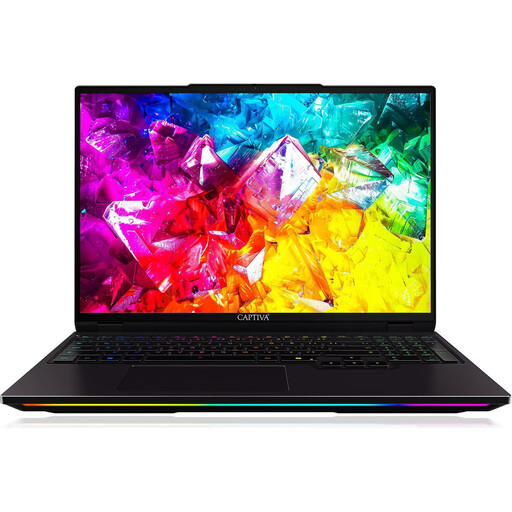
Captiva I92-069, Core Ultra 9 275HX, GeForce RTX 5080
If you want to compare the display specifications of the exact variant for city-building and simulation games, the product title lists a 16-inch WQXGA display with a 300 Hz refresh rate.
The details also list 32 GB RAM, a 1 TB SSD and Windows 11 Home. Bluetooth is listed as a possible connection for headphones; check that it’s compatible with your headset.
Joybuy
 No image available
THUNDEROBOT Radiant 16, Core i7-14700HX, RTX 5070
For gaming on the built-in screen, the product title lists a matte 16-inch display with a 240 Hz refresh rate. Check that the display specification suits the way you like to view games.
The title lists 32 GB RAM and a 1 TB SSD. Up to 96 GB RAM and up to 8 TB storage are also listed for this model; check these details against the specific configuration.
Joybuy
 No image available
MSI Raider 18 HX A2WH-1088, Core Ultra 9 275HX, RTX 5070 Ti
If you prefer a large built-in screen for maps and menus, the product title lists an 18-inch QHD+ display with a 240 Hz refresh rate.
The specifications list 32 GB RAM, a 1 TB SSD and a 3.5 mm audio socket. Check that the connection works with your headset.
Joybuy
 No image available
HP OMEN MAX 16-ak0693ng, Ryzen AI 9 HX 375, GeForce RTX 5070 Ti
For gaming on the built-in display, the product title lists a 16-inch WQXGA screen with a 240 Hz refresh rate. Factor the display specifications into your comparison, along with your preferred scaling settings.
The details list 32 GB RAM and a 1 TB SSD. A microphone socket is listed for this model; check the exact variant for any other connections your headset needs.
Joybuy
Frequently asked questions
Is an RTX 5060 Laptop GPU automatically powerful enough for Cities: Skylines II?
No, you can’t tell from the name alone. Paradox Interactive’s recommended requirements specify desktop graphics cards and 16 GB RAM. For a particular laptop, look for a test of the complete configuration using relevant game settings.
Can I plug in my wired headset?
MSI lists a combo socket for CTIA and OMTP headsets on the MSI Katana 15 HX B14WFK-487. For other models, check the plug, microphone connection and exact laptop variant. For USB or wireless headsets, check the connection or dongle you’ll need.
What should I check first if the fans get louder?
First, make sure the ventilation openings aren’t blocked. MSI notes that blocked openings can affect fan operation; follow the instructions for your specific device for cleaning and any further steps.
Who should I contact about a fault: the seller or the manufacturer?
Your statutory consumer rights apply against the seller; a voluntary manufacturer’s warranty is separate. Check who the seller is for the specific listing and keep your purchase documents.
Can I cancel an online laptop purchase in Germany?
For a typical online consumer purchase, you generally have a 14-day cancellation period. According to the Federal Ministry of Justice and Consumer Protection, for a purchase of goods, this period begins on the day after the full delivery. The conditions and information for the specific contract apply.


