For colony-building games, start by checking the requirements of the specific games you play against the laptop’s processor, memory and operating system; you don’t automatically need a particularly powerful graphics card. In a shared bedroom, fan noise in the mode you’ll actually use and the space available matter too. A quieter mode may limit performance, while a larger screen needs more room. Klei Entertainment lists 8 GB of RAM and Windows 10 version 21H1 or later as the minimum requirements for Oxygen Not Included. Wube Software lists 4 GB of RAM as the minimum for Factorio and 8 GB as the recommended amount. These specifications don’t guarantee performance with large saves or mods.
Who are these laptops for?
Evening gamers sharing a room
If you play while someone else needs peace and quiet, fan noise under the load of the games you actually play is important. Lenovo describes different performance and fan limits for each supported operating mode. Notebookcheck’s review of a specific ASUS TUF Gaming A18 also shows differences between modes.
Players building large colonies
If you’re planning long saves or expansions, compare your games’ requirements with the processor and memory in the specific laptop configuration. The requirements published by Klei Entertainment and Wube Software are starting points for the respective games, not a guarantee of performance with extensive saves.
Players short on desk space
If you share a desk or bedroom, consider the screen size, chassis and space for ventilation together. A larger screen needs more room. Acer describes the Nitro V 16 range as having a 16:10 display with extra vertical screen space.
What should you look for when buying?
First, check the specific hardware against your games and expansions. Then look at fan noise in the relevant operating mode, and make sure there’s enough room for the screen, laptop and ventilation.
| Consideration |
What to check when buying |
Who is it important to? |
| Fan noise in the evening |
Reviews of the exact configuration under load and in the quiet mode you plan to use; available operating profiles. |
If I play in the evening, I want the laptop to disturb the other person as little as possible. Around 36% of consumers put quiet gaming first. |
| Headroom for large saves |
Compare the requirements of the games and expansions you actually play with the CPU and RAM in the specific configuration. |
As my colony grows, I want to know whether the hardware will also suit later stages of the game. Around 29% of consumers prioritise performance headroom for their games and saves. |
| Hardware that suits your needs |
Compare your games list with the full model specification, rather than choosing based on the product range alone. |
If I mainly play colony-building games, I don’t want to choose hardware I don’t need for the games I play. Around 21% of consumers are particularly keen to avoid unnecessary hardware costs. |
| Screen and desk space |
Check the dimensions of the specific configuration, desk space, ventilation grilles and room for the power adapter. |
If I set up my laptop in a shared room, the screen and ventilation need to fit the space available. Around 14% of consumers prioritise desk space and screen size. |
Common misconceptions
-
‘Quiet’ means silent or just as fast as ‘Performance’
On the devices covered in Lenovo’s documentation, factors such as available performance and fan limits vary between operating modes. A quieter profile therefore doesn’t guarantee silent operation or unchanged gaming speed.
Compare reviews of the exact model configuration under load and in the evening mode you plan to use. Also check which profiles the device actually offers.
-
Minimum requirements guarantee smooth performance with large saves
Klei Entertainment and Wube Software’s minimum requirements apply to their respective games. They don’t automatically tell you how large colonies or mods will perform on your device.
Check the requirements for each game and expansion separately, and don’t decide based only on the lowest entry-level specification.
-
A review applies to the entire model range
Notebookcheck’s review of the ASUS TUF Gaming A18 FA808UP-S8022W with RTX 5070 can’t automatically be applied to the differently specified FA808UM-S8012W with RTX 5060.
Check the full model number and specifications before applying reviews of noise levels or performance to a different device.
Key brands at a glance
Lenovo
Legion models may be worth considering if you want to switch between operating profiles to suit different situations.
- Lenovo’s manual for certain Legion devices describes Quiet, Balance and Performance profiles, each with different performance, power consumption and fan limits.
- The documentation isn’t an independent noise measurement and doesn’t automatically apply to every Legion model.
ASUS
TUF Gaming includes devices of different sizes and specifications, so always check reviews for the exact variant.
- Notebookcheck described the TUF Gaming A18 FA808UP-S8022W with RTX 5070 that it tested as quiet in Performance mode.
- According to Notebookcheck, this test device was louder and used more power in Turbo mode. The result doesn’t establish how other A18 configurations perform.
Acer
The Nitro V 16 range gives you a way to compare devices with a 16-inch, 16:10 display.
- Acer says the 16:10 display provides extra vertical screen space.
- Information about a product range doesn’t automatically confirm the specifications of a particular variant or how noisy its fans will be in a bedroom.
HP
For OMEN and Victus, it’s worth taking a close look at the model variant and its performance and fan controls.
- HP explains that Performance mode affects fan speed, and that airflow affects temperature.
- HP lists certain control features only for supported models. This doesn’t provide a measured noise level for a specific OMEN or Victus device.
MEDION ERAZER
For ERAZER devices, keep any judgements about noise specific to the model that was tested.
- COMPUTER BILD described the Beast X40 it tested as ‘a little loud’.
- This assessment applies to the Beast X40 that was tested and can’t be extended to all ERAZER laptops.
Joybuy products
The Joybuy picks below are gaming laptops. Their specifications, displays and weights can help you compare them with your games and the space available, but they don’t tell you how noisy the fans are.
 No image available
Acer Nitro V14 AI gaming laptop
The compact screen size may suit a limited amount of desk space. Also check your games’ requirements against the specific specifications.
14.5 inches; AMD Ryzen AI 7 350; NVIDIA GeForce RTX 5050 with 8 GB GDDR7; 16 GB DDR5; 1 TB PCIe Gen4 SSD; Windows 11 Pro; English international keyboard.
Use on a flat, hard surface when gaming and keep the ventilation grilles clear.
View at Joybuy
 No image available
MSI Crosshair 16 Max HX E2WGXK-023
If you’re considering a 16-inch device, allow room for the chassis and ventilation as well as the screen. The specifications aren’t a substitute for a fan-noise test.
16 inches; Intel Core Ultra 9 275HX; NVIDIA GeForce RTX 5070 with 12 GB; 16 GB DDR5; 1 TB SSD; QHD+ OLED with 165 Hz; Windows 11 Home.
Keep the ventilation grilles clear during use and make sure there’s adequate airflow.
View at Joybuy
 No image available
MSI Stealth A16 AI+ Mercedes-AMG Motorsport A3XWGG-052
The screen size and stated weight can help you plan where to set it up. Compare the specifications with your games’ requirements.
16 inches; AMD Ryzen AI 9 370; NVIDIA GeForce RTX 5070; 32 GB RAM; 2 TB SSD; Windows 11.
Keep the ventilation grilles clear and place the laptop somewhere well ventilated when it’s under heavy load.
View at Joybuy
 No image available
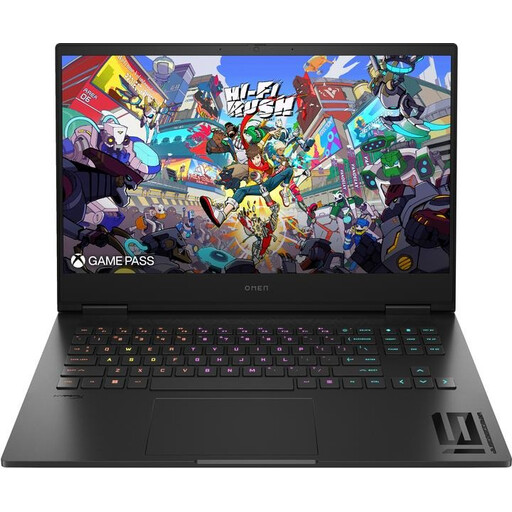
HP OMEN 16 16-wf1473ng
Factor in the 16.1-inch display and stated weight when planning where to set it up in a shared room. A model name alone doesn’t tell you how loud it will be during gaming.
16.1 inches; Intel Core i7-14700HX; NVIDIA GeForce RTX 4060; 16 GB RAM; 512 GB SSD; Full HD with 165 Hz.
Use a flat, well-ventilated surface when gaming and keep the ventilation grilles clear.
View at Joybuy
 No image available
MSI VenturePro A16 AI+ A3HWEG-003
If you want to switch between operating modes, check the controls and fan noise for the specific configuration. The product specifications alone don’t confirm noise levels.
16 inches; AMD Ryzen AI 7 350; NVIDIA GeForce RTX 5050; 16 GB RAM; 1 TB SSD; Windows 11 Home.
Keep the ventilation grilles clear and use the laptop on a flat, well-ventilated surface.
View at Joybuy
Frequently asked questions
Is integrated graphics enough for colony-building games?
It depends on the specific game and device. For Oxygen Not Included on Windows, Klei Entertainment lists Intel HD 4600 or comparable graphics as the minimum requirement. Wube Software lists specific minimum and recommended specifications for Factorio. These details don’t guarantee a particular frame rate or good performance with large saves or mods.
Does Quiet mode make a laptop silent at night?
No. Quiet mode doesn’t guarantee silent operation. On the devices covered in Lenovo’s documentation, factors such as performance and maximum fan speed vary by mode. Check a review of your exact configuration in the mode you plan to use, and keep the ventilation grilles clear. HP notes that airflow affects temperature.
Who should I contact if a fault develops after purchase in Germany?
The seller is responsible for the statutory guarantee, which is separate from a voluntary manufacturer’s warranty. The Verbraucherzentrale explains the difference. According to information from the European Union, consumer purchases have a minimum two-year guarantee from the date you receive the goods. If a fault is covered, repairs or a replacement are initially free of charge.
Can an old laptop go in household rubbish?
No. The Umweltbundesamt says that old electrical equipment must be disposed of separately, and lists local collection points and retailer take-back options. Check the terms of the relevant collection point or take-back scheme before returning your laptop.


