For colony sims, the most powerful graphics card isn’t necessarily the most important thing to look for. With large saves and office software open at the same time, start by checking the processor, RAM and exact configuration. If you also play graphically demanding 3D titles, the specific GPU matters more. A shared work and gaming space also makes the screen, ports and cooling important considerations.
Who is a gaming laptop suitable for?
Players with large colonies
If you want to use large saves or mods while keeping office software open, pay particular attention to the processor, RAM and upgrade options. If you have problems with Oxygen Not Included, Klei Entertainment recommends trying disabling mods, among other things.
Players of graphically demanding 3D titles
If you plan to play graphically demanding strategy games as well as classic colony sims, compare each game’s requirements with the GPU and RAM in the full laptop configuration.
Anyone sharing a workspace for work and gaming
If you use the same desk for working from home and longer gaming sessions, screen size, ports, desk space and clear airflow all form part of your buying decision.
What should you look for when buying?
Start with the games you play and the size of your saves. If you share your desk, the screen, ports and cooling matter too.
| What matters to you? |
What should you look for? |
Who should pay particular attention? |
| Processing power and memory |
Compare your games’ requirements with the processor and RAM in the exact model configuration. Check the listed RAM slots too. |
If I load large saves or use office software at the same time, I want to choose a processor and RAM to suit the exact configuration. Around 31% of consumers are likely to prioritise processing power and memory. |
| Graphics for the games you plan to play |
Compare the requirements of specific 3D titles with the exact laptop GPU. Don’t rely on the laptop range name alone. |
If I also play graphically demanding 3D titles, I want to compare the GPU in the model on offer with their requirements. Around 25% of consumers are likely to consider graphics performance their main priority. |
| Cooling and noise |
Look for independent tests of the exact variant under load. Make sure the vents are unobstructed when you set it up. |
If I work and play in the same space, I want to avoid unnecessary disruption. Around 25% of consumers are likely to place particular importance on quiet operation. |
| Screen and desk space |
Compare the screen size, dimensions and ports of the exact configuration with your desk and any external monitor you plan to use. |
If I also plan to use the laptop at my desk for work, I need a suitable display and enough room for my mouse and cables. Around 19% of consumers are likely to prioritise the screen and workspace layout. |
Avoid common misconceptions
-
Assuming minimum requirements guarantee performance with large colonies
The minimum requirements published by Klei Entertainment give you a starting point, but they don’t guarantee performance with large or modded saves.
Compare the requirements of the specific games you play, and look for tests of the relevant configuration if you have particularly large saves. Minimum specifications don’t tell you what frame rate to expect.
-
Assuming the range name tells you about the RAM, graphics or operating system
Lenovo and MSI offer different configurations within their laptop ranges, so you can’t assume one variant’s specifications apply to another model in the same range.
Check the full model number against the RAM, GPU, display and pre-installed operating system.
The wrong specifications could mean replacing components or spending extra time setting things up later.
-
Treating claims of quiet cooling as measured results
HP describes the OMEN 16-ap0793ng as particularly quiet. This is the manufacturer’s claim, not an independent noise measurement for every operating condition.
If a quiet workspace matters to you, look for measurements of the exact configuration in the performance mode you’ll use.
Brands and ranges at a glance
Lenovo
The LOQ-15IRX10 family is worth considering if you want to factor upgrade options and external displays into your choice.
- Lenovo’s platform specifications list two DDR5 SODIMM slots and outputs for external displays.
- The platform includes different processor, GPU and operating system configurations, so check the specifications for the exact variant.
MSI
The Katana 15 HX B14W range includes variants with a 15.6-inch display and a dedicated GPU.
- MSI lists an RTX 5060 Laptop GPU and 16 GB RAM for the Katana 15 HX B14WFK-487.
- Resolution, GPU and operating system vary between models in the range. The B14WFK-487’s specifications don’t confirm the features of other variants.
Acer
The Nitro V 15 NH.QPDEG.001 is a specific configuration you can use to compare memory, SSD, screen and ports.
- Acer lists 32 GB RAM, a 1 TB SSD, a matte 15.6-inch Full HD display and HDMI for this variant.
- These specifications apply to the NH.QPDEG.001 and can’t automatically be assumed to apply to other Nitro V 15 variants.
HP
The OMEN 16-ap0793ng is an example of a configuration with a 16-inch display and 32 GB RAM.
- HP also lists a 1 TB SSD for the OMEN 16-ap0793ng.
- HP’s claim that its cooling is particularly quiet is a manufacturer statement, not an independent noise measurement.
Gaming laptops at Joybuy
The Joybuy models below are for buyers who want to play colony games as well as graphically demanding 3D titles. Compare the exact specifications with your games and the space available on your desk.
 No image available
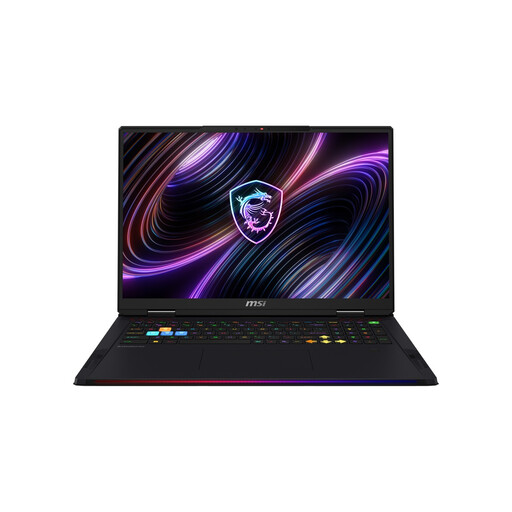
MSI Raider 18 Max HX A2WI-1075
The listed combination of 32 GB RAM and an RTX 5080 is worth considering if you choose games based on the exact GPU and memory specifications.
18-inch Mini-LED display with WQUXGA, Intel Core Ultra 9 290HX, NVIDIA GeForce RTX 5080, 32 GB DDR5, 2 TB SSD and Windows 11 Home.
Keep the vents clear while the laptop is in use.
View at Joybuy
 No image available
THUNDEROBOT Radiant 16
The listed 32 GB RAM and RTX 5070 make it easier to compare the laptop with the requirements of the games you plan to play.
16-inch display with 240 Hz, Intel Core i7-14700HX and 32 GB RAM.
The product title lists an RTX 5070 with 8 GB GDDR7 and 115 W GPU power, as well as 200 W total power. It also lists support for upgrades to up to 96 GB RAM and 8 TB of storage.
View at Joybuy
 No image available
MSI Titan 18 HX Dragon Edition Draco Epic A2WJ-1218
With 96 GB DDR5 and an RTX 5090, you can compare this configuration with the requirements of demanding games you plan to play.
Intel Core Ultra 9 290HX Plus, NVIDIA GeForce RTX 5090 with 24 GB, 4 TB SSD and an 18-inch UHD+ Mini-LED display with 240 Hz.
Keep the vents clear while the laptop is in use.
View at Joybuy
 No image available
MSI Crosshair 16 Max HX E2WGXK-023
The listed RTX 5070 and 16 GB RAM let you compare this specific configuration with the games you plan to play.
Intel Core Ultra 9 275HX, NVIDIA GeForce RTX 5070 with 12 GB, 16 GB DDR5 and 1 TB SSD.
16-inch QHD+ OLED display with 165 Hz and Windows 11 Home. Keep the vents clear while the laptop is in use.
View at Joybuy
 No image available
MSI Raider 18 HX A2WH-1088
The listed combination of 32 GB RAM and an RTX 5070 Ti makes it easy to compare this model with the requirements of your games.
Intel Core Ultra 9 275HX, NVIDIA GeForce RTX 5070 Ti with 12 GB, 32 GB DDR5 and 1 TB SSD.
18-inch QHD+ display with 240 Hz and Windows 11 Home. Keep the vents clear while the laptop is in use.
View at Joybuy
Frequently asked questions
Which system requirements should I compare first?
Start with the requirements for the games you actually want to play. For Oxygen Not Included on Windows, Klei Entertainment lists a minimum of 8 GB RAM and Windows 10 version 21H1 or later. These minimum specifications don’t guarantee a particular level of performance with large saves.
What can I check if I have problems with Oxygen Not Included?
Klei Entertainment recommends checking the game files, updating your operating system and drivers, and trying to disable mods, among other steps. These can help you troubleshoot, but they don’t replace checking your hardware against the game’s requirements.
Can I charge any gaming laptop with a USB-C power adapter while gaming?
No. The current requirements for a common charging port don’t tell you whether a particular USB-C power adapter can provide enough power for gaming on a specific laptop configuration. Check the charging specifications and what’s included with the model. The European Commission lists 28 April 2026 as the date when the relevant requirements begin to apply to covered laptops.
What are my rights if a laptop is faulty or bought online?
If a laptop is faulty, your statutory rights against the seller are separate from any voluntary guarantee. According to the Verbraucherzentrale, consumers generally have a 14-day right to cancel an online purchase. When the period starts and whether any exceptions apply depend on the specific contract and the rules in force.


