Choose your laptop based on the games you actually play and your workspace. A clear display and the right ports may matter more for cards, text and office work than top-end graphics performance. A more powerful model makes sense if you also play more demanding games or use graphics-intensive applications. Check the full model number, operating system and ports before you buy.
Who is a gaming laptop suited to?
Card strategists at their desk
If you mainly play deck-building games and also use your laptop for office work, look for a screen that makes cards and text easy to read. Compare the screen size and resolution with your workspace, and check the requirements of the specific games you play before opting for extra graphics power.
Home office users with an external monitor
If you switch between work and gaming at a fixed desk, make sure the ports on the specific model are compatible with your monitor and input devices. The right connection depends on the ports available on both devices.
Players with other PC games
If you want to play more demanding games or use graphics-intensive applications as well as deck-builders, compare the full configuration rather than just the laptop range name. Manufacturers such as Lenovo, ASUS and HP offer different specifications depending on the model.
What should you look for when buying?
First, check which games you want to play and how you’ll connect the laptop at your desk. Then compare the display, full configuration and space requirements.
| Buying priority |
What to look for |
Who is it important to? |
| Easy-to-read display |
Compare screen size, resolution, aspect ratio and available desk space. ASUS lists a 16-inch display with a resolution of 1920 × 1200 pixels for the TUF Gaming A16 FA608UH-RV027W; these specifications apply to this configuration. |
If I want to see cards and work windows clearly side by side, the screen’s actual display quality is crucial. Around 30% of consumers have this as their main priority. |
| Monitor and device connections |
Check your monitor’s inputs against the video outputs on the laptop’s full configuration. Lenovo PSREF lists HDMI, USB-A and USB-C with DisplayPort 1.4 for the LOQ-15IRX10 platform; check the ports on the specific configuration. |
If I want my home office monitor and input devices to work with my laptop, the connections need to suit my workspace. Around 30% of consumers prioritise ports above all else. |
| Performance for your choice of games |
Compare the requirements of the games you want to play with the processor, graphics solution, RAM, operating system and storage of the full model number. |
If I want to play other PC games as well as deck-builders, I choose a specification to suit those exact titles. Around 20% of consumers have this as their main performance requirement. |
| Use away from your desk |
Consider weight and battery capacity as device specifications, not as a promise of battery life. ASUS lists 90 Wh and 2.20 kg for the TUF Gaming A16 FA608UH-RV027W; the power adapter’s weight is not included. |
If I often move my laptop or work in a shared room, weight and a suitable setup matter to me. Around 20% of consumers prioritise flexibility or a quiet working environment. |
Avoiding buying pitfalls
-
Assuming the specification from the range name
Specifications can vary within a laptop range. For example, HP lists the Victus 15-fa2750ng with FreeDOS rather than Windows pre-installed.
Before buying, compare the full model number, operating system, RAM and ports for the configuration on offer.
If your chosen model has FreeDOS, you’ll need to plan to install a suitable operating system.
-
Assuming battery capacity equals gaming time
A figure in watt-hours describes battery capacity, not how long the battery will last while playing your games or during your particular use.
Use capacity figures as a specification, and look for tests of the exact configuration under a comparable workload to estimate battery life.
-
Buying more graphics power without checking your needs
The term “deck-builder” alone doesn’t tell you what every game you want to play, or any other applications, will require.
First decide which games and applications you’ll use, then check their current requirements against the laptop’s full configuration.
Key brands at a glance
Lenovo
The LOQ-15IRX10 platform is one option to compare if you’re looking for a gaming laptop with ports for a monitor and peripherals.
- Lenovo PSREF lists HDMI, USB-A and USB-C with DisplayPort 1.4 for the platform.
- Graphics and operating system options vary. The platform specifications don’t confirm the details of every listing or guarantee quiet operation.
ASUS
The ASUS TUF Gaming A16 FA608UH-RV027W is a specific configuration with a documented 16-inch display and several types of port.
- ASUS lists a resolution of 1920 × 1200 pixels, 16 GB RAM, HDMI 2.1, USB4 and RJ45 for this model.
- The 90 Wh figure doesn’t confirm how long the battery will last while playing your games, and doesn’t automatically apply to other TUF A16 configurations.
HP
Victus includes a range of configurations, so compare the full model number each time.
- HP lists 16 GB RAM, a 512 GB SSD and an RTX 5050 for the Victus 15-fa2750ng.
- This configuration is listed with FreeDOS rather than Windows pre-installed. Check which operating system you need.
MEDION
The ERAZER Crawler E30 Core is one example of the specifications available in the gaming laptop range.
- For the documented Core configuration, MEDION lists an RTX 3050, 16 GB RAM, a 512 GB SSD and Windows pre-installed.
- This configuration doesn’t represent the entire ERAZER range, so check the specifications of the model you’re considering.
Gaming laptops for your desk
The gaming laptops below are presented with use at a home office desk in mind. Compare the display, ports and listed configuration with your games and workspace.
 No image available
MSI Crosshair 16 Max HX E2WGXK-023
Could suit a fixed workspace if you want a 16-inch display and the listed ports.
16-inch QHD+ OLED display with 165 Hz, Intel Core Ultra 9 275HX, NVIDIA GeForce RTX 5070 with 12 GB, 16 GB DDR5, 1 TB SSD and Windows 11 Home.
USB-C, USB-A, HDMI and RJ45 are listed; check that the ports work with your monitor and devices.
View at Joybuy
 No image available
HP OMEN 17 17-db1071ng
Could be worth considering for your desk if you’re looking for a larger display and Windows 11 Home in the listed configuration.
17.3-inch Full HD IPS display with 144 Hz, AMD Ryzen AI 7, 16 GB RAM, 1 TB SSD and NVIDIA GeForce RTX 5050.
HDMI and USB-C with Power Delivery are listed; check compatibility with your monitor and accessories.
View at Joybuy
 No image available
THUNDEROBOT Radiant S16
Could suit a fixed workspace if you want a 16-inch display and the listed ports for your devices.
16-inch QHD+ display with 2560 × 1600 pixels and 240 Hz, AMD Ryzen 7 7745HX, NVIDIA GeForce RTX 5060, 16 GB DDR5 and 1 TB SSD.
USB-C, USB-A, HDMI and Mini DisplayPort are listed; check the video outputs against your monitor.
View at Joybuy
 No image available
ASUS ROG Strix G17
Could work well at a fixed desk if you want a 17.3-inch display and the listed Windows configuration.
17.3-inch Full HD IPS display with 144 Hz, AMD Ryzen 9 7940HX, NVIDIA GeForce RTX 4060 with 8 GB, 16 GB RAM, 1 TB SSD and Windows 11 Home.
HDMI, USB-C and RJ45 are listed; check that the specific ports suit your workspace.
View at Joybuy
 No image available
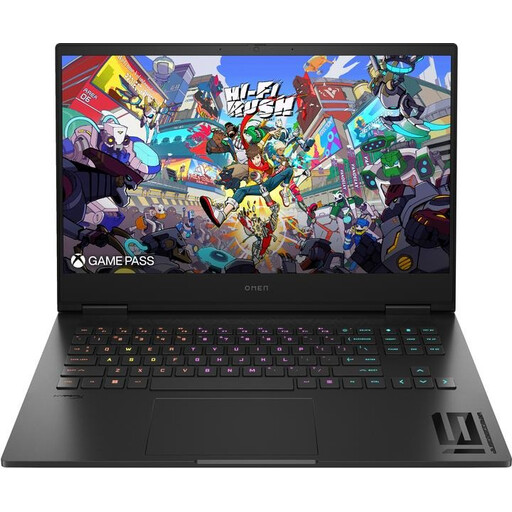
HP OMEN 16 16-wf1473ng
Could suit desk-based work if you’re looking for a matt 16.1-inch display and the listed ports.
16.1-inch Full HD IPS display with 165 Hz, Intel Core i7-14700HX, 16 GB RAM, 512 GB SSD and NVIDIA GeForce RTX 4060.
Windows 11 Home, HDMI, USB-A and USB4/Thunderbolt 4 are listed; check the ports against your accessories.
View at Joybuy
Frequently asked questions
Do I automatically need a particularly powerful graphics card for Balatro or Slay the Spire 2?
No, you can’t tell from the genre alone. Playstack describes Balatro and Mega Crit Games describes Slay the Spire 2 as deck-building games. Check the current requirements of each title you want to play against the laptop’s full configuration, rather than assuming you’ll need a particular frame rate.
How do I connect my laptop at my desk and keep the vents clear?
Compare your monitor’s inputs with the documented video outputs of the exact laptop model. Keep the vents clear and follow the device instructions; Lenovo warns in a guide for one Legion model against blocking vents with soft surfaces.
What should I do if my laptop is faulty or I don’t like one I bought online?
Your statutory rights if a product is faulty are separate from any voluntary guarantee. The Verbraucherzentrale states that, in general, online orders can be cancelled within 14 days of receipt; the relevant statutory conditions and exceptions apply.
Can I put an old laptop in household rubbish in Germany?
No. Old electrical equipment must be collected separately and handed to an authorised organisation. The Federal Ministry for the Environment gives municipal collection points as one example; any retailer take-back is subject to its stated conditions.


