What matters when buying?
First decide whether you need a large screen built into the laptop or whether a monitor you already own will do. Then check the full configuration against the games you play and how often you need to carry the laptop.
17.3- or 18-inch laptop
A good fit if: you mainly play in one place and want a large display without a separate monitor.
The trade-off: A larger screen makes the device less portable, and screen size alone tells you nothing about resolution or gaming performance.
Smaller laptop with an external monitor
A good fit if: you already own a large monitor and mainly need a big display at home.
The trade-off: You won’t have the same large display when you’re out and about without the extra monitor. You may also need a cable or adapter to connect it.
Higher-spec configuration
A good fit if: you play more demanding games as well as deck-building games, or use other processor-intensive applications.
The trade-off: Not every model in a range has the same specifications, and the game genre alone doesn’t determine which graphics card you need.
| Buying priority |
What to check when buying |
Who particularly values this? |
| Readability on the laptop |
Compare the screen size, native resolution and display finish of the full model configuration. |
If I want to see cards and text clearly without an extra monitor, the built-in display is particularly important to me. This is the main priority for around 36 % of consumers. |
| The right specifications |
Compare the requirements of the games you play with the processor, graphics chip and memory in the exact configuration. |
If I play more demanding games as well as deck-building games, I want to choose the specifications to suit them rather than relying on the gaming label alone. Around 29 % of consumers prioritise this comparison. |
| Portability and space |
Check the weight and dimensions of the complete device, not just the screen size. |
If I want to take a large display with me to different places, the device’s dimensions matter to me. This is the main priority for around 21 % of consumers. |
| Connecting an existing monitor |
Check the laptop’s video output against the monitor’s input, as well as whether you need a cable or adapter. |
If I already have a large monitor at home, I want to check whether I can connect my laptop to it. Around 14 % of consumers focus on using an external display. |
Gaming laptops with large displays
This selection includes gaming laptops with 17.3- or 18-inch displays, so you can play without a separate monitor. Depending on the games you play, compare the exact resolution and specifications too; a large display alone doesn’t tell you what graphics performance you need.
 No image available
MSI Titan 18 HX Dragon Edition Draco Epic A2WJ-1218
Worth considering if you’re looking for an 18-inch display for gaming without an extra monitor.
Intel Core Ultra 9 290HX Plus; NVIDIA GeForce RTX 5090 24GB; 96GB DDR5; 4TB SSD; UHD+ Mini LED with 240 Hz. The stated weight is 3.6 kg.
Joybuy
 No image available
MSI Raider 18 HX A2WH-1088
This 18-inch model could be a good fit if you prefer a large built-in display to an extra monitor.
Intel Core Ultra 9 275HX; NVIDIA GeForce RTX 5070 Ti 12GB; 32GB DDR5; 1TB SSD; QHD+ with 240 Hz. The stated weight is 3.6 kg.
Joybuy
 No image available
HP OMEN 17-db1071ng
The 17.3-inch display is an option if you want to play on your laptop without a separate monitor.
Full HD with 144 Hz; AMD Ryzen AI 7; 16 GB RAM; 1 TB SSD; Windows 11; USB-C Power Delivery.
Joybuy
 No image available
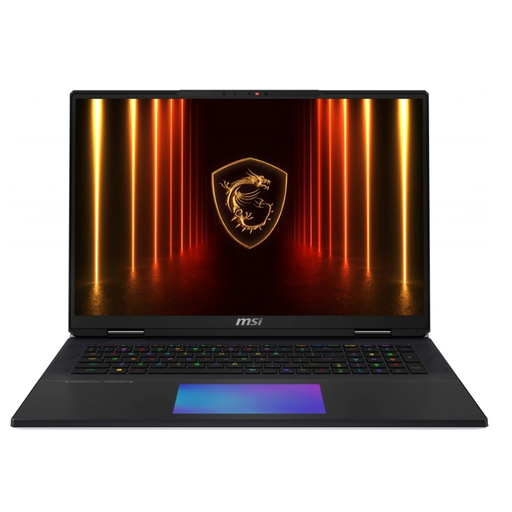
MSI Titan 18 HX AI A2XWJG-656
Worth considering if you’re looking for a built-in 18-inch display and want to compare the specifications with the games you play.
Intel Core Ultra 9 285HX; NVIDIA GeForce RTX 5090; 64 GB RAM; 6 TB SSD. According to the product description: UHD+ Mini LED with 120 Hz and HDMI 2.1. The stated weight is 3.6 kg.
Joybuy
 No image available
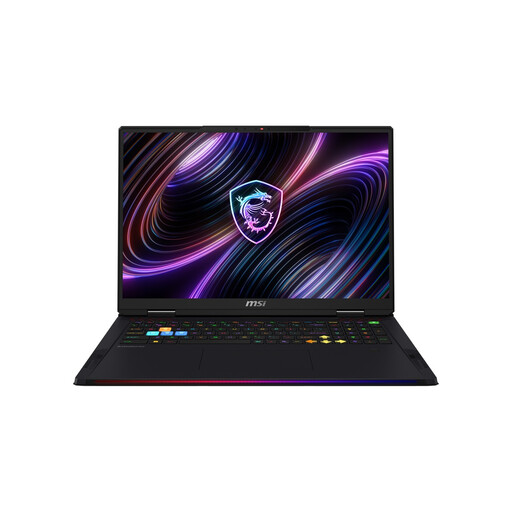
MSI Raider 18 Max HX A2WJ-1074
This 18-inch model is for you if having a large display built into the laptop matters.
Intel Core Ultra 9 290HX Plus; NVIDIA GeForce RTX 5090; 64GB DDR5 RAM; 2TB SSD; UHD+ Mini LED. The stated weight is 3.6 kg.
Joybuy
Frequently asked questions about choosing
Do I need a particularly powerful graphics card for deck-building games?
No, not just because of the game genre. Compare the requirements of the specific games you play with the laptop’s full configuration. The answer may be different if you also play more demanding games.
How do I connect a laptop to my existing monitor?
Compare the video output on the exact laptop with the monitor’s input, then choose a suitable cable or, if necessary, an adapter. For example, Lenovo lists HDMI and USB-C with DisplayPort functionality for the LOQ 17IRX10.
How can I check that the details for a laptop configuration match?
Compare the full model or part number with the definitive details for the configuration on offer. This is particularly important if the title and description list different processor or graphics specifications.
What are my rights if the laptop I bought is faulty?
When you buy as a consumer from a trader, your statutory rights for faulty goods are against the seller. Your Europe, the European Union’s information portal, states that you are entitled to at least two years’ protection from the date you receive the goods. An additional manufacturer’s warranty does not replace these rights. Different rules apply to purchases from private individuals.
Can I cancel an online laptop purchase?
For qualifying distance contracts between a consumer and a trader, you generally have a right to withdraw from the purchase; the standard statutory period is 14 days. Section 312g of the German Civil Code (BGB) sets out exceptions. Check the details of your specific contract and the applicable statutory exceptions.


