What should you look for when buying?
Demanding 3D projects
Best for: If you work on large 3D scenes in Unreal Engine or Blender, their memory recommendations can serve as a useful benchmark.
Bear in mind: These recommendations are not universal minimum requirements for every editor, nor do they guarantee a particular working speed or quiet operation.
Smaller Unity projects
Best for: If Unity is your editor, compare the specs with the size and complexity of your projects.
Bear in mind: Unity's recommendation for the editor doesn't indicate how much memory your finished project or other 3D programmes running at the same time will need.
For demanding Unreal and Blender work, Epic Games and the Blender Foundation each recommend 32 GB RAM and 8 GB graphics memory. Unity Technologies notes that larger and more complex projects need more.
| Criterion |
What to check before buying |
Who should pay particular attention? |
| RAM and graphics memory |
Check the RAM and dedicated graphics memory of the exact configuration separately. |
If I create large 3D scenes, I want to compare both memory specifications with the requirements of my editor. Around 36% of consumers prioritise RAM and graphics memory. |
| Processor and SSD |
Compare the processor and available SSD storage with your project and build files. |
If I work on projects locally and create builds, I need specs that suit my files and workflow. Around 29% of consumers prioritise editing and builds. |
| Display and workspace |
Check the resolution, screen size, matt or glossy finish, and the ports you need. |
If I want the editor and preview to fit side by side on the laptop, I look at the usable screen area and lighting at my desk. Around 21% of consumers prioritise the display and workspace. |
| Model configuration and setup |
Compare the full model number, operating system, RAM and SSD. For Wi-Fi or Bluetooth, also check the applicable compliance documentation. |
If I want to open the editor without extra setup, I check exactly what's included with the specific configuration. Around 14% of consumers prioritise the configuration and setup requirements. |
How Joybuy products compare with your needs
The Joybuy products below cover configurations for demanding 3D work, smaller Unity projects and creating maps at your desk at home. Compare the exact specs with your editor, and check the applicable compliance documentation for devices with Wi-Fi or Bluetooth.
 No image available
HP OMEN MAX 16-ak0693ng
These specifications are worth comparing for more demanding Unreal or Blender work.
32 GB RAM, 1 TB SSD and GeForce RTX 5070 Ti with 12 GB graphics memory.
16-inch WQXGA display with 2560 × 1600 pixels, anti-glare finish and 240 Hz; AMD Ryzen AI 9 HX 375 and Windows 11 Home.
Joybuy
 No image available
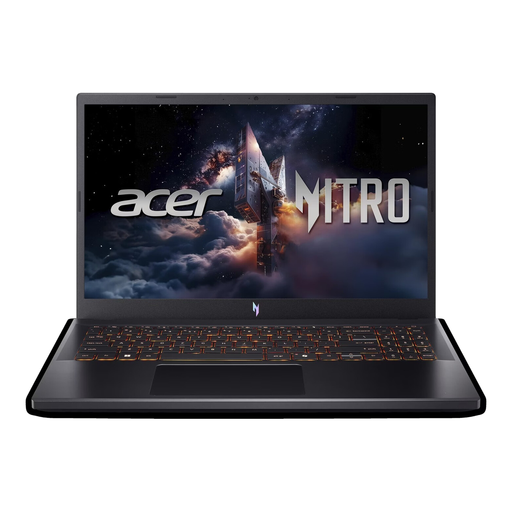
Acer Nitro V 15 ANV15-52-592S
These specifications are an option to compare for smaller or less complex Unity projects. Unity notes that larger projects need more memory.
16 GB DDR4 RAM, 512 GB SSD and NVIDIA RTX 5050 with 8 GB graphics memory.
15.6-inch Full HD display with 165 Hz, Windows 11 Home and Thunderbolt 4. The listing specifies a US keyboard layout, so check whether it suits your day-to-day use.
Joybuy
 No image available
HP OMEN 17 17-db1071ng
The 17.3-inch display is worth considering if you mostly work on maps at your desk.
16 GB RAM, 1 TB SSD and RTX 5050 with 8 GB graphics memory.
Full HD display with 144 Hz, AMD Ryzen AI 7 and Windows 11.
Joybuy
 No image available
THUNDEROBOT Radiant S16
The display format and stated resolution are worth considering for creating maps at your desk at home.
16 GB DDR5 RAM, 1 TB SSD and NVIDIA GeForce RTX 5060.
16-inch QHD+ display with 2560 × 1600 pixels and 240 Hz; AMD Ryzen 7 7745HX.
Joybuy
 No image available
ASUS ROG Strix G17
The stated large, matt display is worth considering for creating maps at a permanent desk setup.
16 GB RAM, 1 TB SSD and GeForce RTX 4060 with 8 GB graphics memory.
17.3-inch Full HD display with 144 Hz and matt finish; AMD Ryzen 9, Windows 11 and German QWERTZ keyboard layout.
Joybuy
Frequently asked questions
Do I always need 32 GB RAM to create my own game maps?
No, it depends on the editor and project size. Epic Games recommends 32 GB RAM for Unreal Engine on Windows, and the Blender Foundation recommends the same for Blender on Windows. Unity Technologies recommends at least 8 GB for the editor and notes that larger or more complex projects need more.
What should I check before setting up my map editor?
Check your editor's operating system requirements and whether the specific laptop configuration includes an operating system. For example, Lenovo describes the Legion 5 83F1004BGE configuration as a model without an operating system.
How can I keep my laptop well ventilated during long sessions at my desk?
Place it on a firm, level surface and keep the vents clear. Lenovo recommends cleaning dusty vents when the device is switched off; always follow the instructions for the model you actually buy.
Which compliance details matter for a Wi-Fi or Bluetooth laptop in Germany?
Look for the CE markings and compliance documentation that apply to the specific device. When carrying out market surveillance of devices with Wi-Fi or Bluetooth, the German Federal Network Agency checks, among other things, that the CE marking is correct and that a declaration of conformity is provided. A CE marking is a manufacturer's declaration, not an independent quality mark.
Can I return a laptop bought online in Germany?
In general, you have a right to cancel a distance-selling consumer contract; the Verbraucherzentrale gives 14 days as the standard period. You must notify the retailer or contracting party that you wish to cancel. Check whether an exception applies to your specific contract.


