What to consider when choosing
First, compare your games’ requirements with the exact configuration. Then check fan noise and performance modes under load, and finally measure the available space, including room for your mouse and cables.
| Priority |
What to look for when buying |
Who it matters most to |
| Fan noise while gaming |
Look for independent measurements for the exact configuration and performance profile; keep the ventilation openings clear. |
If I play in the evening while someone else in the room needs peace and quiet, noise under gaming load matters more than the name of a mode. Around 33% of consumers cite fan noise as their main concern. |
| Performance for the game you play |
Compare the official requirements for the game with the laptop’s CPU, GPU, RAM and desired resolution; recommended specifications don’t guarantee a particular frame rate. |
If I want to play specific historical games with my preferred graphics settings, I base my choice on their requirements. Around 27% of consumers cite gaming performance as their main concern. |
| Desk space and screen size |
Compare the case’s width and depth with your available desk space, leaving room for your mouse, cables and ventilation. |
If my laptop and mouse share a desk, I want enough room to work while still being able to see the maps clearly. Around 20% of consumers cite space as their main concern. |
| Specifications and keeping costs in check |
Compare the full model number, RAM, SSD, ports and included power supply; distinguish your statutory rights when goods are faulty from a voluntary warranty. |
If I haven’t set a budget for extras, I want to choose specifications that suit my games rather than pay for features I don’t need. Around 20% of consumers cite keeping costs in check as their main concern. |
For laptops with wireless technology sold in Germany, the relevant EU requirements and mandatory CE marking apply. Check the device identity and the manufacturer and compliance information; according to the European Commission, CE marking is not an independent safety guarantee.
Related products at Joybuy
These models offer 15.6-, 16- and 18-inch screen options, as well as different configurations for historical strategy games. Compare the model number with the specifications of the specific offer. For laptops with wireless technology sold in Germany, also check the relevant compliance information.
 No image available
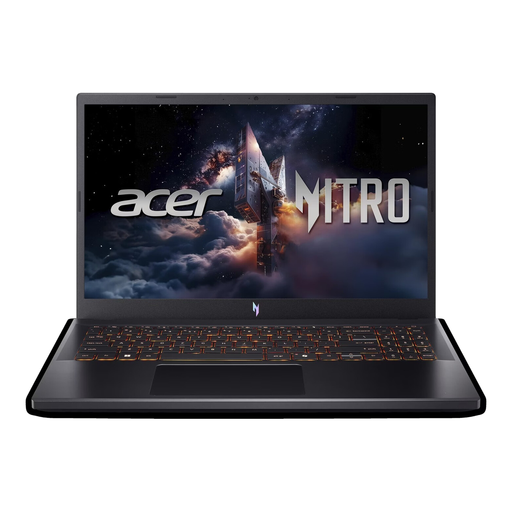
Acer Nitro V 15 ANV15-52-592S
The 15.6-inch screen is a smaller option if you need to balance screen size with room for your mouse and cables; also check the case dimensions.
15.6 inches, Full HD, 165 Hz; Intel Core i5-13420H; NVIDIA RTX 5050 8 GB; 16 GB DDR4; 512 GB SSD; Thunderbolt 4; Windows 11 Home.
The 16 GB RAM matches the published recommendation for Age of Empires IV from Age of Empires Support; this doesn’t guarantee a particular frame rate.
View at Joybuy
 No image available
HP OMEN 16-ap1099ng
The 16-inch version gives you a larger screen option; before choosing, compare its case dimensions with the space you have available.
16 inches; AMD Ryzen 9 8940HX; 24 GB RAM; 1 TB SSD; GeForce RTX 5070; Windows 11 Home.
Age of Empires Support recommends 16 GB RAM for Age of Empires IV. The higher RAM specification alone doesn’t guarantee a particular frame rate.
View at Joybuy
 No image available
HP OMEN 16-ap1071ng
At 16 inches, this model offers a larger screen; check that the laptop, mouse and cables will fit on the desk space available.
16 inches; 165 Hz; AMD Ryzen 7 8745HX; 16 GB RAM; 1 TB SSD; GeForce RTX 5060; Windows 11 Home.
The listed RAM configuration matches the recommendation for Age of Empires IV published by Age of Empires Support; it doesn’t guarantee a particular frame rate.
View at Joybuy
 No image available
MSI Thin 15 B13UC-3475NN
The 15.6-inch screen may suit you if you’re weighing screen size against the space needed for your mouse and cables; check the case dimensions separately.
15.6 inches, Full HD, 144 Hz; Intel Core i5-13420H; 16 GB RAM; 512 GB SSD; NVIDIA RTX 3050.
The 16 GB RAM matches the published recommendation for Age of Empires IV from Age of Empires Support; it doesn’t guarantee a particular frame rate.
View at Joybuy
 No image available
MSI Titan 18 HX Dragon Edition Draco Epic A2WJ-1218
The 18-inch display gives you a large screen, but needs plenty of space; measure your desk and check the case dimensions.
18 inches, UHD+, Mini LED, 240 Hz; Intel Core Ultra 9 290HX Plus; NVIDIA GeForce RTX 5090 24 GB; 96 GB DDR5; 4 TB SSD; Windows 11 Home.
Age of Empires Support recommends 16 GB RAM for Age of Empires IV. A higher RAM specification alone doesn’t predict a particular frame rate for this or any other game.
View at Joybuy
Frequently asked questions
Do I need a particularly powerful graphics card for every historical war game?
No, there’s no one-size-fits-all requirement for every title. Compare the official specifications for the game you want to play with the laptop’s full configuration. Age of Empires Support publishes separate minimum and recommended specifications for Age of Empires IV; the recommended configuration doesn’t guarantee a particular frame rate.
Will a ‘Silent’ mode make a laptop quiet enough to use in a bedroom while gaming?
Not necessarily. A manufacturer may document fan or performance modes, but that doesn’t tell you how noisy a specific laptop will be under gaming load. Compare independent measurements for the exact model number and performance profile, and keep the ventilation openings clear.
What should I measure before setting up in a shared room?
Measure the available desk space, including room for your mouse and cable routes. Then check the exact model’s width, depth, port positions and ventilation openings; screen size alone won’t tell you how much room the case needs.
What are my rights when buying a laptop online in Germany?
Consumers generally have a 14-day right to cancel an online purchase; the Verbraucherzentrale explains that you must notify the retailer of your cancellation. Your statutory rights if goods are faulty are separate from a voluntary manufacturer’s warranty.
What should I check on a laptop’s CE marking?
For a laptop with wireless technology, the relevant EU requirements and mandatory CE marking apply. Check the exact device number and the manufacturer and compliance information; according to the European Commission, the CE mark is not an independent safety guarantee.


