First, choose a laptop with a display finish and legibility suited to your bright window-side workspace, then check that the full specification meets your engine’s requirements. Germany’s Federal Institute for Occupational Safety and Health highlights distracting reflections on glossy screens. For straightforward 2D projects, you won’t necessarily need a particularly powerful dedicated GPU, while the Blender Foundation’s recommendations for RAM and graphics memory are relevant for more demanding 3D work. A high refresh rate is no substitute for a suitable display or for checking whether reflections are distracting in your own workspace.
Who is this selection for?
Level designers working by a window
If you mainly work on the built-in display in daylight, the finish and legibility of the specific display variant matter. Germany’s Federal Institute for Occupational Safety and Health discusses distracting reflections on glossy screens as an issue related to workplace lighting.
Developers of simple 2D puzzle levels
If you want to view your levels, tools and preview on one screen, check that the resolution and aspect ratio suit your editor. Choose components to match the requirements of the engine you actually use and the scale of your project.
Developers of complex 3D levels
If you model or test more demanding 3D scenes, check that the RAM, graphics memory and graphics interface match your software and project size. The Blender Foundation provides recommendations for Blender; they don’t apply universally to every puzzle level or engine.
What should you look for when buying?
Start by checking the display finish and legibility in your window-side workspace. Then choose a screen format and components to suit your editor, engine and project scope.
| Buying priority |
What to look for |
Who will find this most important? |
| Legibility by a window |
Compare the matte or anti-glare finish and stated brightness of the exact variant; Germany’s Federal Institute for Occupational Safety and Health highlights distracting reflections on glossy screens. |
If I work right next to a bright window, I want to see the controls and preview without distracting reflections; around 36% of consumers put window-side legibility first. |
| Space for the editor and preview |
Check the resolution, aspect ratio and screen size against the layout in your development software. |
If I arrange levels, tools and the preview on one screen, I need enough usable space; around 29% of consumers prioritise this space for 2D work. |
| Performance for development software |
Check the RAM, graphics memory and supported graphics interface against your engine, renderer and project scope. The Blender Foundation, Godot Engine Documentation and Unity Documentation describe requirements for different software and workloads. |
If I regularly work on complex 3D scenes, I check that the memory and graphics performance match my software; around 21% of consumers put performance for 3D projects first. |
| Flexible workspace setup |
Compare the laptop’s dimensions and the space needed for its power adapter and peripherals with the desk space available; check the ports against the full specification if needed. |
If I move my laptop between different workspaces, it needs to fit along with its accessories; around 14% of consumers prioritise a flexible workspace. |
Common buying mistakes
-
Assuming OLED, HDR or a high refresh rate means the screen will be easy to read by a window
According to ASUS, the documented ASUS ROG Zephyrus G16 GA605 variants have glossy OLED displays. Whether reflections are distracting also depends on the light and how the laptop is positioned.
Check the display finish against the full model number and consider where you plan to position the laptop in relation to the window. If possible, assess legibility under lighting similar to your own workspace.
-
Applying the demands of complex 3D work to every 2D puzzle level
The Godot Engine Documentation and the Blender Foundation cover different programmes and workloads. Recommendations for more complex 3D work aren’t automatically necessary for a simple 2D project.
First decide on your engine, renderer and project scope, then compare the RAM and GPU in the specific laptop configuration with your software’s requirements.
-
Assuming the name of a model range tells you the specification of every laptop in it
Even within the documented ASUS and MSI ranges, the GPU and other features can vary.
Check the full model number, display, RAM, GPU and operating system against the specific listing.
Relevant brands and model ranges
Lenovo
The documented LOQ-15AHP11 configuration is a useful point of comparison for a matte 15.3-inch display.
- For configuration 83TNCTO1WWDE2, Lenovo Germany lists a matte IPS display with 1920 × 1200 pixels, 300 cd/m² brightness and 16 GB RAM.
- A matte finish doesn’t guarantee good legibility in direct sunlight, so check how the laptop performs in your specific window-side setup.
HP
The OMEN 16-ap0798ng is documented as an anti-glare 16-inch option for a bright workspace.
- For configuration C65DFEA#ABD, HP lists an anti-glare IPS display with 2560 × 1600 pixels, 500 nits and 32 GB RAM.
- The stated brightness isn’t a measurement taken by your window and doesn’t guarantee a particular level of legibility there.
MSI
The documented Stealth 16 AI Studio A1V variants offer points of comparison for matte displays in a 16:10 format.
- MSI lists anti-glare displays, 2560 × 1600 pixels and 32 GB RAM for the A1VGG-038 and A1VFG-039.
- The variants differ in their laptop GPUs. Check the exact model number and whether the display suits your window-side workspace.
ASUS
The ROG Zephyrus G16 GA605 is a glossy OLED alternative if you can control the light in your workspace.
- ASUS lists a 16-inch OLED display with 2560 × 1600 pixels and a glossy finish for the GA605 variants shown.
- The GPU varies between configurations. Check the full model number and bear in mind that the glossy finish may reflect light from the window.
Acer
The Predator Helios Neo 16 AI PHN16-73-9816 is a documented 16-inch option for more demanding projects.
- For NH.QX3EG.00A, Acer lists 32 GB RAM, a 1 TB SSD and WQXGA at 240 Hz, among other specifications.
- Check the display finish and brightness of the full variant before choosing it for a bright window-side workspace.
Gaming laptops at Joybuy
This selection includes gaming laptops for designing levels on the built-in display, including models with plenty of screen space and variants specifically described as anti-glare or matte. Check the finish of the exact configuration before choosing one for your window-side workspace.
 No image available
MSI Titan 18 HX Dragon Edition Draco Epic A2WJ-1218
The stated 18-inch UHD+ Mini LED display provides plenty of room for levels, tools and previews on one screen.
The product title lists an Intel Core Ultra 9 290HX Plus, NVIDIA GeForce RTX 5090 with 24 GB, 96 GB DDR5, a 4 TB SSD and a 240 Hz refresh rate. Check the display finish of the specific variant for your window-side workspace.
View at Joybuy
 No image available
HP OMEN MAX 16-ah0698ng
The 16-inch display with 2560 × 1600 pixels is listed as a high-resolution workspace for your editor and preview.
The product title lists an Intel Core Ultra 9 275HX, 64 GB RAM, a 2 TB SSD, GeForce RTX 5090 with 24 GB, WQXGA at 240 Hz and Windows 11 Home. Check the display finish of the specific variant for your window-side workspace.
View at Joybuy
 No image available
HP OMEN MAX 16-ak0693ng
If reflections from a window are a concern, this variant is described as having a matte, anti-glare IPS display.
The 16-inch display offers 2560 × 1600 pixels in a 16:10 format. Other listed specifications include an AMD Ryzen AI 9 HX 375, 32 GB RAM, a 1 TB SSD, GeForce RTX 5070 Ti with 12 GB, 240 Hz and Windows 11 Home.
View at Joybuy
 No image available
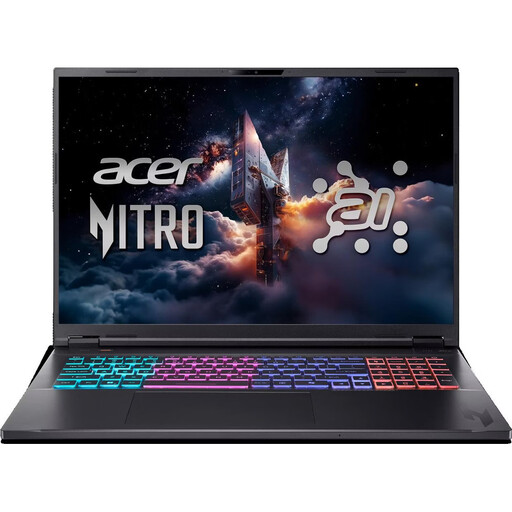
Acer Nitro 18 AI AN18-61-R40J
The anti-glare 18-inch IPS display offers 2560 × 1600 pixels in a 16:10 format, giving you plenty of room to design levels on the built-in screen.
The listed specifications include a Ryzen AI 7, 16 GB RAM, a 1 TB SSD and an RTX 5070. According to the product description, the RAM is expandable to 32 GB. For more demanding Blender work, the Blender Foundation recommends 32 GB RAM; check that this recommendation suits your project.
View at Joybuy
 No image available
MSI Katana A15 AI B8VG-459
The matte 15.6-inch IPS display is an option if you want to reduce reflections from a window, although legibility also depends on how the laptop is positioned.
The display offers Full HD. Listed specifications include an AMD Ryzen 9 8945HS, 16 GB RAM, a 1 TB SSD and an NVIDIA GeForce RTX 4070 with 8 GB. Compared with larger, higher-resolution displays, this configuration offers less room for your editor and preview. For more demanding Blender work, the Blender Foundation recommends 32 GB RAM.
View at Joybuy
Frequently asked questions
Do I need a particularly powerful gaming GPU for a simple 2D puzzle level?
Not just because of the type of project. The Godot Engine Documentation sets out different requirements depending on the renderer and project scope, so check your engine version and project against the full laptop specification.
What can I do if the window is reflected on my screen?
First, check the position of your laptop and your viewing angle in relation to the window, and see whether you can use a blind or another form of screening. Then check the finish of the exact display variant. Germany’s Federal Institute for Occupational Safety and Health describes glare from reflections on glossy screens and recommends avoiding distracting reflections when setting up a workspace; this workplace guidance is not a blanket purchasing requirement for private users.
How much RAM is useful for Blender models?
For more demanding 3D work, the Blender Foundation recommends 32 GB RAM. This isn’t a general minimum requirement for puzzle levels or other engines, so check the recommendation against your Blender version and project scope.
What rights do I have when buying a new laptop online from a business seller?
According to the Your Europe consumer information, a qualifying distance purchase generally comes with a 14-day right to cancel from the date of delivery, subject to legal exceptions. For faulty new goods, you have a statutory guarantee from the seller of at least two years; an additional manufacturer’s warranty does not replace it. Check the seller’s status and the specific returns terms.


