What should you look for when buying?
Start with your software and project size. Then compare the exact specifications and check that the screen, cooling and portability suit your shared workspace.
Simple 2D editor or small Godot project
A good fit if: You mainly arrange and label maps, or work on a small project in the Godot editor.
Trade-off: The documented requirements for simple projects don’t tell you what you’ll need for large projects, demanding games or several programmes open at once.
Unity project with occasional gaming
A good fit if: You’re developing your map in Unity and can check the configuration against both the version you use and the scope of your project.
Trade-off: Unity Technologies recommends at least 8 GB RAM for the Unity 6.3 editor; more complex projects may need more. Calling a laptop a gaming laptop doesn’t guarantee enough RAM for your project or a particular battery life.
Demanding Unreal or Blender work
A good fit if: You regularly create complex 3D scenes and can compare the exact configuration with your software’s recommendations.
Trade-off: For Windows, Epic Games’ recommendations for Unreal Engine 5.8 and the Blender Foundation’s recommendations for Blender each specify 32 GB RAM and 8 GB graphics memory for more demanding work. These are software-specific recommendations, not requirements for every quest-map laptop.
| Priority |
What to check when buying |
Who is it important to? |
| Performance for your engine and project |
Software version and project size; RAM and graphics memory in the full configuration. |
If I regularly work on demanding Unreal or Blender scenes, I want to choose the RAM and graphics memory to suit my software. For around 26% of consumers, performance for more complex projects comes first. |
| Keeping costs down without over-specifying |
Match the overall specification to the work you actually do; factor in any planned RAM or SSD upgrade. |
If I mainly work on simple maps, I don’t want to pay for specifications my editor doesn’t need. For around 21% of consumers, keeping costs down is the priority. |
| Noise in your room |
Check measurements for the exact model variant and operating profile. |
If I work in a shared room for long periods, I want to take noise under load into account. For around 16% of consumers, a quieter room is a key consideration. |
| Screen and desk space |
Compare the resolution and aspect ratio, as well as the dimensions of the full model variant. |
If my desk is small but I want to see the map and tool windows at the same time, the usable screen area needs to fit the space available. For around 16% of consumers, making sure the laptop suits their workspace is a priority. |
| Taking it to campus |
Consider the laptop’s weight and dimensions together with the power adapter and any equipment you need. |
If I regularly carry my laptop between my room and campus, I want to plan for everything I’ll need to take with me. For around 21% of consumers, regular portability is a deciding factor. |
Gaming laptops at Joybuy
This Joybuy selection includes gaming laptops for demanding 3D projects, as well as more compact options for travelling between your room and campus. Check the exact configuration and make sure it suits your software, available space and commute.
 No image available
HP OMEN MAX 16-ah0698ng
For demanding 3D projects, if you’re looking for plenty of RAM and graphics memory alongside a large display.
16-inch WQXGA OLED, 2560 × 1600 pixels; 64 GB RAM; 2 TB SSD; GeForce RTX 5090 with 24 GB graphics memory; 240 Hz; Windows 11 Home. Its specifications exceed the recommendations for more demanding work from Epic Games and the Blender Foundation.
View at Joybuy
 No image available
HP OMEN MAX 16-ak0693ng
For more demanding 3D projects, if you want to check the RAM and graphics memory against your software’s requirements.
16-inch WQXGA display in a 16:10 format, with 240 Hz; 32 GB RAM; 1 TB SSD; GeForce RTX 5070 Ti with 12 GB graphics memory. Epic Games and the Blender Foundation each recommend 32 GB RAM and 8 GB graphics memory for more demanding work.
View at Joybuy
 No image available
MSI Raider 18 HX A2WH-1088
For more demanding 3D projects, if you have space on your desk for a large screen.
18-inch, 2560 × 1600 pixels, 240 Hz; 32 GB RAM; 1 TB SSD; GeForce RTX 5070 Ti with 12 GB graphics memory. The laptop measures 404 × 308 mm and weighs 3,6 kg, which is worth bearing in mind if space is tight or you’ll be carrying it regularly.
View at Joybuy
 No image available
Acer Nitro V14 AI
For regular trips between your room and campus, if the smaller display and specific RAM configuration suit your project.
14,5-inch WUXGA, 1920 × 1200 pixels and 120 Hz; 16 GB RAM; 1 TB SSD; RTX 5050 with 8 GB graphics memory; stated weight 1,60 kg; Windows 11 Pro; English-International keyboard. Its 16 GB RAM is below the recommendations for more demanding Unreal or Blender work.
View at Joybuy
 No image available
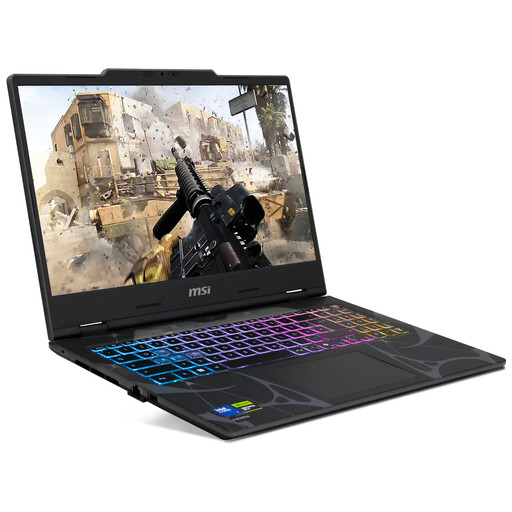
MSI Cyborg 15 B2RWEKG-067
For working on maps on your laptop, if a 15,6-inch display suits your workspace and 16 GB RAM is enough for your software.
15,6-inch Full HD with 144 Hz; 16 GB RAM; 512 GB SSD; RTX 5050 with 8 GB graphics memory. Its 16 GB RAM is below the recommendations for more demanding Unreal or Blender work.
View at Joybuy
Frequently asked questions
Do I definitely need a dedicated gaming graphics card for a simple 2D quest map?
No, not just because it’s a quest map. Godot Engine also lists supported integrated graphics for simple editor work. Choose based on your programme, its renderer and the size of your project.
Can I upgrade a laptop with 16 GB RAM later?
It depends on the exact model variant and which slots are occupied. ASUS lists the TUF Gaming A16 FA608UH-RV027W with two installed 8 GB modules and two RAM slots. Lenovo PSREF also lists two slots for the LOQ 15IRX10, but configurations aren’t consistent across all variants. Check the exact configuration and the conditions for carrying out any upgrades before buying.
What are my rights if I buy a laptop online and want to return it or it develops a fault?
As a general rule, when you buy online from a business seller, you have 14 days from receiving the goods to cancel your order. Exceptions and possible return costs may apply. Your statutory rights against the seller are separate from any voluntary manufacturer’s warranty.
What should I check to make sure a wireless laptop sold in Germany complies with regulations?
For products covered by relevant EU harmonisation legislation and placed on the EU market, Germany’s Federal Network Agency describes CE marking as a requirement. Check the details for the specific device; a general description of a product range doesn’t confirm that a particular variant complies.


