
Lieferung heute & morgen

Qualitätsgarantie

Willkommens-Angebote freischalten: KOSTENLOSE Lieferung | Bis zu 80 % RABATT | Kostenlose 30-Tage-JoyPlus-Testphase
App herunterladen
Choosing the right gaming mouse can be a challenge with the sheer number of models and technical specifications available. From DPI values and sensor technologies to ergonomic shapes, the details determine whether a model will enhance or hinder your in-game precision. This guide is designed to help you understand the key features and make an informed decision tailored to your individual needs.
As your Joybuy Product Recommendation Officer, I have compiled information on various models to provide you with clear and objective guidance.
Before you decide on a model, there are several fundamental criteria to consider. These will help you narrow down the selection to products that truly match your playstyle.
The sensor is the most critical component for tracking accuracy. Sensitivity is measured in DPI (Dots Per Inch). A high DPI value means the cursor travels a long distance on the screen with minimal physical mouse movement. While high values are often advertised, most gamers use settings between 800 and 3,200 DPI. More important than a maximum DPI value is a sensor that operates precisely at your preferred setting, without any smoothing or acceleration.
The Polling Rate, measured in Hertz (Hz), indicates how often the mouse reports its position to the computer. A standard value of 1000 Hz (a 1-millisecond response time) is sufficient for most gaming applications. Some esports-grade models offer higher rates, promising even lower latency.
A mouse must fit comfortably in your hand. The choice depends on your hand size and grip style (Palm, Claw, or Fingertip Grip). An ergonomically shaped mouse can reduce fatigue during long gaming sessions.
Weight is also a crucial factor. A lightweight gaming mouse (often under 80 grams) allows for quick, sweeping movements and is particularly valued in fast-paced FPS games like CS:GO or Valorant. In contrast, heavier mice can provide a sense of greater control and stability, which can be advantageous in other genres.
Modern wireless gaming mice are now virtually on par with their wired counterparts in terms of latency. Technologies like Logitech LIGHTSPEED or Razer HyperSpeed provide connections reliable enough for competitive play. The advantage lies in unrestricted freedom of movement without cable drag. Pay attention to battery life and charging options (e.g., via USB-C). Wired mice offer a consistently stable connection and never need to be charged, making them a worry-free option.
Here is a selection of models that cater to different needs and budgets.
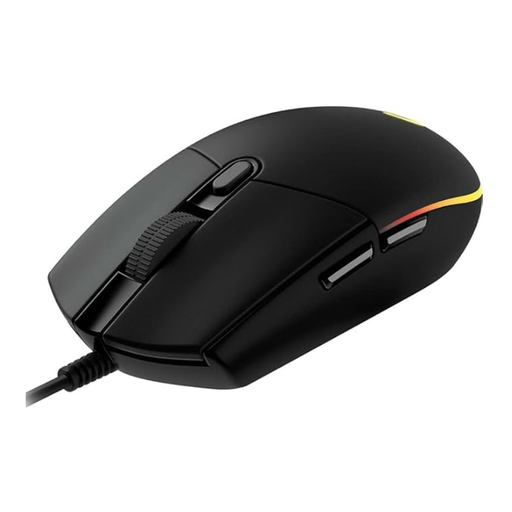
Why It Stands Out: The Logitech G102 is a solid entry-level model that offers proven technology at an accessible price. Its classic design and reliable performance make it a popular choice for gamers upgrading from a standard office mouse.
Pros:
Who Is It For? This model is ideal for beginners, casual gamers, and users on a limited budget who are looking for a reliable and functional budget-friendly gaming mouse.
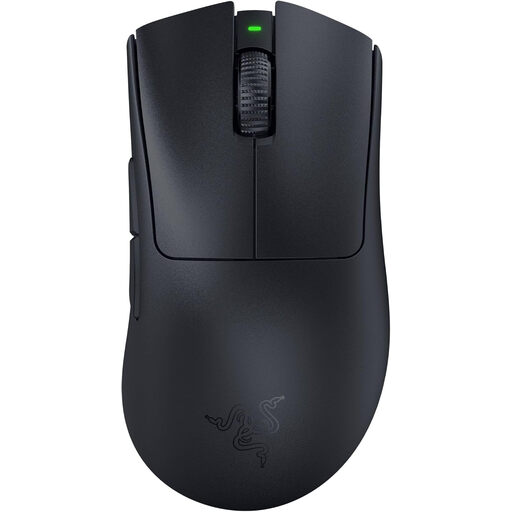
Why It Stands Out: The Razer DeathAdder V3 Pro is meticulously designed for low weight and ergonomic perfection for competitive play. At just 63 grams, it is one of the lightest ergonomic mice on the market.
Pros:
Who Is It For? This esports mouse is aimed at competitive gamers, especially in FPS titles, who seek maximum performance, an ergonomic shape, and the lowest possible weight.
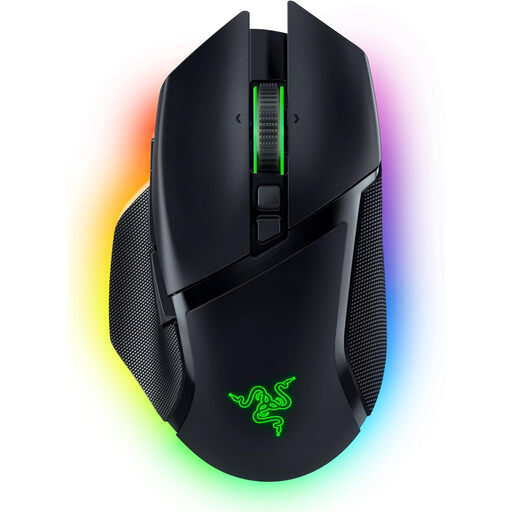
Why It Stands Out: The Razer Basilisk V3 Pro is a versatile powerhouse distinguished by its extensive customisation options. Its smart scroll wheel and numerous programmable buttons make it an all-rounder for various game genres.
Pros:
Who Is It For? Gamers who use a single mouse for a variety of genres and value maximum customisation, numerous buttons, and a pronounced RGB gaming mouse aesthetic.
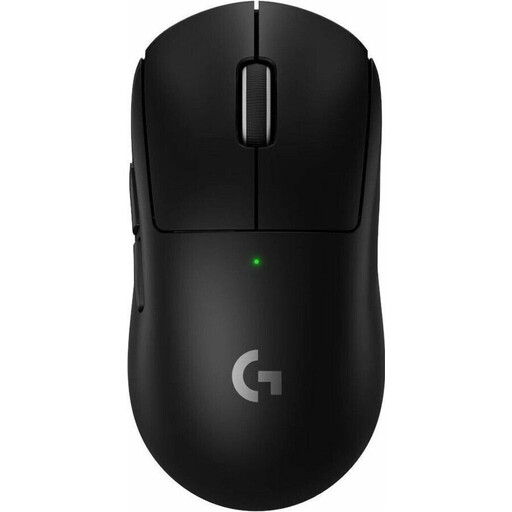
Why It Stands Out: As an evolution of a model established among pros, the SUPERLIGHT 2 focuses on uncompromising competitive performance. With a weight of just 60 grams and state-of-the-art sensor technology, it is designed for the highest demands.
Pros:
Who Is It For? This professional gaming mouse is the choice for ambitious and professional players for whom every gram and every millisecond counts. It is designed for maximum precision and speed in competition.
Haven't found the right model for you yet, or do you prefer a different design? Explore our wider selection and find more models in our category.
? Discover our entire selection of black mice here
1. What does DPI mean on a gaming mouse? DPI (Dots Per Inch) is a measure of the mouse sensor's sensitivity. A higher DPI value means the cursor moves further across the screen for the same physical movement of the mouse. Most gamers use settings between 800 and 3,200 DPI, as extremely high settings can be difficult to control. What's more important is a precise sensor that works reliably at your chosen setting.
2. Are wireless gaming mice suitable for competitive play? Yes. Modern wireless technologies from leading manufacturers like Logitech gaming mice (LIGHTSPEED) or Razer gaming mice (HyperSpeed) offer latency times that are virtually indistinguishable from their wired counterparts. Many esports pros now use wireless models for their greater freedom of movement.
3. What should I look for in a lightweight gaming mouse? With a lightweight gaming mouse (typically under 80g), balance and shape are just as crucial as the weight itself. The mouse should fit well in your hand and be well-balanced to allow for controlled movements. Also, look for a sturdy build, as some ultra-lightweight models can sacrifice structural integrity. PTFE feet (often referred to as Teflon) are also important, as they ensure a smooth glide.