What to look for when buying
Start by comparing shape and available movement space, then check connectivity and power. Only consider extra buttons if they’ll be genuinely useful in your game.
| Buying criterion |
What to check |
Who it matters most to |
| Fit and movement space |
Compare the mouse’s shape and dimensions with the free space beside your keyboard and the way you hold it. |
If there’s barely any room beside my keyboard, I need a shape that suits my hand and grip; around 36% of consumers prioritise fit and movement space. |
| Freedom from cables |
Check whether your device supports a USB receiver or Bluetooth and has a suitable port available. |
If a cable gets in the way in my limited movement area, I want to keep the mouse’s path clear; around 29% of consumers prioritise cable-free movement. |
| Easy-to-reach buttons |
Check whether the game lets you assign actions to buttons and whether you can reach them without an awkward change of grip. |
If my card game supports actions I use repeatedly, I want buttons I can reach easily; around 21% of consumers prioritise assignable inputs. |
| Power and ports |
Check whether it uses an AA battery or rechargeable battery, which ports you’ll need and, if relevant, whether you can use it while charging. |
If I want battery and charging to fit into my daily routine, I also check which ports I’ll need; around 14% of consumers prioritise power and connection requirements. |
Joybuy product selection
The following wireless mice from Joybuy are selected to help keep your movement area clear. Buttons, connection options and power sources vary by model.
 No image available
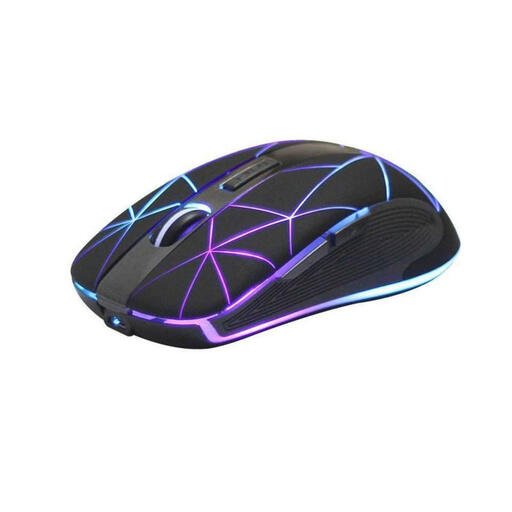
RM200 Wireless Optical Mouse
The wireless design can help keep an inconvenient cable out of the way.
The product name specifies five buttons, a rechargeable battery and USB charging.
Described as ergonomic and suitable for work and gaming.
View at Joybuy
 No image available
ATTACK SHARK X11 Wireless Gaming Mouse
For wireless gaming, provided you can match the connection options to your devices.
The title lists tri-mode connectivity via 2.4 GHz, Bluetooth and USB-C, five programmable buttons and a weight of 62 g.
According to the product name, the box includes an RGB charging dock and grip tape.
View at Joybuy
 No image available
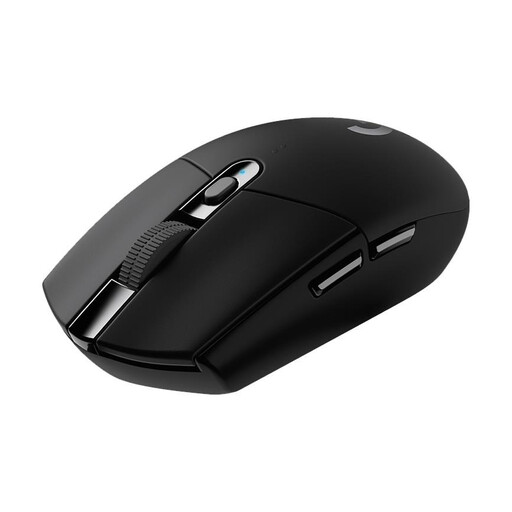
Logitech G305 LIGHTSPEED
The compact wireless design may suit you if you have a spare USB port for the receiver.
The product description lists six programmable buttons and a USB nano receiver; power comes from an AA battery.
Logitech G gives a battery life of up to 250 hours with an AA battery. This is the manufacturer’s figure, not a guarantee for every usage pattern.
View at Joybuy
 No image available
AJAZZ AJ200 AI MC Wireless Gaming Mouse
A wireless option to keep your mouse path clear; check which connection mode works with your device.
The title lists tri-mode connectivity via Bluetooth, 2.4 GHz and USB-C, and a weight of 63 g.
A charging dock is included, according to the product name.
View at Joybuy
 No image available
AULA SC620 Wireless Gaming Mouse
Wireless connectivity can help you avoid a cable getting in the way; check that the modes work with your device.
The product name lists Bluetooth 5.0, 2.4 GHz and USB-C, as well as seven programmable buttons.
The title also gives a weight of 67 g and a 400-mAh battery.
View at Joybuy
Frequently asked questions
Do I need an especially high maximum DPI for digital card games?
No. A high maximum DPI isn’t a must-have for card games. What matters is whether you can control the cursor across the space you actually have; check fit and usability separately.
What should I check before setting up a wireless mouse?
Check whether the mouse uses a USB receiver, Bluetooth or both, and whether your device supports the connection mode you want to use. Also check whether it takes an AA battery or has a rechargeable battery, and whether you need a spare port for connecting or charging it.
How should I dispose of an old mouse and its battery in Germany?
Electrical and electronic waste must be collected separately. The German Environment Agency recommends removing batteries before handing the item in, if they can be taken out easily by hand. Check with your local collection point about how to return it.
What are my rights if my mouse is faulty?
For consumer purchases from a trader in the EU, a two-year legal guarantee generally applies from the date you receive the goods, as explained by Your Europe, the European Union’s information portal. This is different from a voluntary manufacturer’s warranty.
What should I check on the labelling of a wireless model?
The German Federal Network Agency explains that the CE marking is the manufacturer’s declaration that the product complies with relevant EU requirements. Check the marking and required accompanying documents in the specific listing; a product description alone doesn’t prove conformity.


