What to consider when buying
The key is deciding what matters most during your gaming sessions. Check whether the mouse’s shape, controls and connectivity suit your particular setup.
| What matters |
What to check when buying |
Who it matters most to |
| Fit during long sessions |
Compare the shape and dimensions with your current mouse; consider your hand position and how easily you can reach the buttons. |
If I play for long periods, the shape and button placement need to suit my hand; around 33% of consumers are likely to prioritise fit. |
| Control when navigating |
Check how wheel movement and clicking the wheel are assigned in the game; compare notched, free-spinning and side-tilting wheels. |
When switching between the map overview and detailed views, I want to control scrolling precisely; around 27% of consumers are likely to prioritise navigation. |
| Frequently used commands |
Check the in-game button assignments, the position of the buttons and whether the specific model requires software. |
If I often use the same commands, I want to assign them to mouse buttons I can reach reliably; around 20% of consumers are likely to prioritise extra buttons. |
| Connectivity at your desk |
Check supported connection types, charging options and available USB ports; if you experience dropouts, consider the receiver’s placement too. |
With wireless headphones, I want to plan for freedom of movement, receiver ports and charging all at once; around 20% of consumers are likely to prioritise their wireless setup. |
Joybuy products for different setups
This selection includes wired and wireless gaming mice for different combinations of fit, scroll wheel, extra buttons and connectivity.
 No image available
Razer Basilisk V3 35K, wired
May suit you if you play at a fixed PC setup and want wired USB connectivity and extra buttons.
11 programmable buttons; optical sensor with 35,000 DPI; right-handed design; wired USB.
The right-handed shape and the space taken up by the cable should suit your desk.
View at Joybuy
 No image available
ATTACK SHARK X11, black
May suit you if you want to switch between wireless, Bluetooth and USB-C connections.
2.4 GHz, Bluetooth and USB-C connectivity; five programmable buttons; 22,000 DPI; 62 g; RGB charging dock.
The listed features include a charging dock for wireless use.
View at Joybuy
 No image available
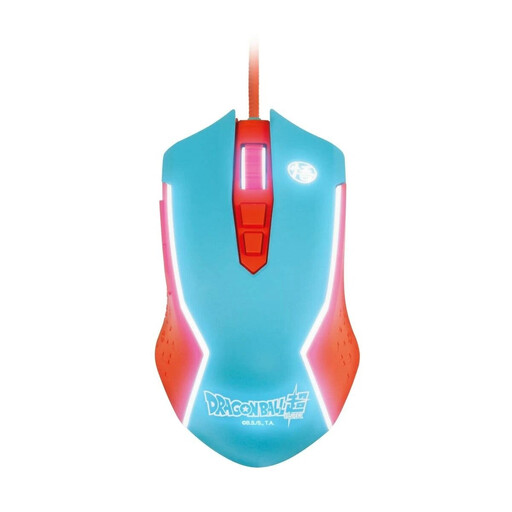
Blade Dragon Ball Goku wired gaming mouse
May suit you if you are looking for a wired gaming mouse for a fixed PC setup.
Wired PC mouse.
View at Joybuy
 No image available
Razer Naga V2 HyperSpeed
May suit you if you want to assign frequently used game commands to several mouse buttons.
19 programmable buttons; 2.4 GHz wireless and Bluetooth; optical Focus Pro 30K sensor; runs on one AA battery; up to 250 hours according to the product name.
According to the product description, this model is designed for right-handed users and runs on batteries.
View at Joybuy
 No image available
AULA SC620 wireless gaming mouse, white
May suit you if you want to switch between wireless connections and USB-C and assign functions to extra buttons.
Bluetooth 5.0, 2.4 GHz wireless and USB-C; seven programmable buttons; 400 mAh battery.
View at Joybuy
Frequently asked questions
Do I need a particularly high DPI for colony-building games?
A high maximum DPI figure on its own does not prove that it will improve your control in a game. Check the fit and controls first, then set the pointer speed so you can navigate reliably in the game you play. Logitech describes the G502 HERO as having adjustable DPI settings.
How do I set up extra buttons?
First, check which commands the game supports. Factorio’s official controls overview explains that button assignments can be changed; Logitech says that G HUB can be used to programme the G502 HERO’s buttons. Assigning a command in the mouse software does not guarantee that every game will support the action you want.
What should I check if my mouse and wireless headphones both cut out at the same time?
Do not assume that mice and headphones are generally incompatible. If you have a wireless mouse, first check its battery level and connection. Logitech Support also recommends trying a different position for the USB receiver if the mouse cuts out, and keeping other wireless devices away from it. These are troubleshooting suggestions, not a guarantee for every device combination.
What are my rights if a mouse bought online is faulty?
For new goods, the Verbraucherzentrale explains that your statutory rights apply for two years from receipt. These rights are against the seller and are separate from a voluntary warranty. Online purchases also generally come with a 14-day right to cancel from the date you receive the goods; you must notify the retailer that you wish to cancel.
How should I dispose of an old gaming mouse and its battery?
In Germany, electrical waste must not go in household rubbish. The Umweltbundesamt lists local collection points and retailer take-back schemes. If you can remove batteries or rechargeable batteries easily, separate them before returning the mouse and take them to an appropriate collection point.


