Frequent scrollers
If you often navigate long views or menus, a mouse with different scroll modes could be worth considering. Logitech describes these modes for the G502 X Wired, while Razer lists two scroll modes for the Basilisk V3.


Start by thinking about how you play: if you scroll frequently and use the same commands repeatedly, the right scroll-wheel modes and easy-to-reach buttons matter more than an especially high DPI figure. If a cable restricts where you can sit, a wireless connection could be the deciding factor. Also check how the mouse fits your hand, its connection type and whether your particular game supports the button assignments you want. Manufacturer specifications alone don’t prove that a mouse will improve your gameplay.
If you often navigate long views or menus, a mouse with different scroll modes could be worth considering. Logitech describes these modes for the G502 X Wired, while Razer lists two scroll modes for the Basilisk V3.
If you want to trigger recurring, game-supported commands without changing your grip, look for extra buttons that are easy to reach. Logitech, Razer and Corsair all list programmable controls for the models featured here.
If you play on a big screen from a distance, check whether a cable could restrict where you sit or how freely you can move. With a wireless model, also consider the connection and power requirements of the specific mouse.
First, decide whether navigation, recurring commands, how the mouse fits your hand or freedom of movement at your desk matters most. Then compare the features of the specific models.
| What matters | What to check | Who is it important to? |
|---|---|---|
| Scroll wheel and navigation | Check whether the scroll modes suit your game’s menus and views. | If I often switch between large views and individual menu items, I want to be able to adjust the scrolling to suit. Navigation is the top priority for around 27% of consumers. |
| Easy-to-reach extra buttons | Count the commands you use regularly and check that your game and software support the assignments you want. | I want to trigger frequent, supported commands without having to change my grip. Assigning these commands is the most important buying consideration for around 27% of consumers. |
| How it fits your hand | Compare the shape of the mouse, your grip and the position of the side buttons. | During longer gaming sessions, I want to reach the buttons comfortably rather than choose a mouse based simply on its button count. How a mouse fits the hand comes first for around 26% of consumers. |
| Connection and freedom of movement | Check the cable route or, for a wireless mouse, the connection and power requirements of the exact model. | If I sit further from my PC, I want to move freely without a mouse cable getting in the way. Freedom of movement is the top priority for around 20% of consumers. |
Models with similar names can differ in their exact model, connection and features. Always compare the full model name and details for the specific version.
Check the product details and compare the model name and connection with the manufacturer’s specifications.
The stated button count doesn’t tell you whether the buttons suit your grip or whether your game supports the commands you want.
First, list the actions you actually use regularly, then check the button positions and assignment options.
A cable can limit where you position yourself. With a wireless mouse, you’ll also need to consider the connection and power requirements of the version you choose.
Before choosing a connection type, check how far you sit from your PC, how much room you have to move and which ports are available.
The G502 X Wired combines a switchable, tilt-enabled scroll wheel with assignable controls for desktop gaming.
The wired Basilisk V3 combines several programmable buttons with different scroll-wheel modes.
The Aerox 5 Wireless is a wireless option with several extra buttons.
The SCIMITAR ELITE WIRELESS is an option for players who need plenty of thumb buttons after checking their in-game commands.
The wired Pulsefire Core is worth comparing if seven programmable buttons are enough for you.
This selection includes wired and wireless gaming mice with programmable buttons and, in some cases, multiple scroll-wheel modes – for navigation, recurring commands and different seating distances.
 No image available
A wireless option if you’d like more freedom of movement at your desk.
The title lists five programmable buttons, along with 2.4 GHz, Bluetooth and USB-C connections. An RGB charging dock is also listed in the title.
 No image available
This wireless model is worth considering if you want to compare extra buttons with the freedom to sit without a cable getting in the way.
The product description lists seven programmable buttons. The title lists Bluetooth, 2.4 GHz and USB-C; the description specifies a 400 mAh battery.
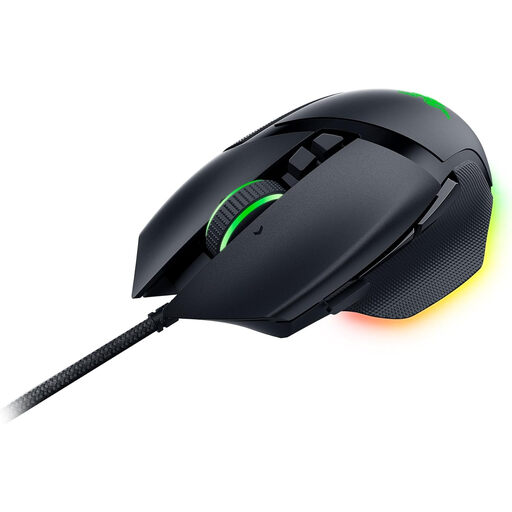
 No image available
A wireless option for switching frequently between scroll modes and recurring commands.
The description lists 13 programmable controls and a scroll wheel with free-spin and ratchet modes. The built-in battery charges via USB-C.
 No image available
A wired option if you want to use multiple scroll modes and programmable buttons at your desk.
The description lists 11 programmable buttons and a scroll wheel with two modes. It also specifies a 2.1 m USB cable and adjustable weights.
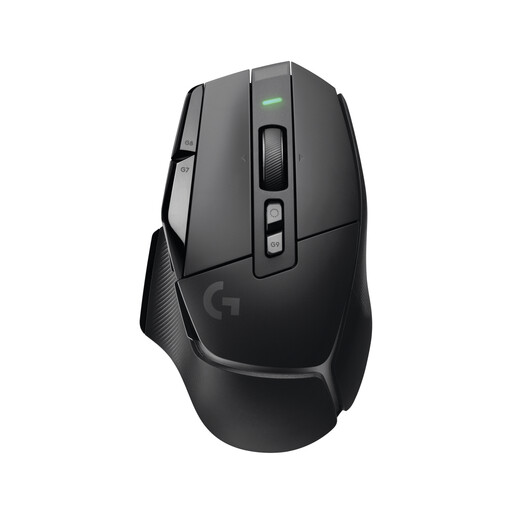
 No image available
This wired option combines several scroll modes with programmable buttons.
The description lists 11 programmable buttons and a tilt-enabled wheel with free-spin and tactile modes. It also specifies a USB connection and a right-handed shape.
No. Screen size alone doesn’t call for a particular DPI setting. Adjust the pointer speed to suit your screen and seating position, then consider the scroll wheel, buttons and fit separately.
That depends on whether your game supports the input and assignment you want. Manufacturers such as Logitech and Razer list programmable buttons; check the game settings to see whether you can assign the specific building action.
Logitech says the USB-A cable connects to your PC and G HUB software is used for customisation. Check that you have an accessible port and enough room for the cable at your gaming spot.
Check that the connection type suits the distance and layout of your setup, and find out how the specific model is powered. For models with a battery, also check the charging port.
No. Check the full model name, as well as the connection and features of the specific version. For example, the Basilisk V3, Basilisk V3 35K and Basilisk V3 Pro are different models.