Joybuy products
This selection includes gaming mice for movement-focused play, extra assignable buttons and different connection and control preferences.
 No image available
Razer Viper V3 Pro Wireless, white
For quick mouse movements and a few directly assignable commands, the listing specifies six programmable buttons.
The listing specifies 54 g, a Focus Pro 35K sensor, 8000 Hz, third-generation optical switches and USB-C charging.
Joybuy
 No image available
Razer Basilisk V3 35K, wired, black
For extra game commands and customisable controls, the description specifies 11 programmable buttons.
The description specifies USB, a two-mode scroll wheel and up to five saved profiles. The right-handed shape with a thumb rest is a product specification, not a guarantee of fit.
Joybuy
 No image available
Logitech G PRO X2 SUPERSTRIKE LIGHTSPEED Wireless
For movement-focused play with a few assignable buttons, the description specifies five programmable buttons.
The description specifies 61 g, a HERO 2 sensor and USB-C charging. It also lists adjustable actuation points and trigger reset for clicking.
Joybuy
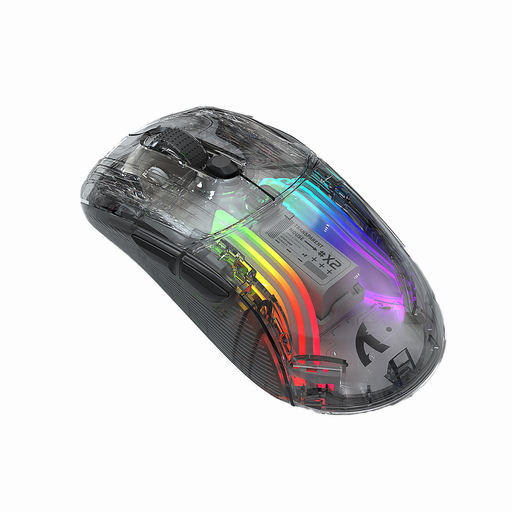 No image available
KINSI X2 Wireless Bluetooth Mouse, three modes
The description specifies a symmetrical shape and several connection options; check whether they suit your hand position and device.
The listing specifies 2.400 DPI, rechargeable power, RGB lighting and a transparent casing. ‘Silent’ isn’t a comparable noise measurement.
Joybuy
 No image available
Razer Naga V2 HyperSpeed
For a few directly assignable game commands, the description mentions profiles for games; check whether the specific button layout meets your needs.
The title specifies wireless 2.4 GHz and Bluetooth connectivity. The description specifies a LIGHTSPEED receiver, a HERO sensor and an AA battery.
Joybuy
Frequently asked questions
Do I need as many mouse buttons as possible for a historical strategy game?
No. What matters is which commands you actually use often and what the game lets you assign. Age of Empires Support documents freely assignable keyboard shortcuts and notes that assignments can conflict; this doesn’t mean you can assign every in-game action to a mouse button.
How do I set up extra buttons and profiles?
First, check the software and requirements for the exact model, then assign only the commands you need. Razer documents configuration of the Basilisk V3 35K through Synapse 4; for the M50 Wireless, CHERRY XTRFY specifies five customisable onboard profiles and Windows 10 or later as a software requirement.
Are headphones a reason to buy an especially quiet mouse?
Not on their own. Click noise may matter if it disturbs others in the room or is picked up by an open microphone. If so, check the clicks of the specific model and your microphone settings separately; there are no comparable click-noise measurements for the gaming mice mentioned here.
What ongoing costs and consumer rights should I be aware of?
A wireless mouse may need charging or, where applicable, a battery change, so check the power supply for the specific model. Your Europe explains that goods bought by consumers from traders in the EU come with a minimum two-year legal guarantee from receipt. For a typical online purchase, you generally have a 14-day right to cancel, subject to legal exceptions; this is separate from any additional manufacturer’s guarantee.
What should I know about wireless mice and disposal?
For products covered by the relevant EU harmonisation legislation, Germany’s Federal Network Agency describes CE marking as a requirement; the mark isn’t an independent performance test. The German Environment Agency advises against disposing of electrical equipment in household waste. Where possible, removable batteries should be taken separately to battery collection points.


