For puzzle adventures at a small desk, the first thing to consider is whether the gaming mouse suits your hand and the space you have to move it around. High DPI or polling rate figures alone won’t determine which one is right for you. A wireless mouse keeps its cable out of the way, but depending on the model, you may need to manage charging or batteries, and it may come with a receiver. A wired mouse doesn’t need charging, but you’ll need to make sure its cable can move freely – and “mini” doesn’t guarantee a good fit.
Which mouse considerations matter to you?
Gamers with limited mouse space
If your keyboard and other items share a small desk, what matters most is whether you can move the mouse with control. A wireless model can get an obstructive cable out of the way, but you’ll still need to check that it fits your hand.
Gamers with specific fit requirements
For longer puzzle and menu sessions, it’s worth considering the shape of the mouse, button placement and your grip together, rather than comparing sensor specifications alone. A compact or adjustable design can be a starting point for trying it out, but it’s no guarantee of comfort.
Gamers sharing a computer setup
If you switch between devices or use your desk for other things too, check that the mouse supports the connection types you need. Also make sure the settings you need are available on your device.
What to look for when buying
First, measure the space you actually have for moving your mouse and check how it fits your hand. Then you can weigh up wired and wireless options, and their power requirements, to suit your setup.
| What matters |
What to check before buying |
Who it matters most to |
| Room to move |
Compare the mouse’s size with the space you have available. For a wired mouse, check that the cable can pass your keyboard without pulling. |
When my keyboard and other items take up space, I want to be able to move my mouse freely. Around 36% of shoppers put having clear space first. |
| Fit and button placement |
Check that the shape and buttons suit your hand and grip. For adjustable designs, consider whether the available shapes feel comfortable to you. |
If you use your mouse for long periods, you’ll want to reach the buttons and scroll wheel comfortably, rather than simply choosing a small model. Fit is the main consideration for around 29% of shoppers. |
| Connection to your gaming device |
Check that the connection types supported match your device’s ports. With a wireless mouse, allow space for a receiver if needed, and check Bluetooth and software compatibility. |
If I switch between devices, I need a connection that works with all of them. Connection is the deciding factor for around 21% of shoppers. |
| Ease of use |
Check the power requirements and what’s included. For wireless models, consider how they charge or whether the batteries need replacing; for wired models, check the cable routing. |
If you want to avoid charging, batteries or extra setup, remember to factor in the ongoing effort involved. Ease of use is the main consideration for around 14% of shoppers. |
Common misconceptions
-
“Mini” means comfortable for every hand
A compact mouse can save space, but that alone doesn’t tell you whether its shape and button placement will suit your hand.
Compare the shape and button positions with your hand. If you’re buying online, check the cancellation terms that apply to your purchase beforehand.
If the grip or button placement doesn’t suit you, you may need to look for another model.
-
Wireless means no maintenance or accessories
A wireless mouse keeps its cable out of your moving space, but depending on the model, it may need a power source and a receiver.
Check the specific model to see how it’s powered, whether you can use it while charging by cable and what’s included.
Depending on the model, you may need to charge it or replace the batteries. A wireless receiver may also take up a USB port.
-
Taking a retailer’s description as a model feature without checking
ASUS lists a Li-Ion battery for the ASUS ROG Harpe Ace Aim Lab Edition, while a Joybuy product description mentions an AAA battery.
Before buying, check the full model name, power requirements and what’s included against the manufacturer’s information for that exact model.
Brands and designs to help you choose
Razer
The wired Razer Cobra has a compact design for right-handed users, making it an option if you’d rather have a cable than go wireless.
- Razer describes this model as having a compact body, flexible cable and adjustable sensitivity.
- The shape is no substitute for trying it in your hand, and the cable will still be part of your desk setup.
HyperX
According to HyperX, the Pulsefire Haste 2 Mini Wireless is aimed at gamers looking for a small wireless mouse with several connection options.
- HyperX lists 2.4 GHz wireless, Bluetooth and the ability to play while charging via USB cable.
- The mini design won’t automatically suit every hand. The battery life of up to 100 hours quoted by HyperX is the manufacturer’s maximum figure.
SteelSeries
The Rival 3 Gen 2 is a wired alternative if you don’t want a mouse with a battery.
- SteelSeries describes this model as having a symmetrical, right-handed shape and PTFE feet.
- The product information doesn’t describe the mouse as especially small. Check the space it needs and how it fits your hand separately.
CHERRY XTRFY
The M42 RGB Wireless has an adjustable shell, giving you the option to try different fits.
- CHERRY lists 2.4 GHz wireless and two interchangeable shells in different sizes for this model.
- Two shell shapes don’t guarantee a comfortable fit, and Bluetooth isn’t mentioned in the product description for this model.
ASUS ROG
The ROG Harpe Ace Aim Lab Edition offers several connection options in one model.
- ASUS lists dimensions of 127.5 × 63.7 × 39.6 mm and USB, Bluetooth and 2.4 GHz wireless connectivity for this model.
- Make sure its length suits your hand and your small desk. ASUS lists a Li-Ion battery, while a Joybuy product description mentions an AAA battery. Check the power requirements on the specific listing.
Joybuy products
The following Joybuy listings include wired and wireless gaming mice. For your small desk, the main things to consider are fit, cable management and power requirements.
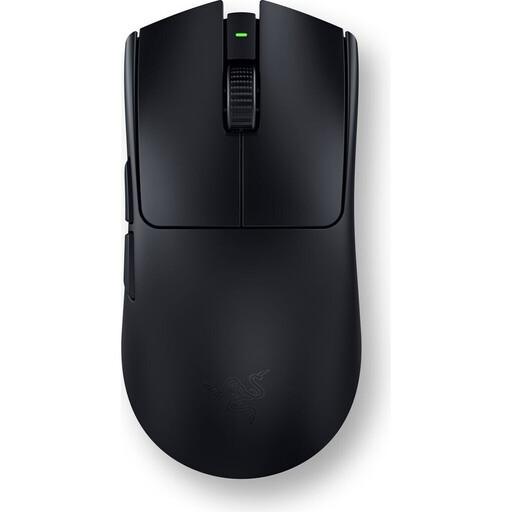 Image unavailable
Viper V3 Pro – Black
A wireless connection could be a good fit if a mouse cable gets in the way on your small desk. The description also says it has an ambidextrous design.
View at Joybuy
 Image unavailable
HyperX Pulsefire Haste 2 Wired – White
If you want to avoid charging a mouse, its USB cable is the key difference. Route the cable so it doesn’t get in the way of your movements.
View at Joybuy
 Image unavailable
Razer Naga V2 HyperSpeed – Black
This wireless MMO mouse could suit you if you want extra button assignments; the product description lists 19 programmable buttons. It takes one AA battery.
View at Joybuy
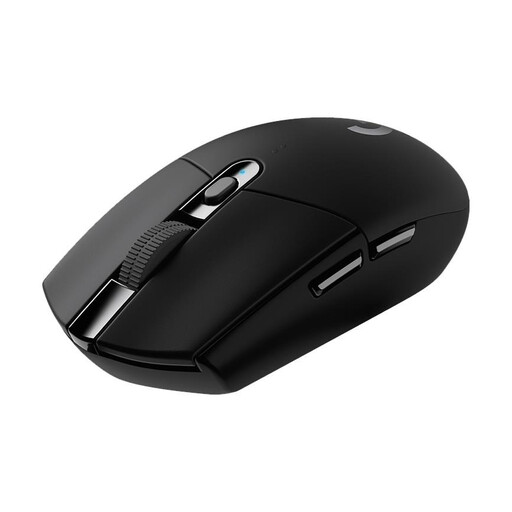 Image unavailable
Logitech G305 LIGHTSPEED – Black
The wireless connection and nano receiver can keep the mouse area clear of cables. The product description lists an AA battery; also check that you can connect the receiver to your device.
View at Joybuy
 Image unavailable
AJAZZ AJ200 AI MC Wireless Gaming Mouse – 63 g, Tri-Mode
The product name lists Bluetooth, 2.4 GHz and USB-C as connection options. The product description says the shape is suited to medium to large hands, so check that it fits yours.
The product name also lists a weight of 63 g and up to 24,000 DPI. High DPI figures alone don’t tell you whether you’ll be able to control the pointer comfortably across your available space.
View at Joybuy
Frequently asked questions
Do I need especially high DPI or polling rates for puzzle adventures?
No. High figures alone don’t prove that a mouse is better for puzzle adventures. Start by choosing a shape that suits you, buttons you can reach easily and a pointer speed you can control in the space you have.
How do I set up a wireless mouse at a small PC desk?
First, check which connection options the specific model supports and whether your device has the USB port or Bluetooth it needs. HyperX lists a 2.4 GHz receiver, Bluetooth and charging via USB cable while in use for the Pulsefire Haste 2 Mini Wireless. For button customisation, the manufacturer recommends NGENUITY.
What should I bear in mind when buying online and if the mouse develops a fault later?
For a typical online purchase in Germany, you generally have a 14-day right to cancel, although exceptions may apply; you must notify the seller that you wish to cancel. The Verbraucherzentrale distinguishes between your statutory rights against the seller and a voluntary guarantee. For wireless mice, also check the power requirements and what’s included for the specific model.
Can I put an old gaming mouse in household waste in Germany?
No. Under § 10 ElektroG, end users must ensure that waste electrical equipment is collected separately from unsorted household waste. The Umweltbundesamt lists recycling centres as one way to dispose of it; removable batteries should be taken out and disposed of separately where possible.


