If someone else needs to sleep, look for switches explicitly described as quiet on the specific model. The CHERRY GENTIX SILENT is one example, but it’s a three-button office mouse, not a gaming mouse confirmed to be quiet. For space games with commands you use frequently, a gaming mouse with programmable buttons could be a good fit. However, extra buttons don’t mean quiet clicks, so check the noise claims, button layout and fit separately.
Who is this selection of gaming mice for?
Considerate late-night gamers
If you share a room with someone who needs quiet, click noise and lighting often matter more than extra buttons. CHERRY describes the switches on its three-button GENTIX SILENT as quiet, but doesn’t make that claim about gaming mice in general.
Gamers with lots of commands
If you want to trigger space game actions directly from your mouse, check the in-game controls and the position of any programmable buttons. Roberts Space Industries describes customisable key bindings for Star Citizen, and some gaming mice offer extra controls.
Gamers with limited space
If cables or visible lights could be a nuisance in a shared room, check the connection options and lighting on the specific model. CHERRY lists several connection options for the M50 Wireless and says the M8 Wireless has no lighting.
Which buying criteria matter in a shared bedroom?
First, consider whether a quiet room, quick access to in-game commands, fit or connectivity matters most to you. Roberts Space Industries describes customisable key bindings for Star Citizen, making the mouse’s button layout an important point to check.
| What matters |
What to check before buying |
Who is it important to? |
| Click noise and lighting |
Check the switch information and lighting for the full model; don’t assume a gaming mouse will have quiet clicks. |
If someone else is sleeping in the room, I want to keep clicks and lighting as unobtrusive as possible. Around 33% of shoppers in this situation would prioritise a quiet environment with minimal disruption from clicks or lights. |
| Access to in-game commands |
Compare the in-game controls with the number and position of programmable buttons on the specific model. |
If I want to trigger frequent actions directly from the mouse, I need to be able to assign them sensibly and reach the buttons with my usual grip. Around 27% of shoppers in this situation would prioritise access to in-game commands. |
| Fit during longer sessions |
Check whether the mouse is suitable for your hand, its dimensions and how easily you can reach the side buttons on the specific model. |
During longer gaming sessions, I want to reach the buttons with my usual grip without constantly having to adjust my hand. Around 20% of shoppers in this situation would make fit their most important criterion. |
| Connectivity and power |
Check whether the full model uses a cable, wireless connection or Bluetooth, as well as its power requirements and what’s included. |
If cables get in the way by the bed or desk, I need a suitable connection and charging solution for a shared room. Around 20% of shoppers in this situation would prioritise connectivity and power. |
Common buying misconceptions
-
Lots of gaming buttons don’t automatically mean quiet clicks
Quiet switches are specified for the three-button CHERRY GENTIX SILENT office mouse. Extra controls on gaming models, on the other hand, tell you nothing about how loud their clicks are.
If a quiet night matters, check the switch information for the full model first, then see whether it supports the in-game controls you need.
-
Mice with similar names aren’t interchangeable
Wired and wireless versions can differ in their connection options and controls. For example, information about the Basilisk V3 35K doesn’t automatically apply to the Basilisk V3 Pro 35K or V3 X HyperSpeed.
Check the full model name, connection options and what’s included rather than assuming features carry over from one version to another.
-
Wireless doesn’t mean maintenance-free
Wireless mice need a suitable power source. Depending on the model, you may need batteries, a spare rechargeable battery or separate charging accessories.
Before buying, check how the specific model is powered and what’s included in the box.
Also consider how you’ll power the mouse during longer gaming sessions and whether you’ll need accessories or spare batteries.
Brands to consider
CHERRY / CHERRY XTRFY
The product ranges take different approaches to quiet workspaces and gaming setups.
- CHERRY describes the GENTIX SILENT as a three-button mouse with specially designed quiet switches. The XTRFY M50 Wireless offers wired, 2.4 GHz wireless and Bluetooth connections; the M8 Wireless has no lighting.
- The quiet-switch information doesn’t apply to the gaming mice mentioned here. Multiple connection options and the lack of lighting don’t prove that clicks are quiet either.
Razer
Basilisk models vary in their connectivity and controls, depending on the full version.
- Razer describes the wired Basilisk V3 35K as having customisable controls and different scroll modes.
- This information doesn’t confirm quiet clicks and doesn’t automatically apply to the wireless Basilisk V3 Pro 35K or V3 X HyperSpeed.
Logitech G
The G502 HERO and G502 LIGHTSPEED offer different connection options.
- Logitech G lists programmable buttons for the G502 HERO and documents wireless connectivity and POWERPLAY compatibility for the G502 LIGHTSPEED.
- Check connectivity and charging accessories for the specific model. The information doesn’t confirm that G502 models have quiet clicks.
SteelSeries
The Aerox 5 Wireless could be a good option if its programmable buttons suit the controls you want to use in your game.
- SteelSeries lists nine programmable buttons for the Aerox 5 Wireless.
- The number of buttons doesn’t guarantee that they’ll be comfortable for every hand or that the clicks will be quiet.
Joybuy gaming mice for space games
This selection features gaming mice for setups where extra, customisable in-game actions matter. Click noise, lighting and fit are still worth checking for each model.
 No image available
NAXSIR 3-in-1 gaming mouse, black
The programmable macro buttons mentioned in the product name could be useful for frequently used in-game commands.
7 programmable macro buttons; wired, 2.4 GHz wireless or Bluetooth; RGB lighting.
The product’s claim about quiet microswitches isn’t a noise test for bedroom use; the RGB lighting could bother someone who is sensitive to light.
View at Joybuy
 No image available
Razer Naga V2 HyperSpeed
If you want to assign lots of actions to mouse buttons, the product name specifies 19 programmable buttons.
2.4 GHz wireless and Bluetooth; up to 250 hours of battery life according to the product information; Focus Pro 30K optical sensor.
This model is designed for right-handed users and uses an AA battery.
View at Joybuy
 No image available
AULA SC620 wireless gaming mouse, white
The programmable buttons mentioned in the product name could suit a setup with customisable in-game actions.
7 programmable buttons; Bluetooth 5.0, 2.4 GHz wireless or USB-C; 67 g; 400 mAh battery; RGB lighting.
The RGB lighting could be a consideration if someone in the room is sensitive to light.
View at Joybuy
 No image available
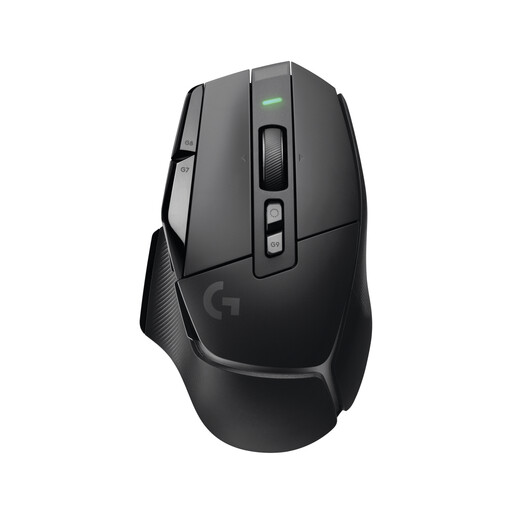
Logitech G G502 X LIGHTSPEED
This wireless gaming mouse could be a good option if you want to avoid cables in your setup.
The product name identifies this model as a wireless gaming mouse.
View at Joybuy
 No image available
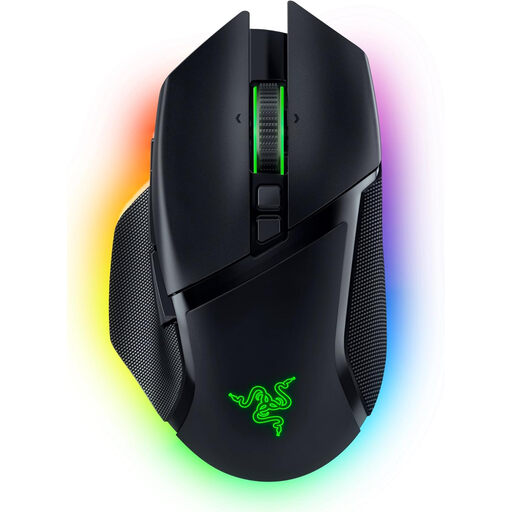
Razer Basilisk V3 Pro, black
If you want to control different in-game actions with your mouse buttons, the product description lists 10+1 programmable buttons.
2.4 GHz wireless, Bluetooth and USB-C wired connectivity; tiltable HyperScroll wheel; 13 RGB lighting zones.
The RGB lighting could be a consideration if someone in the room is sensitive to light.
View at Joybuy
Frequently asked questions
How do I set up mouse buttons for Star Citizen?
Roberts Space Industries Support explains how to customise controls in the key bindings menu. There, you can select an input device, change bindings and view any conflicts. Then check that the actions you want are triggered as intended.
Does a high DPI rating automatically make a mouse suitable?
No. A high DPI rating on its own won’t tell you whether a mouse is suitable for a shared bedroom. Also check the click noise, how easy the buttons are to reach, the fit and the lighting on the specific model.
What should I look out for with a wireless mouse?
Check whether the specific model uses a rechargeable battery or replaceable batteries, which connection options it supports and whether the necessary charging accessories are included. The German Environment Agency recommends checking whether rechargeable batteries can be replaced and whether replacements are available.
What rights do I have when shopping online in Germany?
Consumers generally have a statutory right to cancel a distance contract. Sections 312g and 355 of the German Civil Code (BGB), as published by the Federal Ministry of Justice and the Federal Office of Justice, set out the conditions and a 14-day cancellation period; statutory exceptions apply. If a product is faulty, statutory consumer rights should be distinguished from a voluntary guarantee.


