The search for a new Gaming Monitor can quickly become overwhelming. Manufacturers bombard you with a deluge of technical specs and marketing terms that often create more confusion than clarity. Many of these specifications are less relevant in practice than they appear and frequently lead to costly mistakes.
As your Joybuy Product Recommendation Officer, I'll help you see through these marketing promises. We'll focus on the objective criteria that truly matter and expose two common traps you should avoid when making your choice.
- Trap 1: The "1ms Response Time" Ambiguity: Nearly every gaming monitor advertises a 1ms response time, but the devil is in the details. Often, this refers to the MPRT (Moving Picture Response Time) value, not GtG (Grey-to-Grey). MPRT is achieved through a technique called backlight strobing, which, while reducing motion blur, can also lead to lower brightness and noticeable flicker. A true 1ms monitor with a fast GtG response time delivers a sharper image without these drawbacks.
- Trap 2: Misleading HDR Claims: The term "HDR" (High Dynamic Range) is not a protected standard. Many entry-level models carry a VESA DisplayHDR 400 certification. However, this only requires a peak brightness of 400 cd/m?, which offers barely any noticeable difference compared to a good SDR display. A true HDR experience with stunning contrast only begins at higher tiers like DisplayHDR True Black or with OLED Gaming Monitors, which enable pixel-level brightness control.
The Decisive Metrics: What You Really Need to Look For
To make an informed decision, you should focus on three core areas that fundamentally determine a monitor's performance and image quality.
Panel Technology: IPS, VA, or OLED?
The panel technology is the heart of every monitor and defines its fundamental characteristics.
- IPS (In-Plane Switching): These panels are known for their excellent colour accuracy and wide viewing angles. Modern "Fast IPS" variants also offer fast response times and are a great choice for gamers who also do colour-critical work like photo editing. Their disadvantage is often lower contrast, which can make blacks appear more like dark grey.
- VA (Vertical Alignment): VA panels are the masters of contrast. They typically offer three to five times deeper black levels than IPS panels, providing more depth and detail, especially in dark game scenes. Many Curved Gaming Monitors use VA technology. Older VA panels could suffer from "ghosting," but modern variants have largely minimised this issue.
- OLED (Organic Light Emitting Diode):OLED Gaming Monitors represent the current pinnacle of technology. Since each pixel is self-emissive and can be turned off completely, they achieve perfect black levels and an infinite contrast ratio. Their response times are virtually instantaneous, often just 0.03 ms (GtG), making them ideal for competitive gaming. The potential risk of burn-in with static image content is a factor to consider, though manufacturers counteract this with protective mechanisms.
Resolution and Refresh Rate: The Sweet Spot for Your System
The balance between resolution (detail) and refresh rate (motion smoothness) is crucial.
- Resolution: For most gamers, a WQHD Gaming Monitor (2560 x 1440 pixels) between 27 inches and 32 inches is the ideal sweet spot. It offers a significantly sharper image than Full HD without being as demanding on the graphics card as 4K. A 4K Gaming Monitor (3840 x 2160 pixels) delivers maximum sharpness and is ideal for story-driven games and content creation, but it requires a very powerful graphics card to achieve high frame rates. Ultrawide Monitors (e.g., 3440 x 1440) offer a particularly immersive experience with their 21:9 aspect ratio.
- Refresh Rate (Hz): A 144Hz Monitor is considered the modern standard for smooth gaming. For competitive players, especially in fast-paced shooters, a 240Hz Monitor or higher can provide a tangible advantage, as movements are clearer and reactions can be faster. Keep in mind that your graphics card must be able to consistently deliver high frame rates (Frames Per Second, FPS) to take advantage of the high hertz rate.
Synchronisation: G-Sync, FreeSync, and HDMI 2.1 VRR
Adaptive sync technologies prevent "screen tearing," where the image appears torn because the monitor and graphics card are out of sync.
- NVIDIA G-Sync & AMD FreeSync:G-Sync is NVIDIA's proprietary solution, which often requires dedicated hardware in the monitor and ensures a high standard of quality control. FreeSync is an open standard from AMD. Many monitors today are "G-Sync Compatible," meaning they also work smoothly with NVIDIA cards.
- HDMI 2.1 Monitor: For PlayStation 5 or Xbox Series X owners, a monitor with an HDMI 2.1 port is important. This standard enables gaming in 4K resolution at 120 Hz and supports VRR (Variable Refresh Rate), the console version of adaptive sync.
Our Top Product Recommendations
Based on these objective criteria, we have identified some models that are particularly well-suited for specific user groups in the UK.
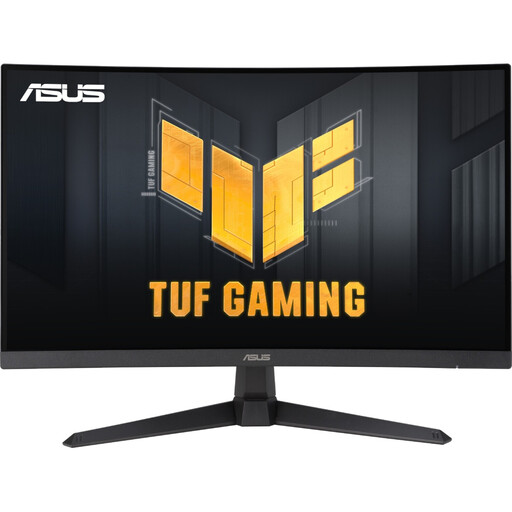
MATCH FOR: The WQHD All-Rounder
Why This Fits Their Persona: Ideal for gamers seeking balanced performance across a wide variety of games. The combination of 27 inches, WQHD resolution, and a fast 180 Hz refresh rate provides a sharp and fluid gaming experience without requiring an absolute top-tier graphics card. The 1500R curve enhances immersion.
How It Avoids the Trap
This model specifies a fast 1ms (GtG) response time. Its modern Fast VA panel delivers clear motion rendering without the drawbacks of a pure MPRT solution.
Key Advantage & Pros
The high static contrast ratio of 5,000:1 ensures deep blacks and a more three-dimensional image, which is a significant advantage over IPS panels, especially in dark game environments.
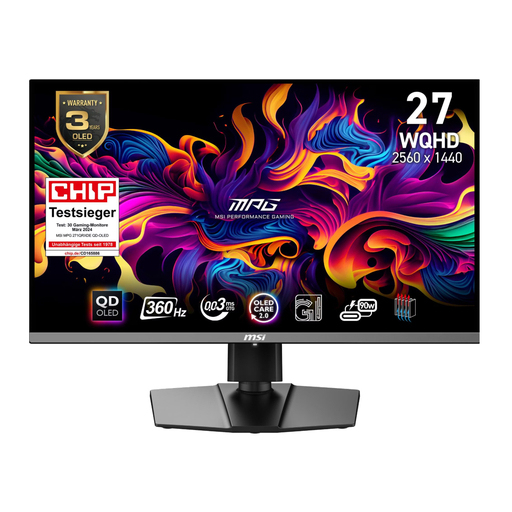
MATCH FOR: The Competitive Esports Athlete
Why This Fits Their Persona: For esports athletes, every millisecond counts. This monitor maximises performance with an extreme 360 Hz refresh rate and the virtually instantaneous 0.03ms (GtG) response time of QD-OLED technology. The WQHD resolution is the perfect compromise for achieving maximum FPS.
How It Avoids the Trap
The 0.03ms is a true GtG value, made possible by the self-emissive pixels of the OLED panel. This eliminates all ghosting and motion blur, a fact objectively confirmed by its VESA ClearMR 13000 certification.
Key Advantage & Pros
The combination of 360 Hz and QD-OLED offers unparalleled motion clarity. Furthermore, the DisplayHDR True Black 400 certification guarantees perfect black levels and high contrast for better visibility of opponents in dark areas.
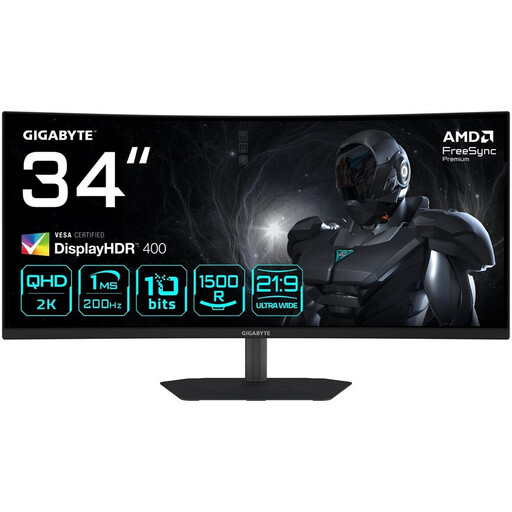
MATCH FOR: The Immersive Ultrawide Gamer
Why This Fits Their Persona: Perfect for players who want to dive deep into the worlds of RPGs, simulations, or racing games. The 34-inch Ultrawide (21:9) format fills the peripheral vision, while the 1500R curve creates an enveloping feel.
How It Avoids the Trap
Instead of relying on a basic DisplayHDR 400 certification, this monitor scores with its VA panel's inherently high contrast ratio of 4000:1. This provides visibly better image depth than many IPS models with the same HDR rating.
Key Advantage & Pros
The combination of an immersive 34-inch Ultrawide format and a very high 200 Hz refresh rate offers an excellent price-to-performance ratio in this category.
Looking for More Options?
We have compiled a complete, up-to-date list of products that fully meet these strict selection criteria and all relevant safety regulations.
Frequently Asked Questions (FAQ)
Is a Curved Gaming Monitor Worth It?
A Curved Gaming Monitor can significantly enhance immersion—the feeling of being in the game. The curvature fills your peripheral vision more effectively and brings the edges of the screen closer to you, complementing the natural curve of the human eye. This is especially beneficial for large Ultrawide Monitors. However, for productivity tasks like graphic design where straight lines are crucial, a flat monitor may be the better choice.
What's More Important: Resolution or Refresh Rate?
This decision heavily depends on your preferred games and your hardware.
- For competitive players (e.g., in shooters like Valorant or Apex Legends), a high refresh rate (144Hz, 240Hz, or more) is more important. It ensures smoother motion and allows for faster reactions. Here, a WQHD Gaming Monitor is often a better choice than 4K to consistently achieve high FPS.
- For players of single-player titles with a focus on graphics and atmosphere (e.g., Cyberpunk 2077 or The Witcher 3), a high resolution like that of a 4K Gaming Monitor is more advantageous. It provides maximum image sharpness and detail. A refresh rate of 120Hz or 144Hz is typically sufficient here.
How Do I Protect an OLED Monitor from Burn-in?
Modern OLED Gaming Monitors include built-in protective features to minimise the risk of burn-in from static image elements (like taskbars or in-game HUDs). These include:
- Pixel Shift: Imperceptibly shifts the entire image by a few pixels at regular intervals.
- Logo Detection: Detects static logos and selectively dims their brightness.
- Pixel Refresh Cycles: Automatically runs a maintenance cycle after several hours of use to calibrate the pixels. Additionally, you can contribute by using a screensaver, setting the taskbar to auto-hide, and turning off the monitor when you'll be away for an extended period.