Which buying criteria matter for aim training?
First decide whether motion clarity, versatile picture quality, headset connectivity or long-term use matters most to you. Then check the relevant features on the specific model and your source device.
| What matters |
What to look for when buying |
Who is it most relevant to? |
| Motion clarity and latency |
Independent input-lag and pixel-response measurements at your target refresh rate; overdrive and overshoot. |
If I want to track fast-moving targets as clearly as possible, I check measurements at the refresh rate I can actually use. Around 36% of consumers put motion clarity first. |
| Picture sharpness and versatility |
Native resolution and the refresh rate your PC can output at that resolution in the game you want to play. |
If you use your screen for other games or content as well as aim training, you may want to prioritise a sharper picture. Around 29% of consumers prioritise picture sharpness and versatility. |
| Headset and source device |
Check headphone and microphone connections separately. For consoles, also check audio output and the supported HDMI picture mode. |
If I want to use my existing headset without switching connections, I plan where to connect the headphones and microphone in advance. Around 21% of consumers put headset compatibility first. |
| Ergonomics and long-term use |
Check the stand’s adjustment options and the EU energy label. For OLED, also check the care guidance and warranty terms. |
If ergonomic adjustment, energy information and care matter more to you than the other considerations, check these details for the specific model. Around 14% of consumers prioritise long-term use. |
Joybuy products for aim training and other games
This selection features QHD gaming monitors for PC aim training and other screen use. Check the usable refresh rate and the headset connection you need for each specific model.
 Image unavailable
MSI MAG 272QPDE QD-OLED X24, 27 inches, QHD
An option if your PC can output QHD at your desired refresh rate and you want to connect your headphones to the monitor.
QD-OLED; 2560 × 1440; 240 Hz; 3.5 mm audio output. For OLED, the care guidance and warranty terms for the specific model are important.
Joybuy
 Image unavailable
GIGABYTE G27Q26, 27 inches, QHD
A good fit if your PC can output QHD at your desired refresh rate and you want to use the monitor’s headphone output.
SuperSpeed IPS; 2560 × 1440; 260 Hz, up to 275 Hz in activated OC mode; 3.5 mm headphone output.
Joybuy
 Image unavailable
ASUS ROG Strix WOLED XG27AQWMG, 27 inches, WQHD
An option if you want to combine QHD resolution with a high refresh rate and an adjustable stand.
WOLED; 2560 × 1440; 280 Hz. For OLED, the care guidance and warranty terms for the specific model are important.
Joybuy
 Image unavailable
INNOCN 2751S PLUS, 27 inches, QHD
An option if you want to use QHD for aim training and connect your headphones to the monitor.
Mini LED with 1152 zones; IPS; 2560 × 1440; 275 Hz; audio output.
Joybuy
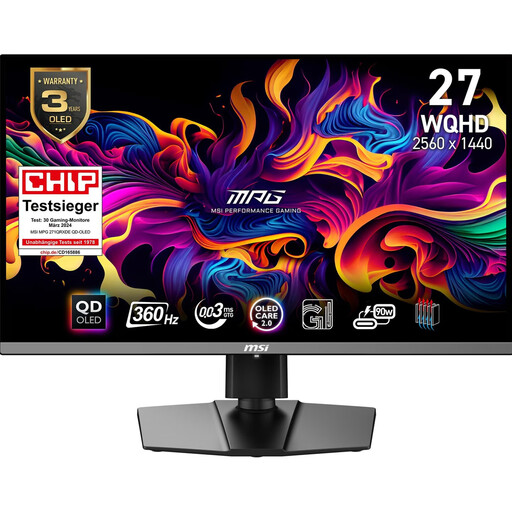 Image unavailable
MSI MPG 271QRXDE QD-OLED, 26.5 inches, WQHD
An option if you want to combine QHD and a high refresh rate for aim training with other screen use.
QD-OLED; 2560 × 1440; 360 Hz; audio output. For OLED, the care guidance and warranty terms for the specific model are important.
Joybuy
Frequently asked questions
Is an especially low advertised response time the same as low input lag?
No. Pixel response describes how quickly individual pixels change colour; input lag is the delay before a change appears on screen. Compare independent measurements at the refresh rates that matter to you, and check for overshoot too.
Do I need an audio output on my monitor to use headphones?
Not necessarily. What matters is where your specific headset connects. On PS5, you can choose the audio output device in the sound settings. If you want to use the monitor’s output, check the exact model and confirm the microphone connection separately.
How do I check whether my PS5 will output the picture mode I want?
Check the video output with the display connected and the game you want to play. Sony states that the PS5 supports video output up to 4K at 120 Hz with a compatible display; this doesn’t guarantee that every game will use that mode.
What should I bear in mind when using an OLED monitor for long training sessions?
Read the care guidance and warranty terms for the specific model. MSI describes protective features for compatible OLED monitors and flags the risk from static elements displayed for extended periods; these features don’t rule out burn-in.
Which consumer rights and energy information are relevant when buying a monitor in Germany?
If there’s a fault, contact the seller. The Verbraucherzentrale distinguishes statutory consumer rights from a voluntary manufacturer’s warranty. Electronic displays are covered by EU energy labelling. Compare the label for the specific model.


