Players who prioritise speed
You want smooth motion in fast-paced arena matches and want to match your monitor’s refresh rate to your PC’s frame rate.


Start by choosing a monitor that matches the frame rate your PC can actually deliver in your game at your preferred resolution. Then compare screen size and connections. Team chat is a separate audio consideration: a monitor audio output isn’t automatically suitable for connecting a headset or microphone.
You want smooth motion in fast-paced arena matches and want to match your monitor’s refresh rate to your PC’s frame rate.
You need game audio and voice chat, and want to check where to connect your headphones and microphone before you buy.
You want to play fast-paced matches and use the screen for more detailed games or other PC tasks too.
For online arena matches with a headset, your priorities depend on whether you care most about speed, voice chat, image sharpness, desk space or running costs.
| Feature | What to check before buying | Who is it most important to? |
|---|---|---|
| Refresh rate | Check the supported refresh rate at your preferred resolution and through the connection you plan to use. Compare it with the frame rate your PC can achieve in your game. | If a high refresh rate matters more to me than extra pixels in fast-paced matches, I compare the monitor’s refresh rate with the frame rate my PC actually delivers; around 33% of consumers put gaming speed first. |
| Headset and chat | Check whether a connection is for headphones, audio line-out or microphone input. Plan the microphone connection separately and check the audio and microphone settings on your gaming device. | If I need to listen and talk during a match, I check separately where to connect my headphones and microphone; around 27% of consumers prioritise a headset and voice chat. |
| Resolution and size | Compare Full HD and QHD at your preferred screen size. Check whether your PC can deliver the resolution you want at the frame rate that matters to you. | If I want to see more detail as well as play arena matches, I consider resolution and screen size together; around 20% of consumers put image sharpness first. |
| Desk space and power consumption | Compare the dimensions, including the stand, with the space available on your desk. Check the energy label for the specific model and, when working out your own costs, factor in how long you use it and your electricity tariff. | If my desk has limited space or I’m keeping an eye on running costs, I compare the stand dimensions and energy label; around 20% of consumers prioritise these factors. |
Dell notes that certain monitor line-outs aren’t suitable for headphones or headsets. Hearing game audio also doesn’t mean you can connect a microphone.
Check the exact connection label and plan a separate microphone connection to your gaming device.
Depending on the connections available, you may need a different audio connection or a suitable adapter.
LG lists different combinations of resolution and refresh rate for the 27GX790B-B: 540 Hz at QHD or 720 Hz at HD. These specifications apply to this model and require a suitable graphics card.
Consider refresh rate and resolution together, and check which outputs your gaming PC and connection support.
Figures from AOC, MSI and BenQ for pixel response times or motion technologies don’t, on their own, prove the monitor’s overall input lag or that you’ll get better results in a match.
When comparing response-time figures, check how they’re measured and treat claims about hits or wins as manufacturer claims.
AOC describes the 24G4X as a compact 23.8-inch Full HD model with a Fast IPS panel and a 180 Hz refresh rate.
MSI lists a Rapid IPS panel with QHD resolution and a 240 Hz refresh rate for the G274QPX, and a QD-OLED panel with QHD resolution and a 360 Hz refresh rate for the MPG 271QRXDE.
For the German Odyssey OLED G81SF, model number LS27FG814SUXEN, Samsung lists a 27-inch 4K QD-OLED display with a 240 Hz refresh rate.
For the European XL2546X, BenQ ZOWIE lists a Fast TN panel, a 240 Hz refresh rate and DyAc 2.
For the 27GS75QX-B, LG lists a 27-inch QHD IPS display with a 180 Hz refresh rate and up to 200 Hz in overclocking mode.
The Joybuy monitors below have different listed resolutions, screen sizes and refresh rates. Compare these specifications with your gaming PC’s output and the space you have available.
 No image available
The two listed modes let you choose between your preferred resolution and the frame rate you can achieve.
27 inches; Mini-LED; Rapid IPS; UHD at 160 Hz or FHD at 320 Hz; Adaptive Sync.
 No image available
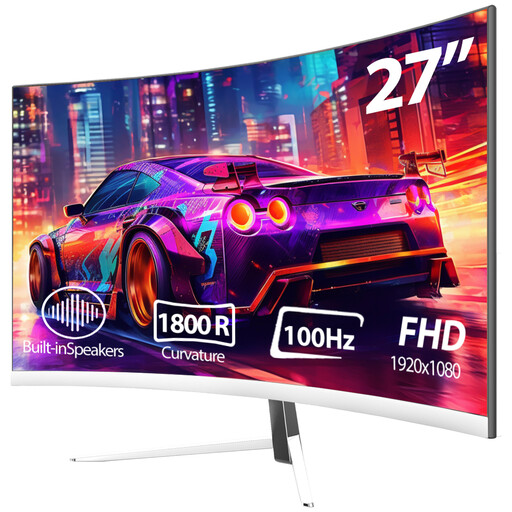
This Full HD model is worth considering if 100 Hz suits the frame rate your gaming PC can deliver.
27 inches; Full HD (1920 × 1080); 100 Hz; 1800R curvature; HDMI and DisplayPort; VESA mount.
 No image available
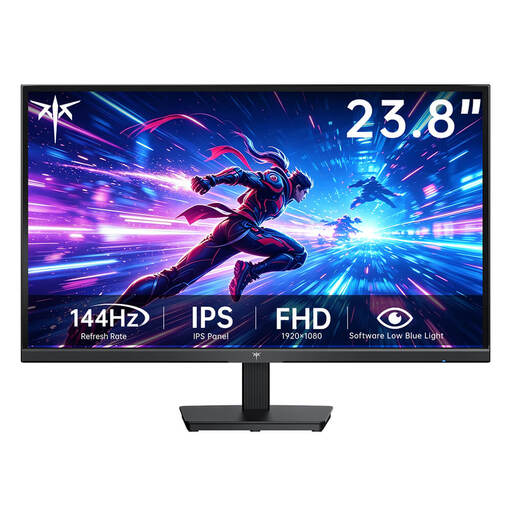
The compact Full HD format is an option if the listed refresh rate suits your system.
Fast IPS; 1920 × 1080; 144 Hz; HDMI and VGA; VESA 75 × 75 mm.
 No image available
This wide UWQHD model is suitable for buyers with enough desk space for this format.
34 inches; UWQHD (3440 × 1440); 165 Hz; 1500R curvature; VA panel; DisplayPort; VESA 75 × 75 mm.
 No image available
If a dedicated headphone output is important to you, also check whether your headset microphone needs a separate connection.
IPS; Full HD; 180 Hz; NVIDIA G-Sync; 3.5 mm headphone output; height-adjustable stand with tilt, swivel and pivot functions.
No, you can use a connection supported by your gaming device. Dell notes that certain monitor line-outs aren’t suitable for headsets; an audio output alone doesn’t mean there’s a microphone connection either.
First, check that your monitor is selected as the audio output on your computer and that the monitor’s audio settings are correct. HDMI and DisplayPort can carry audio as well as video; check the model’s documentation to see whether it has speakers or a suitable headphone output.
Before ordering, compare the monitor’s actual dimensions, including the stand, with the space available on your desk. Dimensions can vary between models.
If you buy from a business seller in the EU as a consumer, you’re entitled to a legal guarantee from the seller for at least two years from the date you receive the goods. An additional manufacturer’s warranty doesn’t replace it; these EU rules don’t apply to purchases from private individuals.
The European Commission provides an energy efficiency scale from A to G for electronic displays; check the label for the specific model. The German Federal Network Agency lists CE marking and product traceability, among other things, as aspects of market surveillance. According to the German Environment Agency, an old monitor shouldn’t go in household waste; it should be taken to a separate collection point for waste electrical and electronic equipment.