Choosing a gaming monitor involves balancing technical specifications that directly impact the gaming experience. Parameters like resolution, refresh rate, and panel technology are crucial for visual fidelity and responsiveness. This article analyses the key criteria to provide an informed basis for purchasing a Gaming Monitor in 2026.
Buyer's Guide: What to Look for in a Gaming Monitor
The right monitor choice depends on your individual needs and primary use case. The following technical features are central to evaluating performance.
Resolution: The Level of Image Detail
Resolution defines the number of pixels that make up the image. A higher resolution results in a sharper, more detailed picture.
- WQHD (2560 x 1440 pixels): This resolution represents a well-balanced compromise between image clarity and performance demands. It allows for high refresh rates even with mid-range graphics cards and is a popular choice for competitive gaming.
- 4K Ultra HD (3840 x 2160 pixels): A 4K Gaming Monitor offers four times the pixel count of Full HD, delivering exceptional image clarity. This is ideal for visually rich single-player titles and for use with current-gen consoles like the PS5. A powerful graphics card is required to achieve high frame rates.
Refresh Rate: The Smoothness of Motion
Measured in Hertz (Hz), the refresh rate indicates how many times the monitor updates the image per second. A higher rate ensures smoother motion and less motion blur.
- 144Hz: Considered the standard for fluid gaming. The difference from 60Hz is clearly noticeable and provides a distinct advantage in fast-paced games.
- 240Hz and above: Monitors with 240Hz or higher rates are geared towards esports. They offer maximum motion clarity and enable extremely fast reactions, which can be decisive in competitive shooters or racing games.
Panel Technology: The Foundation of Image Quality
Panel technology determines fundamental image characteristics such as colour accuracy, contrast, and response time.
- IPS (In-Plane Switching): IPS panels, especially modern Fast IPS variants, are known for their high colour accuracy and wide viewing angles. They now combine fast response times with excellent image quality.
- OLED (Organic Light Emitting Diode): OLED panels offer perfect blacks because each pixel illuminates individually and can be turned off completely when needed. This results in an infinite contrast ratio and extremely vibrant colours. Response times are also exceptionally low.
- VA (Vertical Alignment): VA panels typically offer higher contrast ratios than IPS panels, resulting in deeper blacks. They are a great choice for immersive games set in darker environments.
Form Factor: Immersion and Field of View
- Curved Monitor: A curved screen is designed to better fill the user's peripheral vision, creating a more immersive viewing experience. The curvature is specified in "R" (e.g., 1000R), where a smaller number indicates a more pronounced curve.
- Ultrawide: Monitors with a 21:9 or 32:9 aspect ratio offer a wider field of view, which can provide a strategic advantage in many games. An Ultrawide monitor is also well-suited for multitasking and productivity applications.
Our Recommendations for 2026
Based on an analysis of technical specifications and practical benefits, we present three models that cater to different user profiles.
1. MSI MAG 321UPDE QD-OLED 4K Monitor
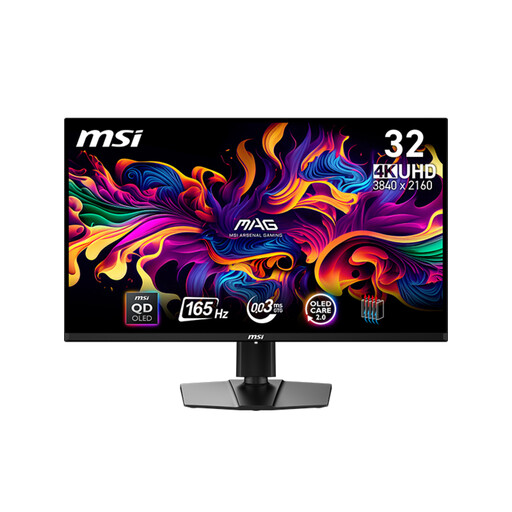
[€10 off with Code: M10] MSI MAG 321UPDE QD-OLED Computer Monitor 80 cm (31.5-inch) 3840 x 2160 Pixels 4K Ultra HD Black
- Why we recommend this product: This model combines the advantages of QD-OLED technology with a 4K Ultra HD resolution. The result is outstanding image quality with perfect blacks, a 1,500,000:1 contrast ratio, and vibrant colours. The extremely fast 0.03 ms (GtG) response time and 165Hz refresh rate make it suitable for both visually demanding titles and fast-paced gameplay.
- Advantages:
- 31.5-inch QD-OLED panel with 4K resolution
- Extremely fast 0.03 ms response time
- VESA DisplayHDR True Black 400 for high dynamic range
- Comprehensive connectivity including HDMI 2.1 (4K@165Hz) and USB-C with 15W Power Delivery
- Ergonomic stand with height, swivel, and tilt adjustment
- Who it's for: Users with the highest demands for image quality, including gamers of visually opulent titles, content creators, and those looking for a future-proof PC Monitor for both PC and console (Monitor for PS5).
2. TITAN ARMY P2710S 240Hz WQHD Monitor
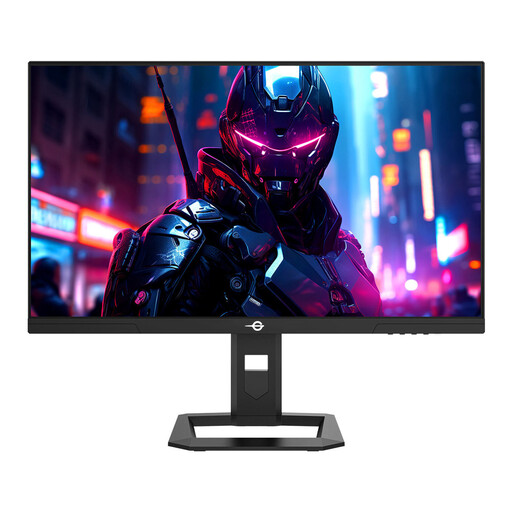
TITAN ARMY P2710S Gaming Monitor, 27-inch 2560*1440 16:9 Fast IPS LCD Screen, 240Hz Refresh Rate, 1ms GTG, HDR 400, EU Version
- Why we recommend this product: The TITAN ARMY P2710S is designed for maximum performance in competitive gaming. The combination of a 27-inch Fast IPS panel, WQHD resolution, and an extremely high 240Hz refresh rate ensures an exceptionally fluid and responsive gaming experience. The 1 ms (GtG) response time minimises motion blur.
- Advantages:
- 240Hz refresh rate for maximum motion clarity
- 27-inch Fast IPS panel with WQHD resolution
- 1 ms (GtG) response time and Adaptive-Sync support
- Good colour gamut coverage (95% DCI-P3) and HDR 400
- Fully adjustable stand (height, tilt, swivel, pivot)
- Who it's for: Esports enthusiasts and competitive players seeking a performance edge in fast-paced titles like FPS or MOBAs through maximum fluidity and minimal latency.
3. KOORUI 34E6UC Ultrawide Curved Monitor
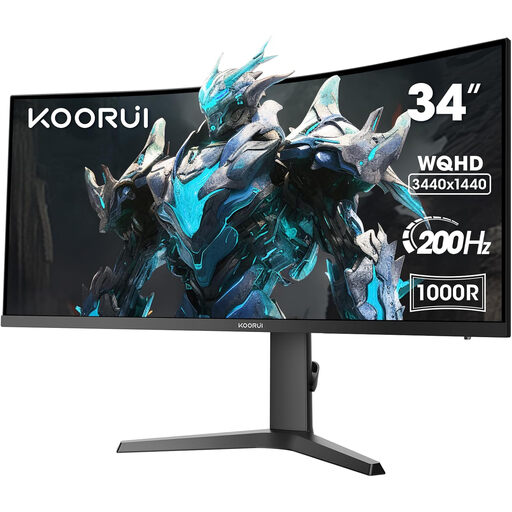
KOORUI 34E6UC 34 Inch Ultrawide Curved Gaming Monitor, PC Screen 200Hz, 1MS HDR 400, 1000R, UWQHD 3440x1440, Adaptive Sync, 2xHDMI & Display Port, VESA 75x75mm, DCI-P3 90% Height Adjustable
- Why we recommend this product: This model offers an immersive gaming experience thanks to its 34-inch Ultrawide 21:9 panel and aggressive 1000R curve. The UWQHD (3440x1440) resolution provides a wide field of view and high pixel density. With a 200Hz refresh rate and 1 ms response time (MPRT), performance remains high even in fast-paced scenes.
- Advantages:
- 34-inch Ultrawide (21:9) panel for a wide field of view
- Aggressive 1000R curve for deep immersion
- High 200Hz refresh rate and Adaptive Sync
- Good colour reproduction with 90% DCI-P3 and VESA DisplayHDR 400
- Height-adjustable stand for optimal ergonomics
- Who it's for: Gamers seeking a particularly immersive experience in racing simulations, RPGs, or strategy games. Also for users who want to leverage the extra screen real estate for productive work.
Discover More Options and PC Monitors
The models featured here cover specific user profiles. If your search requires different specifications, you can find a broader selection of models in our main category. There, you can filter specifically by size, resolution, or panel type.
Discover more models in the PC Screen Monitor category.
Frequently Asked Questions (FAQ)
1. What is the best resolution for a gaming monitor? The choice depends on your graphics card and preferred games. WQHD (1440p) is an excellent all-rounder for high frame rates and good clarity. 4K is ideal for maximum visual detail in single-player titles and on consoles, but it requires very powerful hardware for smooth gameplay at high settings.
2. How many Hertz (Hz) does a good gaming monitor need? 144Hz is the recommended standard for a noticeably smoother gaming experience compared to 60Hz monitors. For competitive players who need maximum responsiveness, models with 240Hz or more are a worthwhile investment.
3. Is a curved monitor better for gaming? A Curved Monitor can enhance immersion by better filling your peripheral vision, creating a feeling of being "in the game." This is particularly effective on large monitors and Ultrawide formats. However, whether this is perceived as an advantage is a matter of subjective preference.
Authored by the Joybuy Product Recommendation Officer

