
Lieferung heute & morgen

Qualitätsgarantie
App herunterladen
Kategorien
Choosing a gaming monitor involves balancing technical specifications that directly impact in-game performance and visual quality. Parameters like resolution, refresh rate, response time, and panel type are crucial factors that must be tailored to your specific use case—whether it's competitive esports, immersive single-player gaming, or use with a console like the PS5. This guide breaks down the relevant technical features to provide a solid foundation for an informed decision.
A monitor's performance is defined by the interplay of several core components. The following sections detail the most important specifications.
Resolution determines the detail density of the image.
The refresh rate, measured in Hertz (Hz), indicates how many frames the monitor can display per second. A higher rate results in a smoother, more responsive perception of motion.
Response time, often specified in milliseconds (ms), measures how quickly a pixel can change its colour. A 1ms response time (GTG - Grey-to-Grey) is the de facto standard for gaming monitors to minimise motion blur and ghosting.
Modern gaming monitors should feature up-to-date connections. HDMI 2.1 is essential for consoles like the PlayStation 5 to enable 4K gaming at 120 Hz. DisplayPort 1.4 is the standard for high-end PC gaming with high resolutions and refresh rates. Such a monitor for PS5 and PC offers maximum flexibility.
Based on the technical criteria above, here is a selection of monitors designed for specific user profiles.
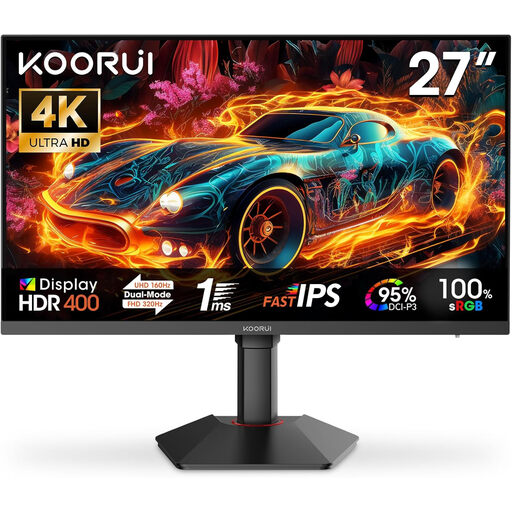
Why we recommend this product: The KOORUI G2741L addresses a core gamer's dilemma: choosing between high resolution and maximum refresh rate. With the push of a button, you can switch between a sharp 4K mode at 160 Hz for visually demanding titles and an FHD mode with an ultra-smooth 320 Hz for competitive esports. This flexibility, combined with a vibrant Fast IPS panel and modern ports, makes it a versatile all-rounder.
Pros:
Who it's for: Users who want to enjoy graphically impressive AAA games in 4K and also leverage the highest possible refresh rate in competitive shooters, without needing two separate monitors.
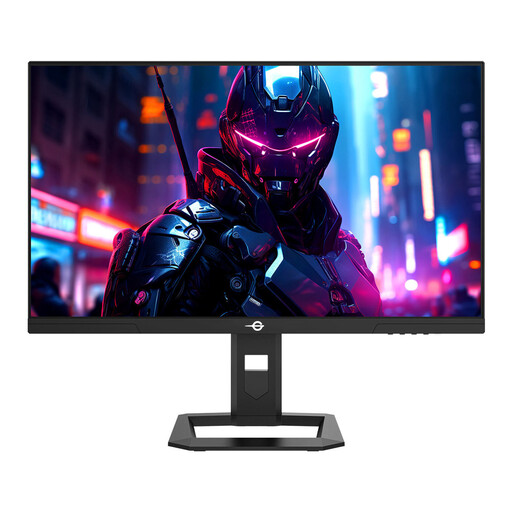
Why we recommend this product: The TITAN ARMY P2710S is engineered for high-performance esports. The combination of a WQHD resolution and a very high 240 Hz refresh rate on a Fast IPS panel delivers an extremely smooth yet sharp image. Features like Adaptive Sync, a 1ms GTG response time, and special game modes (FPS/RTS) underscore its focus on competitive gaming, where minimal latency and maximum clarity are paramount.
Pros:
Who it's for: Competitive PC gamers who seek an advantage in fast-paced multiplayer titles through an extremely high refresh rate but don't want to sacrifice the sharpness of a WQHD resolution.
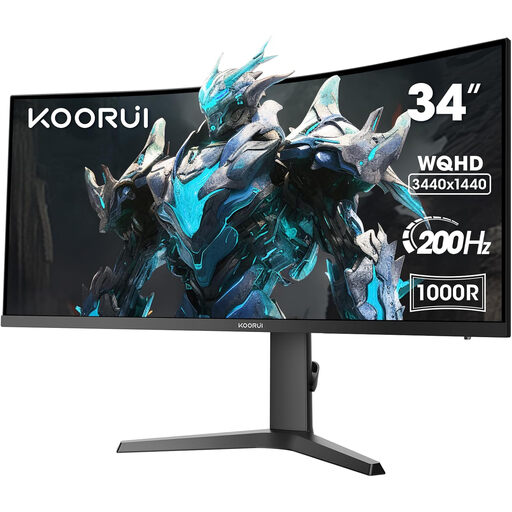
Why we recommend this product: The KOORUI 34E6UC is all about maximum immersion. The 34-inch VA panel in a 21:9 aspect ratio with a pronounced 1000R curve fills the user's peripheral vision, creating an enveloping viewing experience. With a UWQHD resolution (3440x1440), a fluid 200 Hz refresh rate, and high contrast, this Ultrawide Monitor is perfectly suited for atmospheric open-world games, racing sims, and cinematic experiences.
Pros:
Who it's for: Gamers and content enthusiasts who seek a maximally immersive experience and appreciate the wider field of view in supported games and media playback.
If the featured models don't perfectly match your requirements, you can find a broader selection of screens with different specifications in our main category. There, you can filter specifically by size, resolution, or other features.
Discover more models in the Display Screen category.
1. What is more important for gaming: resolution or refresh rate? The priority depends on the type of player. For competitive esports titles (e.g., shooters), a high refresh rate (144 Hz and above) is more important as it enables smoother, more responsive control. For visually-focused single-player games (e.g., RPGs), a higher resolution (WQHD or 4K) can be more beneficial for a more detailed and immersive experience.
2. Do I need a special monitor for the PS5? To unlock the full potential of the PS5, a monitor for PS5 with an HDMI 2.1 port is recommended. This connection allows for the display of 4K content at up to 120 frames per second (in supported games). Monitors with HDMI 2.0 are limited to 4K at 60 Hz or 1080p at 120 Hz.
3. Is an ultrawide monitor worth it for gaming? An Ultrawide Monitor can significantly enhance immersion by expanding the peripheral field of view. This is particularly advantageous in racing games, flight simulators, and many open-world titles. In competitive shooters, the wider aspect ratio is not always supported to ensure fairness. For multitasking and productivity, the 21:9 format also offers a practical benefit.
Authored by: Joybuy Product Recommendation Officer