
Lieferung heute & morgen

Qualitätsgarantie

Willkommens-Angebote freischalten: KOSTENLOSE Lieferung | Bis zu 80 % RABATT | Kostenlose 30-Tage-JoyPlus-Testphase
App herunterladen
A gaming monitor needs to display fast motion cleanly, work with your existing PC or console, and be useful for everyday tasks beyond gaming. The range stretches from compact Full HD monitors to 4K or ultrawide models. However, many product specifications sound more impressive than they actually are in day-to-day use.
A 240 Hz gaming monitor can refresh motion particularly often. For this benefit to be visible, your PC also needs to deliver enough frames per second. With a less powerful system, 240 Hz can go partly unused. For many gamers, a 144 Hz gaming monitor or a model with 165 or 180 Hz can offer a more balanced ratio of price to hardware demands.
With consoles, the supported output is also crucial. The PlayStation 5 and Xbox Series X can typically output high frame rates depending on the game and connection, but not every combination of resolution, HDMI version and game supports the same values.
The specification 1 ms monitor does not automatically refer to identical characteristics. Manufacturers use various methods including MPRT, GtG or overdrive measurements. MPRT describes a method for evaluating motion clarity, while GtG refers to the switching time between colour levels. When comparing, you should therefore pay attention to the specific measurement method.
An aggressively set overdrive can also produce visible overshoot. In practice, a monitor with Adaptive Sync and sensibly tuned response time modes is often more versatile than a model that only advertises a single millisecond figure.
An HDR gaming monitor can process HDR signals, but the actual image quality also depends on brightness, contrast, dimming and colour space coverage. Terms like “HDR Ready” or “HDR400” should therefore be understood as technical support rather than a guarantee of a specific visual effect. If you want to use HDR purposefully, you should check the brightness specification, the DisplayHDR standard and the connection requirements.
A 27-inch gaming monitor offers more workspace and gaming area than a 24-inch model. With Full HD at 1,920 × 1,080 pixels, the image on 27 inches can appear less sharp than with a QHD gaming monitor at 2,560 × 1,440 pixels. QHD is therefore appealing when details, text clarity and desktop workspace play a bigger role.
A 4K gaming monitor with 3,840 × 2,160 pixels shows particularly fine detail, but for PC gaming it requires a more powerful graphics card. Console gamers should check whether the monitor has HDMI 2.1 and supports the desired combination of 4K and high frame rate.
An IPS gaming monitor typically offers wide viewing angles and even colour reproduction. This can be practical for gaming, photo editing and working from home. VA panels often achieve a higher contrast ratio and can display dark scenes with more differentiation. With a curved gaming monitor, the curvature is usually given as a radius such as 1,500R or 1,800R.
OLED and QD-OLED models differ technically from conventional LCD displays. They can offer very short switching times and high contrast values. If you plan to use static content for longer periods, you should follow the manufacturer's guidance on panel care and burn-in prevention.
Adaptive Sync synchronises the monitor's refresh rate with the image output of your compatible graphics card. This can reduce tearing and uneven motion under suitable conditions. What matters is whether the monitor is compatible with your GPU and via the desired connection.
Before buying, also add these points to your checklist:
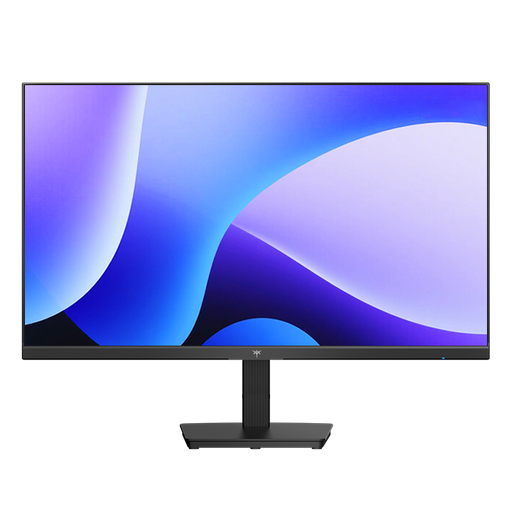
Why this product fits the profile: The 24-inch format with Full HD and 144 Hz is suitable for compact desks and systems that don't aim for extremely high resolutions.
The combination of 144 Hz, IPS panel and Adaptive Sync is more concrete than an isolated 1 ms claim. The stated response time is 5 ms MPRT.
IPS panel, 1× HDMI, 1× DisplayPort, 99% sRGB according to product specification and tiltable stand.
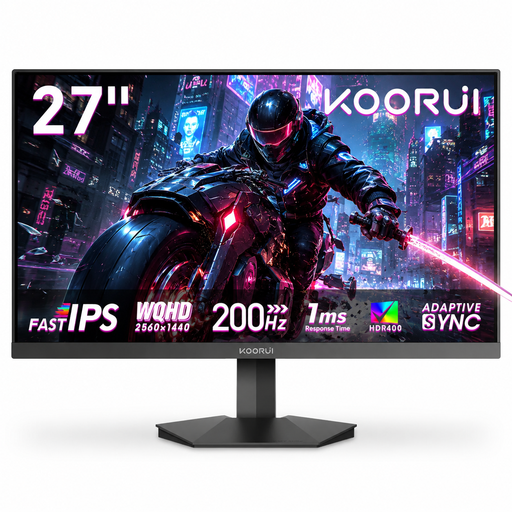
Why this product fits the profile: The 27-inch QHD format combines extra workspace with a high frame rate and is aimed at PC gamers as well as users with creative applications.
The technical specifications list panel type, QHD resolution, 200 Hz and 1 ms OD separately. This makes it easier to match the advertised performance with your graphics card.
Fast-IPS panel, 2,560 × 1,440 pixels, HDR400, 95% DCI-P3, Adaptive Sync and VESA 75 × 75 mm.
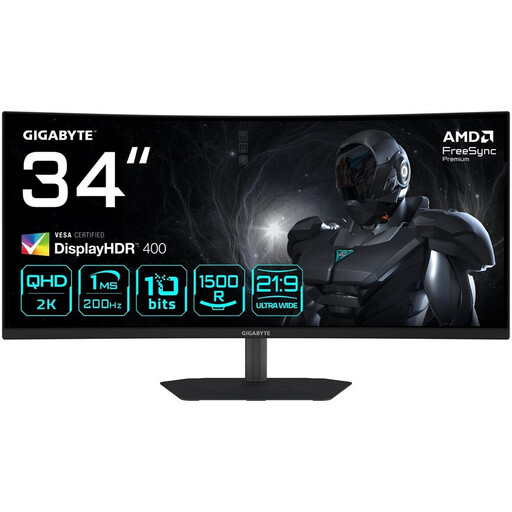
Why this product fits the profile: The 21:9 format offers extra width for multitasking, racing games, strategy titles and productive work with multiple windows.
The UWQHD resolution is combined with 200 Hz, DisplayPort 1.4 and HDMI 2.0. This allows buyers to check the required connection for PC or console specifically.
34 inches, 3,440 × 1,440 pixels, 1500R curvature, VA panel, 200 Hz and height-adjustable stand.
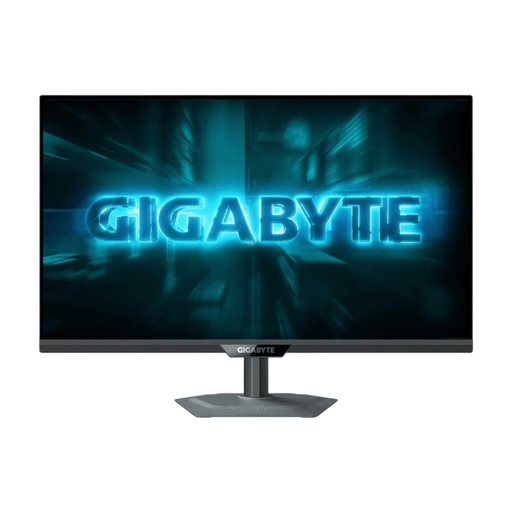
Why this product fits the profile: This model is aimed at users who want to combine high detail resolution on PC with 4K/120 Hz support on compatible consoles.
The dual-mode specification separates 4K at 160 Hz from Full HD at 320 Hz. HDMI 2.1 is available for compatible consoles; the source devices still remain decisive.
4K resolution, 160 Hz, Dual Mode, DisplayHDR 400, Adaptive Sync and height-, swivel- and tilt-adjustable stand.
We have put together a complete, regularly updated list of products that fully meet these strict selection criteria and the safety regulations in force in the EU.
For many desks, 24 to 27 inches is practical. A 24-inch Full HD monitor takes up less space and works well for competitive gaming. 27 inches is suitable for QHD and offers more area for games and applications. A 34-inch ultrawide monitor needs enough distance and a wide desk surface.
144 Hz, or 165 to 180 Hz, is a balanced range for many PC gamers. 240 Hz is worthwhile mainly when your hardware consistently delivers high frame rates and fast multiplayer games are your focus. Also important are DisplayPort, Adaptive Sync and the correct setting in your operating system.
Electricity costs depend on power consumption, brightness, HDR usage and daily operating time. The energy efficiency class on the EU energy label makes comparison easier. If you switch the monitor off after use and reduce standby times, you can limit consumption in everyday life.