For long docking and cockpit sessions, your choice largely comes down to desk space, whether your game supports 21:9 and the connections on your PC. A 34-inch ultrawide gives you more horizontal screen space, while a 27-inch QHD monitor takes up less room. OLED may appeal if you play games with dark scenes, but if fixed HUD elements stay on screen for long periods, check the care guidance and terms for the specific model.
Who are the different monitor sizes suited to?
Cockpit fans with room for an ultrawide
If you want to see your side displays across a wider screen, check that your desk has room and your game supports 21:9. Samsung Germany and AOC Germany offer 34-inch ultrawide models with a resolution of 3440 × 1440 pixels.
Gamers short on desk space
If you want cockpit displays to be easy to read without having to fit a 34-inch screen on your desk, a 27-inch QHD model may be a better fit. LG Germany and ASUS Germany offer models with a resolution of 2560 × 1440 pixels.
Fans of dark scenes with a fixed HUD
If you’re considering OLED and your game displays stay unchanged for long periods, take the care guidance for the exact model into account. Dell Germany lists static game interfaces as a potential burn-in risk for the Alienware AW3423DWF.
What should you look for when buying a monitor?
27-inch, 16:9, QHD with IPS
A good fit if: You’re short on desk space and looking for a 27-inch QHD screen.
The trade-off: You get less horizontal screen space than with a 34-inch, 21:9 monitor. ASUS also lists different maximum refresh rates depending on the connection.
34-inch, 21:9, VA ultrawide LCD
A good fit if: Your game makes good use of 21:9 and you have room for a wide cockpit view. Samsung Germany and AOC Germany list a resolution of 3440 × 1440 pixels for their relevant models.
The trade-off: Check how the HUD appears in the game you play and whether your PC can output at your preferred resolution.
34-inch, 21:9, QD-OLED
A good fit if: You’re interested in OLED for dark scenes and your setup has the space and supports the required display output.
The trade-off: For the Alienware AW3423DWF, Dell Germany lists different refresh rates over DisplayPort and HDMI, as well as care guidance for static displays.
| Consideration |
What to check before buying |
Who this matters most to |
| Desk space and readability |
Compare the overall dimensions, including the stand, and the native resolution; check how easy the screen is to read from your seating position. |
If your monitor needs to fit on a small desk and cockpit displays need to remain easy to read, size and resolution matter. Around 31% of consumers are likely to prioritise desk space and readability. |
| Horizontal cockpit space |
Check whether the specific game supports 21:9 and makes good use of the menu and HUD layout. |
If you want to see side instruments across a wider screen, game support is key. Around 25% of consumers are likely to prioritise horizontal cockpit space. |
| Dark scenes and a fixed HUD |
Read the care guidance and warranty terms for the specific OLED model; don’t assume that the same terms apply to other models. |
If you’re considering OLED but displays stay on screen unchanged for long periods, the care requirements for the specific model should factor into your decision. Around 25% of consumers are likely to place particular importance on dark scenes and HUD longevity. |
| Refresh rate and connections |
Check the refresh rate for your preferred resolution over HDMI and DisplayPort, and make sure it matches your PC’s output capabilities. |
If you want to achieve a particular refresh rate while gaming, it needs to be supported by your monitor, PC and connection. Around 19% of consumers are likely to check the refresh rate and how it connects to their PC first. |
Which buying mistakes should you avoid?
-
Comparing only the highest refresh-rate figure
The maximum listed refresh rate can vary depending on the connection. For the ASUS TUF Gaming VG27AQ3A, ASUS Germany lists up to 180 Hz over DisplayPort and 144 Hz over HDMI. Dell Germany also lists connection-dependent figures for the Alienware AW3423DWF.
Check that the resolution and refresh rate you want are supported by the exact model, your PC’s output and the connection you plan to use.
-
Assuming ultrawide automatically gives you a better cockpit view
21:9 only gives you the extra screen space you want if the specific game and its HUD make good use of the format. A 34-inch, 21:9 screen also needs enough desk space, and 3440 × 1440 puts greater demands on your graphics output than 2560 × 1440.
Measure your desk and check how your game looks before choosing a format.
-
Overlooking OLED care and warranty terms if you use a fixed HUD
Dell lists static game interfaces as a potential burn-in risk for affected Alienware OLED models and describes the refresh features available on the AW3423DWF.
Read the care guidance and warranty terms for the exact model variant; don’t assume they apply to other OLED monitors.
Which brands are worth considering?
Samsung
The Odyssey G5 G55T LC34G55TWWPXEN is one example of a 34-inch ultrawide monitor.
- Samsung Business Germany lists a resolution of 3440 × 1440 pixels, up to 165 Hz, FreeSync Premium and 1000R curvature.
- The advertised 1 ms figure is MPRT, so it isn’t directly comparable with other manufacturers’ GtG figures. Also check whether the curvature and HUD work well with your game.
AOC
The CU34G2XP/BK is a 34-inch ultrawide example with a Fast VA panel.
- AOC Germany lists a resolution of 3440 × 1440 pixels, 180 Hz and FreeSync Premium in its product specifications.
- Manufacturer claims about reduced motion blur are not independent test results.
LG
The UltraGear 27GS75QX-B is a 27-inch QHD IPS example in a 16:9 format.
- LG Germany lists a resolution of 2560 × 1440 pixels and 180 Hz; 200 Hz is specified as an overclocked rate.
- Compare the refresh-rate and overclocking figures with your PC’s settings and output capabilities.
ASUS
The TUF Gaming VG27AQ3A is a 27-inch QHD IPS example with refresh rates that vary by connection.
- ASUS Germany lists up to 180 Hz over DisplayPort and 144 Hz over HDMI.
- According to the German specifications, the supplied stand isn’t height-adjustable. Claims about the effect of ELMB Sync come from the manufacturer.
Dell Alienware
The AW3423DWF is a 34-inch QD-OLED example that highlights the trade-off between an ultrawide view and HUD elements that stay on screen for long periods.
- Dell Germany lists a resolution of 3440 × 1440 pixels, up to 165 Hz over DisplayPort and up to 100 Hz over HDMI.
- Dell warns of a burn-in risk with static displays and describes the available care features. Check the terms for the specific model and purchase.
Joybuy monitors for a wider cockpit view
The selection below focuses on 34-inch ultrawide monitors for a wider cockpit view, including VA and QD-OLED models. For long sessions, check the connection details and, for OLED, the care guidance for the specific model.
 No image available
INNOCN E34A1R, 34-inch, UWQHD, 200 Hz
If you’re looking for a wider cockpit view, the product name describes a 21:9 display with a resolution of 3440 × 1440 pixels.
VA panel, 200 Hz, 1500R curvature, FreeSync and height-adjustable stand.
View at Joybuy
 No image available
ASUS TUF Gaming VG34VQ3B, 34-inch, UWQHD, 180 Hz
If your game supports 21:9, this 34-inch ultrawide format is designed to give you a wider view.
VA panel, 3440 × 1440, 180 Hz, 1 ms MPRT, FreeSync and DisplayHDR 400.
View at Joybuy
 No image available
Xiaomi G34WQi, 34-inch, UWQHD, 180 Hz
If you’re after a wider cockpit view, the product name describes a 34-inch ultrawide display.
VA panel, 180 Hz, 1500R curvature and FreeSync.
View at Joybuy
 No image available
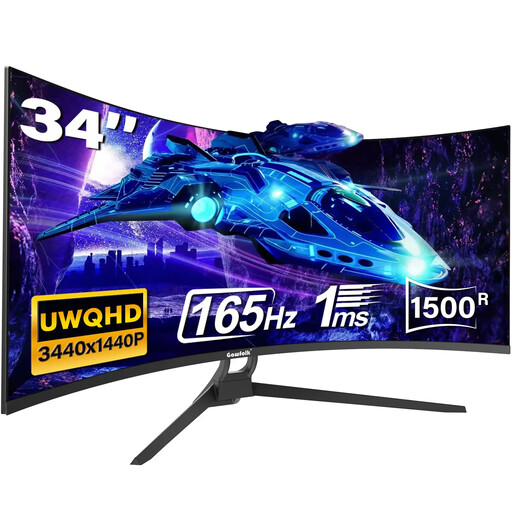
Gawfolk 34-inch, UWQHD, 165 Hz
If you’re looking for a wider format for your cockpit, the product name specifies 21:9 and UWQHD.
165 Hz, 1500R curvature, 1 ms MPRT, HDR10, HDMI 2.1 and DisplayPort 1.4.
View at Joybuy
 No image available
MSI MAG 341CQPDE QD-OLED, 34-inch, 175 Hz
If you’re interested in OLED for dark scenes, the product name describes a QD-OLED panel in a 21:9 ultrawide format.
UWQHD, 175 Hz and a curved display. The product information advises against displaying static images at maximum brightness for long periods and recommends following the OLED care cycles.
View at Joybuy
Frequently asked questions
Is the “180 Hz” figure enough to determine the refresh rate for docking?
No. ASUS Germany lists up to 180 Hz over DisplayPort and up to 144 Hz over HDMI for the VG27AQ3A. The figures for the Dell AW3423DWF also vary by connection. Check that the monitor, PC output and connection all support your preferred resolution.
What should you bear in mind when using an OLED monitor with a fixed HUD?
Dell lists static game interfaces as a potential burn-in risk for affected Alienware OLED models. For the AW3423DWF, Dell describes refresh features; follow the instructions for your specific model and don’t assume that the same guidance applies to other OLED monitors.
Where can you find information about a monitor’s energy use?
For electronic displays covered by the scheme, the European Commission explains that the EU energy label uses efficiency classes from A to G. Include the information for the specific model and how you plan to use it in your comparison.
Are the manufacturer’s warranty and your statutory rights the same thing?
No. The Verbraucherzentrale explains that statutory consumer rights and a voluntary warranty are based on different terms. A warranty applies according to its own conditions, so check what’s promised for the specific OLED model and purchase.
Can you easily cancel an online monitor purchase in Germany?
According to the Verbraucherzentrale, the right to cancel a relevant consumer contract made online generally lasts 14 days from receipt of the goods; you must notify the other party to the contract. Check the circumstances of your specific purchase and distinguish this right from any voluntary returns offered by the retailer.


