Which buying priorities matter?
When choosing between a compact 16:9 monitor, a 27-inch QHD model and a wider 21:9 display, the key factors are available space, instrument readability and support from your gaming system.
Compact 16:9 model around 24 inches
A good fit if: Desk width and seating depth are limited, and the instruments remain readable in Full HD with your chosen text scaling.
Trade-off: You get fewer pixels and less horizontal space than with the larger options; the stand must also fit the available surface.
27-inch 16:9 with QHD
A good fit if: Your cockpit has enough room, your instruments need more pixels and your gaming system can output QHD through the connection you plan to use.
Trade-off: The casing is larger than with the 24-inch option, and the higher resolution may demand more from your graphics output.
29-inch 21:9 model
A good fit if: You have enough space to the sides and your particular space game displays its cockpit view properly in 21:9.
Trade-off: The format offers more horizontal pixels than Full HD, but the documented LG model still has 1,080 vertical pixels; a wider usable view isn’t guaranteed.
| Priority |
What to check when buying |
Who it matters most to |
| Space and positioning |
Compare the available width and depth with the full dimensions of the model, including its stand; check the adjustment range and, where relevant, VESA mounting. |
If my cockpit has limited space, the monitor and stand need to fit. Available space is the top priority for around 36% of consumers. |
| Instrument readability |
Check the size of in-game labels, scaling options and viewing distance; also make sure your system can output QHD. |
If I want maps and displays to be easy to read from my seat, the resolution and scaling need to be right. Instrument and map readability takes priority for around 29% of consumers. |
| Horizontal screen space |
Check that the specific game supports 21:9 and review its field-of-view settings; also check the monitor’s width with the stand. |
If I want a wider cockpit view, the game needs to display the format correctly and there must be room for the screen. A wider view is the top priority for around 21% of consumers. |
| Frame rate and connection |
Check the exact monitor’s supported resolution and refresh rate against your PC or console and the connection mode you’ll use. |
If smooth visuals matter to me, my gaming system and connection need to support the mode I want. Smooth motion and device connectivity are the top priorities for around 14% of consumers. |
Gaming monitors at Joybuy
This Joybuy selection includes compact Full HD models and 27-inch QHD options for instruments and maps. Check the available space and supported video output for each specific model.
 No image available
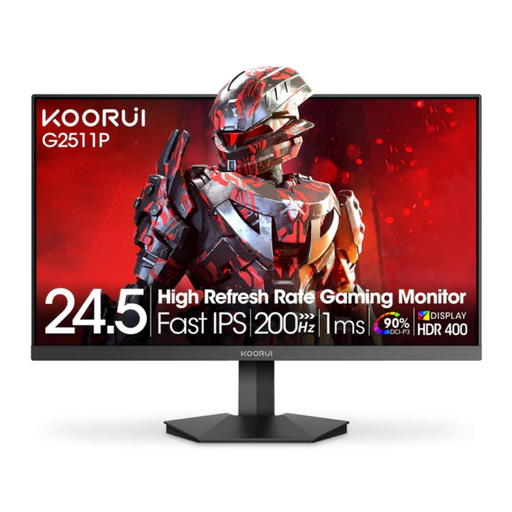
KOORUI G2511P 25-inch gaming monitor
Its 25-inch size could suit a cockpit with limited space; still, be sure to measure the casing and stand.
Full HD (1,920 × 1,080), Fast IPS, 200 Hz, Adaptive Sync, HDR400 and 1 ms GtG; VESA 75 × 75 mm.
View at Joybuy
 No image available
TCL 25G54 25-inch gaming monitor
Its 25-inch size may suit a more compact cockpit, provided the full model dimensions fit the available space.
Mini LED, Full HD, IPS, 144 Hz, 450 nits and VESA Display HDR 400.
View at Joybuy
 No image available
KTC H24B9S 24-inch gaming monitor
Its 24-inch size makes it a compact option; the tilt adjustment from −5° to 15° may also be useful for positioning it in your cockpit.
Full HD (1,920 × 1,080), IPS, 144 Hz, Adaptive Sync, HDMI and DisplayPort.
View at Joybuy
 No image available
INNOCN 2751S PLUS 27-inch QHD gaming monitor
Its QHD resolution is an option for instruments and maps if the larger 27-inch casing fits in your cockpit.
Mini LED with 1,152 zones, QHD, 275 Hz and 1 ms; the stand is height-adjustable and can be tilted, swivelled and rotated into portrait orientation.
View at Joybuy
 No image available
KTC H27D9 27-inch QHD monitor
A 27-inch QHD screen is worth considering if your instruments need more pixels and you have enough room in your cockpit.
IPS, QHD (2,560 × 1,440), 120 Hz and Adaptive Sync; HDMI, DisplayPort and VESA mounting.
View at Joybuy
Frequently asked questions
Do I have to choose a 24-inch monitor for a compact cockpit?
No. Compare the actual dimensions, including the stand, with your cockpit and check readability from your seated position. The documented options range from 23.8-inch Full HD to 27-inch QHD and 29-inch 21:9; screen size alone won’t tell you how much space you’ll need.
How should I position the monitor for my seating position?
First, adjust the height and viewing angle to suit your seating position. Then choose a resolution and refresh rate in your operating system and game that are supported by both the monitor and your video output. ASUS Germany lists height adjustment on the VG249QL3A; Dell Germany specifies the supported modes for HDMI and DisplayPort on the AW2725DM.
Is a 21:9 monitor automatically better for a wider view?
No. The format gives you more horizontal screen space, but whether a particular space game uses it for the cockpit view depends on its 21:9 support and field-of-view settings. Check the game before choosing a wider casing.
What ongoing costs and rights should I consider?
The EU energy label helps you compare stated energy consumption; your actual electricity costs also depend on how you use the monitor and your electricity tariff. If a new product is faulty, you can generally exercise your statutory rights against the seller within two years of receiving it, as explained by the Verbraucherzentrale. A voluntary guarantee is separate from these rights.
What are the rules in Germany for energy labels and disposing of an old monitor?
EU energy-labelling rules cover electronic displays such as computer monitors. The label helps you compare products, but says nothing about whether a monitor will fit in your cockpit. Electrical equipment at the end of its life must not go in household waste; take it to an authorised collection point instead. Local authorities accept waste electrical equipment, while a retailer’s take-back obligations depend on the requirements of the ElektroG, as explained by the German Federal Ministry for the Environment.


